triggers when it's based on an opportunity | Community
Skip to main content
Level 2
April 30, 2025
Solved

triggers when it's based on an opportunity

  • April 30, 2025
  • 1 reply
  • 756 views

Hi, I'm just looking for a steer on the best approach...


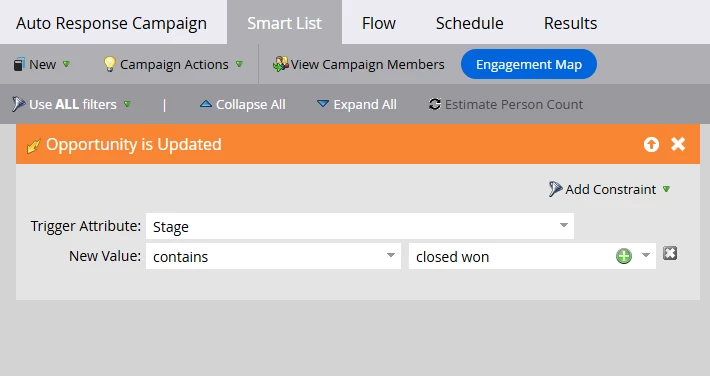
I want to set up a trigger to listen for changes in an opportunity, and then send an email. This will be a custom field = True and the Stage has changed to Closed Won.


What is the best way to identify the recipient. is it best I identify the person and add them to a list and then send the email once they hit the list?


Or is the email going to be sent to all the related contacts in Contract roles?


The field I need to use are not live in Salesforce yet, so I have limited testing on the actual fields. 


Any guidance is very welcome.
This post is no longer active and is closed to new replies. Need help? Start a new post to ask your question.
Best answer by uditmathur

HI @adeleb1 ,


Trigger campaigns are designed to work on the basis of the action performed by/on a lead.

You can definitely set up a trigger campaign which will listen to any change on the opportunity & perform the flow as defined in the trigger campaign (in your case send an email).

As trigger campaign have a higher priority your action will be faster as compared to creating a batch campaign & sending mail to all your qualified list once.


For the matter of testing you can create a Boolean field & manually set it to true/false & check the trigger happening.  


Hope this Helps 😊


1 reply

uditmathur
Community Advisor
uditmathurCommunity AdvisorAccepted solution
Community Advisor
April 30, 2025

HI @adeleb1 ,


Trigger campaigns are designed to work on the basis of the action performed by/on a lead.

You can definitely set up a trigger campaign which will listen to any change on the opportunity & perform the flow as defined in the trigger campaign (in your case send an email).

As trigger campaign have a higher priority your action will be faster as compared to creating a batch campaign & sending mail to all your qualified list once.


For the matter of testing you can create a Boolean field & manually set it to true/false & check the trigger happening.  


Hope this Helps 😊


AdeleB1Author
Level 2
April 30, 2025

thank you for the reply.


if I use the opportunity trigger how does it know who to send the email too. What is the filter I need to make sure I have the correct person.  


I didn't know if I needed to add something in like, has opportunity so it identified the person. I don't have contact roles synced to Marketo either, which I'm waiting for.


I'm trying to test out the workflow, but I don't have all the permissions I need to close the opportunity 😒 so just waiting for someone to close this for me.


Many thanks

AdeleB1Author
Level 2
May 1, 2025

I've just tested this and answered my own question. I used a different stage to test on, and the email went to the contact on the opportunity. Just need to repeat it to make sure it works every time.