Trigger Campaign Using Website Visits | Community
Skip to main content
Level 2
September 19, 2024
Question

Trigger Campaign Using Website Visits

  • September 19, 2024
  • 3 replies
  • 2932 views

Hi everyone! 


I am working on a trigger campaign that sends out an email after contacts visit certain website pages.


I know for a simple flow, I would use the "visits web page" trigger

-If contacts visit X page(s), within 1 hour they will receive email 1


My question concerns future-proofing this trigger campaign to account for contacts who visit the same web page(s) at a later date. I wouldn't want to send them the same email they received previously. I plan on creating two additional emails for contacts who repeatedly return to these web pages, but I'm wondering what the cleanest way to trigger these additional sends is.


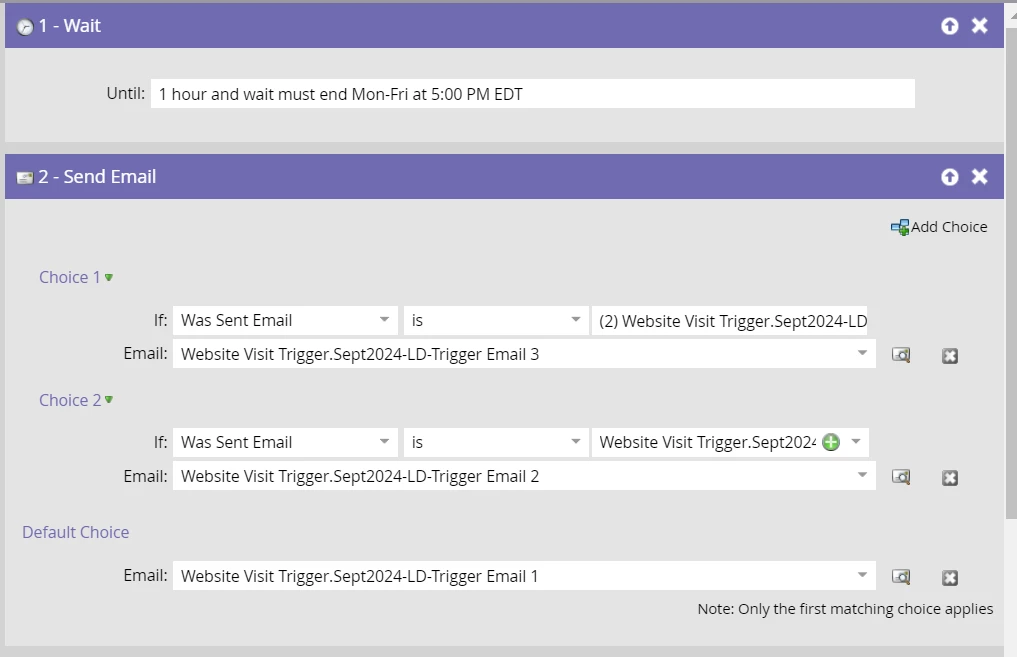
Here is a screenshots of what I'm thinking:
 

Any insight is welcome, thanks!


This post is no longer active and is closed to new replies. Need help? Start a new post to ask your question.

3 replies

Michael_Florin-2
Level 10
September 19, 2024

I know for a simple flow, I would use the "visits web page" trigger

-If contacts visit X page(s) within 1 hour, they will receive email 1


I doubt that you can actually do that. How exactly would that trigger look? 


No, I believe this is not possible. Neither you can - at least easily - formulate a filter/trigger that says "person has visited x pages"  - as in x different ones -, nor can you limited these visits to only count if they happen in an 1 hour timeframe. And if it takes longer than one hour, Marketo is supposed to no longer count the first one.

ddkennedyAuthor
Level 2
October 16, 2024

Regarding the timeframe, I was just noting that I would use the "wait" step before sending the email. You can see the flow in the screenshot I added in the original post.

And here is a screenshot of how I planned on monitoring web site visits:


uditmathur
Community Advisor
Community Advisor
September 23, 2024

Hi @ddkennedy ,

Can you explain on how are you planning to recognize the leads visiting your webpages. You want to send an email to your visitors but if you do not know that visitor how are you planning to send the email to anonymous leads or new visitors.

I will suggest you to make sure that all new leads visiting your webpages are made known first & then set the trigger based on their activity.


Hope this helps.

ddkennedyAuthor
Level 2
October 16, 2024

We have separate campaigns that encourage filling out forms. Once they convert on the site, I have their information to track their website activity. 


Since my original post, I've been working through using lead scoring to control when they receive emails based on web activity. 


Still working through it so open to any insight!

uditmathur
Community Advisor
Community Advisor
October 21, 2024

Hi @ddkennedy ,


Currently in Marketo you can only restrict lead on how often they qualify & not on number of times they qualify.

You can set the Qualification rule to "ONLY ONCE" so that leads can qualify for the email campaign only once & not on regular visit to the page.

For the subsequent visits to can add them to a new program & use the filter Member of the program & send additional emails.

Level 2
October 21, 2024

Hi @ddkennedy 


You can manage this by creating custom fields in Marketo.


First Visit:

When a contact visits the webpage, send Email 1.

To ensure Email 1 hasn't been sent before, add a filter such as 'Not Was Sent Email = Email 1.'

After sending Email 1, update a custom field (e.g., Email_1 = True) to track it.


Second Visit:

If the contact revisits the webpage, add a condition to check if Email_1 = True, confirming they've already received Email 1.

Send Email 2.

After sending Email 2, update another custom field (e.g., Email_2 = True).


Note: This process works well when you have a limited number of emails to send.


ddkennedyAuthor
Level 2
October 22, 2024

Thanks for this idea! 


What do you think about this logic? 


Contacts may run through program multiple times but I used conditions if they have received email 1 and email 2 then they would get skipped.