Tracking Banner Ad w/ UTM Sources | Community
Skip to main content
March 10, 2015
Question

Tracking Banner Ad w/ UTM Sources

  • March 10, 2015
  • 16 replies
  • 3279 views
I created custom URLs using the Google Analytics URL builder, and I created fields in Marketo called:

utm_source
utm_campaign
utm_medium

I am using a URL that that contains each of those parameters. 
?utm_source=naa&utm_medium=native&utm_campaign=advantage

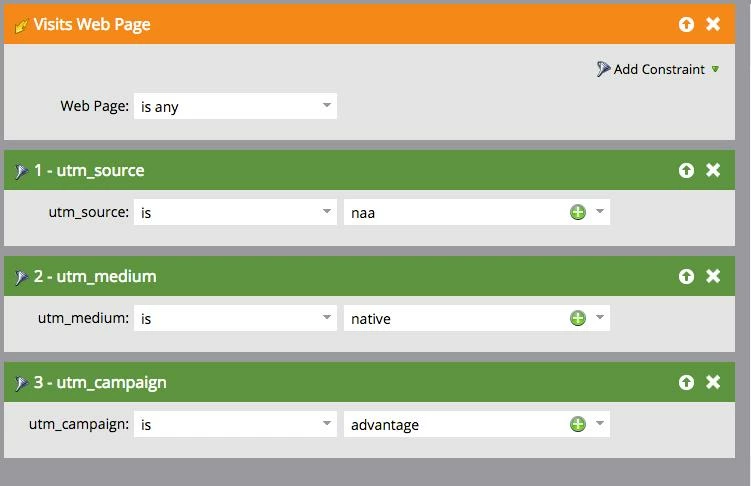
I created a campaign to track leads who visit this URL (see image below), but it's adding me as a member. Is there something I need to do to map the marketo fields to GA? I thought it would just pull those parameters from the URL. Any help is welcome!
This post is no longer active and is closed to new replies. Need help? Start a new post to ask your question.

16 replies

Josh_Hill13
Level 10
March 10, 2015
Are you using these fields as hidden fields on the form?

How do you want to use these fields exactly?

Also, the trigger should look at a specific Web page + Referrer CONTAINS "?XXXXX"
March 10, 2015
So - the page doesn't have a form - http://secondstreetlab.com/2014/02/making-print-your-competitive-advantage-for-online-promotions/

I'll try updating the trigger. 

If I do that, should it fix the issue, you think?

 
Josh_Hill13
Level 10
March 10, 2015
No, that won't work. How will Marketo know to place these values in the fields? To do that w/o a form requires jquery and munchkin to work together. You need a developer.

It may work if you look at Referrer or Querystring- which pulls in the whole thing after the ? but I would not rely on this.
March 10, 2015
Is there another way to do this without a developer?
Bruce_Jeffers
Level 4
March 10, 2015
Kelly, to my knowledge you can't directly map those fields to Google Analytics.  But Josh's comment is right -- To search for UTM codes, use the "Querystring" constraint on the Visits Web Page trigger (or filter).

The numbers in Marketo vs. Google Analytics won't always match up 100% though....because if someone has cookies disabled or 'Do Not Track' turned on in their browser, Marketo may not be able to see these UTM codes on their page visit.
Bruce_Jeffers
Level 4
March 10, 2015
March 10, 2015
if you have a form use the url parameters in hidden fields .
SanfordWhiteman
Level 10
March 11, 2015
Hey @kelly-9 T - I say this a lot on these forums, but you need only the slightest bit of JS to make this work.

"The slightest bit" can of course be too much, and I'm a developer so I don't get worried, but here I've built a page that auto-posts a hidden form.  The form itself is entirely created and maintained within the Marketo Forms 2.0 builder. All the field mappings (setting up your hidden form fields to grab values from the URL) are managed in the Marketo UI.  You only have to include the auto-posting code in your pages, subsituting your own Marketo client ID and the Form ID of course.

 
March 11, 2015
Thanks for the input. How does that hidden form work? You hide the form on an entire site? I'm confused about how that connects to a specific page. 

I'm essentially trying to track GA utm tags from custom URLs into marketo to tell how effective an ad campaign was.
SanfordWhiteman
Level 10
March 11, 2015
You put the form anywhere you want to track UTM codes.  It gets submitted automatically and the user never has to deal with it.  It's exactly the same as the general suggestion about mapping UTMs to Form Fields (which in turn become fields on a Lead) except the user doesn't have to interact with the form.  

(In technical terms, it's an Ajax POST. It happens that that's the method Forms 2.0 uses to send to the Mkto servers.)