Tracking Banner Ad w/ UTM Sources | Community
Skip to main content
March 10, 2015
Question

Tracking Banner Ad w/ UTM Sources

  • March 10, 2015
  • 16 replies
  • 3286 views
I created custom URLs using the Google Analytics URL builder, and I created fields in Marketo called:

utm_source
utm_campaign
utm_medium

I am using a URL that that contains each of those parameters. 
?utm_source=naa&utm_medium=native&utm_campaign=advantage

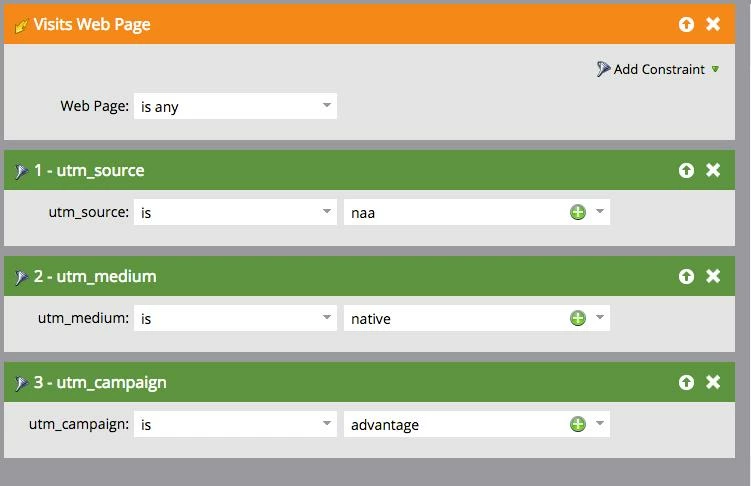
I created a campaign to track leads who visit this URL (see image below), but it's adding me as a member. Is there something I need to do to map the marketo fields to GA? I thought it would just pull those parameters from the URL. Any help is welcome!
This post is no longer active and is closed to new replies. Need help? Start a new post to ask your question.

16 replies

Bruce_Jeffers
Level 4
March 11, 2015
Kelly, if all you want to do is track how a campaign is performing, I'm not sure that you need the hidden form, extra javascript code, etc. The UTM codes will already be visible in Marketo, in the 'Querystring' tags (see my screenshot above). You can set up a search for them just by using that constraint in a SmartList, like in my screenshot.

This is how we track several of our third party campaigns (Adwords/SEM, LinkedIn posts, etc.) and it works quite well for our reporting purposes. We don't use any kind of hidden forms or extra javascript code.
SanfordWhiteman
Level 10
March 11, 2015
@Bruce J You can search on the raw query string.  But as far as persisting the Lead Source(s) to the Lead you'd have to set up a flow to write out the fields.  It's way more complex IMO than having the LS automatically populated (which is why the form-field-read-from-query-string-or-cookie feature exists in the first place, right?).
March 11, 2015
@kelly T, if you want to give me a call directly I can walk you through one way to do it to get you going.
949-697-8606
March 12, 2015
@Bruce J - This is the way I want to track everything. But - it doesn't seem to be working.  Take a look at the below screenshot. This smart list is not returning anyone. And, I know of at least one known lead who visited that page. It doesn't work either when I use "Referrer" instead of "Querystring" as a constraint.

Any ideas?


Bruce_Jeffers
Level 4
March 12, 2015
@Kelly -- Your 2nd screenshot shows the UTM info coming through in the Referrer URL, so that's probably why the Querystring search is coming up empty.

A couple things I'd try:

1. I can't tell from your first screenshot if you've included the UTM codes in the Web Page value. If so, try removing those. Also try shortening the whole URL value that's there. Leave enough of it so that the query still searches just for that specific page, but perhaps remove part of it (for example,  contains: "making-print-your-competitive-advantage" instead of the full URL.)

2. Try adding another filter for Anonymous=true or Anonymous=false and see if that changes the results.

If neither of those work, then I may be stumped here.
March 12, 2015
That didn't work either, @Bruce. 

But - I called Marketo Support (thanks Grant Booth, for your help!) and I believe the issue is that my subscribe form is on a landing page that is iframed into the site and it's not showing that the lead clicked on the actual story, just the iframed page. 

So, I'm off to fix this now. 

Thanks for your efforts all!