
To use reserved Marketo syntax (like ${variable}) in Landing Pages, tap {{my.tokens}} | Community
Skip to main content
SanfordWhiteman
Level 10
June 24, 2023

To use reserved Marketo syntax (like ${variable}) in Landing Pages, tap {{my.tokens}}

  • June 24, 2023
  • 4 replies
  • 1830 views

Marketo’s ${variable} syntax conflicts with other languages using the same dollar-single-curly-quote syntax, like good ol’ JavaScript.


So if you try to use a JS template literal in the LP Editor...

<script> let a = `Report ID ${report} for ${this.name}`; </script>


... Marketo naturally thinks you’re referring to missing variables and throws an error:
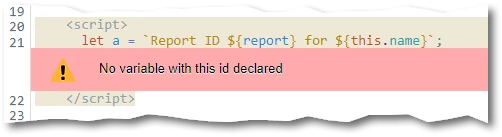
 

Officially, there’s no alternate syntax in Marketo (and there’s definitely no way to change the delimiter in JS). But the workaround is easy. Create a global Text token {{my.d}} just containing the single character $:



(Why {{my.d}}? Just copying Velocity’s $esc.d, which also escapes the dollar sign. You could use another name if you want, but this should be easy to remember.)


Use that token to escape the $ sign:

<script> let a = `Report ID {{my.d}}{report} for {{my.d}}{this.name}`; </script>


Marketo will render this as:

<script> let a = `Report ID ${report} for ${this.name}`; </script>


Presto!

This post is no longer active and is closed to new replies. Need help? Start a new post to ask your question.

4 replies

Level 2
September 13, 2023

Hi - I couldn't get this to work. My landing page was still showing ${{variable}} in the Javascript, rather than the value. Any advice on how to make it work as part of an 'if' statement?


SanfordWhiteman
Level 10
September 13, 2023

You’d have to show your code. Not sure what you mean by ${{variable}} as that’s no Marketo or JS syntax.

Level 2
September 22, 2023

<meta class="mktoBoolean" id="livewebinar2" mktoName="Live webinar?" default="true" true_value="LIVE WEBINAR" true_value_name="Live" false_value="ON-DEMAND WEBINAR" false_value_name="On-demand">

<script>


if ("{{my.q}}{livewebinar2}" == "LIVE WEBINAR") {
MktoForms2.whenReady(function (form){
form.onSuccess(function(vals, page){
form.getFormElem().hide();
var confirm = document.getElementById('confirmation');
confirm.style.display = 'inline-block';
confirm.setAttribute('aria-hidden', false);
return false;
});
});
}
</script>


When I publish my page and view source, the variable doesn't show the value. Instead, it shows: if ("${livewebinar2}" == "LIVE WEBINAR"). So I was assuming it was a problem with the variable not posting the value?


SanfordWhiteman
Level 10
September 22, 2023

That’s the expected behavior when you escape the variable syntax. As far as I can see you have no reason to use the method in this post. You want Marketo to use the standard ${variable} syntax, not ignore it. This method is for people who need to use ${variable} for another purpose and don’t want Marketo interfering.