
Spam Records Created (Bot attack where Honeypot doesn't help) | Community
Skip to main content
keithnyberg
Level 7
November 13, 2017
Question

Spam Records Created (Bot attack where Honeypot doesn't help)

  • November 13, 2017
  • 3 replies
  • 7624 views

Hey Community,

This past week we got hit by a bot or something similar that was creating roughly 250 bad leads in our instance every minute. We caught these getting created because our Trial server crashed out with all the activity and when I investigated, 30K records had already been create in my instance over night (all with inferred IP info from China). I immediately found a common thread (phone number) and filtered these records out of our !Entry Point smart campaigns as the existing backlog of records being processed nearly brought our instance to a halt. So I started to dig in to see what could be done to stop these records from being created.

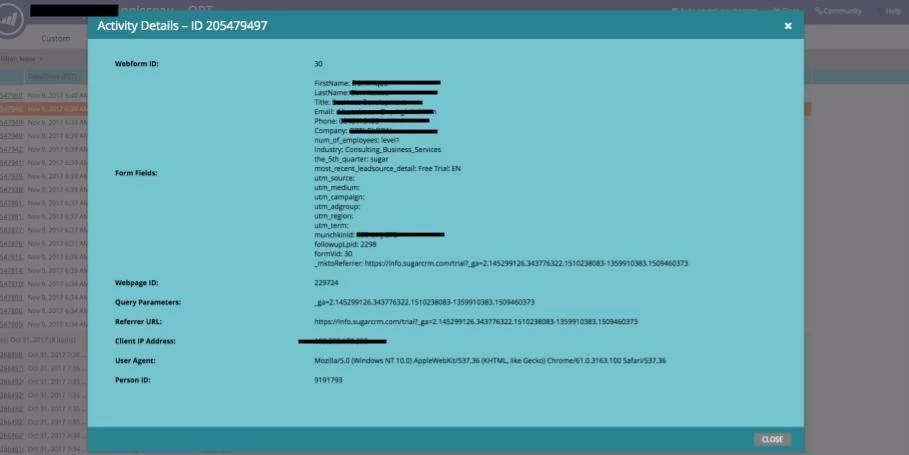
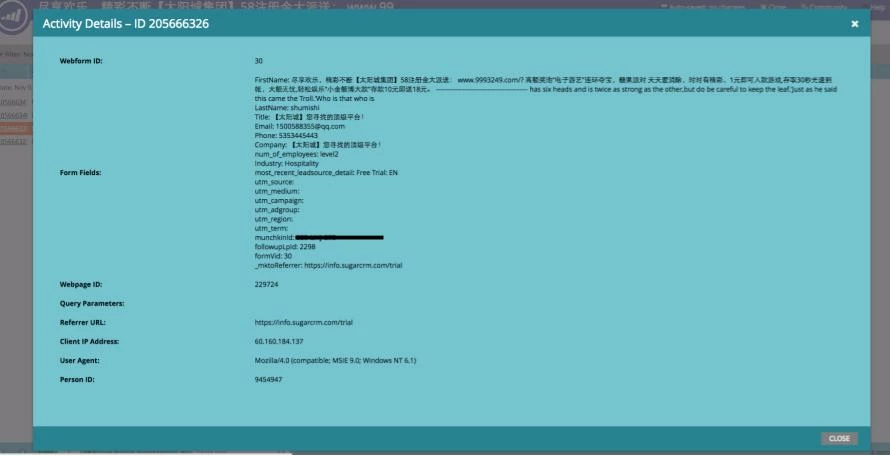
I enabled a honeypot as defined is this sweet Perkuto article (Reduce Spam Leads with a Marketo Honeypot, thanks Perkuto!) but when testing noticed that records being created were missing the new honeypot field I had added in the "Filled Out Form" activity that is logged in MKTO, where real form submissions included this new field. (Honeypot field is called "The 5th Quarter", see images below of form submit activity). We also noticed that Munchkin was not tracking any landing page visits, nor was Google Analytics. All of this leads me to believe that these records are never on our landing pages.

So my question really relates to Marketo's form API and what is required for the API call to be successful and have a record created in our instance. What validation does Marketo require to confirm that the API request is a valid form submit vs being done via another mechanism (just the form #, instance munchkin ID, LP and referrer)? Is that enough? Because in this scenario, i'm not sure if this is something that needs to be tightened on Marketo's side or if nothing can be done at all. (if nothing can be done, what is the most sensitive parameter? I would assume the munchkin ID?

Support's advice was to unapproved the existing form and swap it with the new one. Hope the attackers get a "Form Submit Failed" notification and decide to move on. I wasn't all that thrilled with this answer as it eludes to nothing being possible to stop this from occuring again in the future. And also means my "Filled Out Form" = Trial filter is no longer fully inclusive (not a big deal, but annoying).

Anyone else have this happen? Questions? Thoughts? Comments? Just really unsure what to do next... Screenshots that show valid vs invalid submits are below.

Valid Submission:
Invalid Submit:
This post is no longer active and is closed to new replies. Need help? Start a new post to ask your question.

3 replies

SanfordWhiteman
Level 10
November 13, 2017
I enabled a honeypot as defined is this sweet Perkuto article (Reduce Spam Leads with a Marketo Honeypot, thanks Perkuto!) but when testing noticed that records being created were missing the new honeypot field I had added in the "Filled Out Form" activity that is logged in MKTO, where real form submissions included this new field. We also noticed that Munchkin was not tracking any landing page visits, nor was Google Analytics. All of this leads me to believe that these records are never on our landing pages.

Correct. There's no reason for any human to ever be viewing your LP in a browser. They only need to know how to submit to your form (which can be done via a one-time automated scrape or network recording, still doesn't need to be a human behind it).

So my question really relates to Marketo's form API and what is required for the API call to be successful and have a record created in our instance. What validation does Marketo require to confirm that the API request is a valid form submit vs being done via another mechanism (just the form #, instance munchkin ID, LP and referrer)? Is that enough?

Pod URL + Munchkin ID + Form ID. Exactly what you supply in a loadForm() call -- the server can't require you to know any more than that.

It's not so much a "validation" (there is also some data type checking of fields, date fields for example) as it is a database routing lookup. Without the required config info, there's no place to put the form data or create the Filled Out Form activity.

I recommend a ReCAPTCHA on the form. The honeypot is all too easy to fool (think about it -- all you need is a trace of one successful form post that you can then emulate 1000s of times).

Dan_Stevens_
Level 10
November 14, 2017

Pod URL + Munchkin ID + Form ID. Exactly what you supply in a loadForm() call -- the server can't require you to know any more than that.

All three of these values can be obtained from the underlying source code.  Surprised that this issue isn't more prevalent among Marketo customers.  Aside from using ReCAPTCHA, is there nothing that can done on the Marketo side to prevent these massive form insertions?

keithnyberg
Level 7
November 15, 2017

Thank for the response guys. I have a call scheduled with Marketo support early next week to ask them what can be done here to limit this from occuring more broadly with users. If either of you have recommended or possible solutions to this I would love to bring them up on the call. Let me know!

Grégoire_Miche2
Level 10
November 21, 2017

Hi Keith,

We had the same issue. On important point to know, is that you cannot deactivate a form... It will only stop when you DELETE the form from Marketo. So the support recommendation you mention is... useless. Once the spammer has got the form endpoint and paramaters, unapproving the landing page has not effect.

I also discovered that, in addition to limiting the number of form fillout per minute, Marketo also detects when an IP address summits to many forms and blacklists this IP address (the threshold is not public information)

The problem we faced was that the attack was changing IP address every 1000 submits, and therefore we had to delete the form to stop the attack. 260000 spam leads in about 24 hours...

-Greg

keithnyberg
Level 7
November 22, 2017

Hey @Grégoire Michel​,

Thanks for the comment, and to clarify, the recommendation was to unapprove the form, not just the landing page. Are you sure that you had to actually delete the form to actually stop the submissions? Based on what I was told about the form API's they should not be submittable if the form is not approved. I'll ask support to clarify this via some testing a report back here.

In the end, there really is nothing that could be done here and the final recommendation from support was to limit people accessing our landing pages without JS enabled. Process was described as having the page load to tell the user Java must be enabled to view the page if they have Java disabled. The hope here is to make it harder for bots to find  endpoints in the first place, but this still isn't bulletproof obviously.

SanfordWhiteman
Level 10
November 22, 2017

the final recommendation from support was to limit people accessing our landing pages without JS enabled. Process was described as having the page load to tell the user Java must be enabled to view the page if they have Java disabled. The hope here is to make it harder for bots to find endpoints in the first place, but this still isn't bulletproof obviously.

Whoever thought this was reasonable advice should be relieved of their support duties.

Will_Etling
Level 2
November 26, 2018

I'm experiencing this same issue as I write this. Overseas spam source seems to have begun using our Marketo instance url + Form ID to directly submit data into our Marketo database. In the past I've blocked these sorts of attacks using Javascript, usually just filtering out email domains that are entirely spam, like @qq.com. In this instance, even after adding checks for the bad domains, they are still flowing in at a rapid pace.

It would be wonderful if there was a blacklist or safety valve further up the pipeline, so I could prevent all these from flowing in to Marketo (and then further up the pipe into our CRM, etc.)

It would also be wonderful if the spam IP submission thresholds were user-editable, so I could set some limits that are sane and appropriate for the size of our business.

SanfordWhiteman
Level 10
November 26, 2018

usually just filtering out email domains that are entirely spam, like @qq.com.

One of China's largest email providers != entirely spam.

The reason you see a lot of forged @qq.com addresses is that it's easy to create valid, or simply valid-looking, addresses at that domain because legitimate mailboxes there are all numbers (while no well-formed email address at any domain can actually be known to be valid/invalid just at a glance, this is made even clearer w/QQ because 123435@qq.com could be made-up and 123456@qq.com could be real).

If you don't get legit leads from overseas, that's an even stronger reason to use reCAPTCHA.

Will_Etling
Level 2
November 26, 2018

@Sanford Whiteman Fair point. Didn't mean to paint qq.com with too broad a brush - what I meant was, so far in our experience we have only received spam form submissions from that domain. As of this morning we've had thousands of them, all using the same data for other fields like First & Last Name.

We do get many legit leads from overseas, however, and are reluctant to implement reCAPTCHA (friction is friction!)

I don't mind dealing with an occasional burst of spam - I just wish I had a couple extra tools in my Marketo configuration toolbelt to filter/block them when it happens.