Smart List Logic | Community
Skip to main content
June 30, 2015
Solved

Smart List Logic

  • June 30, 2015
  • 3 replies
  • 1500 views

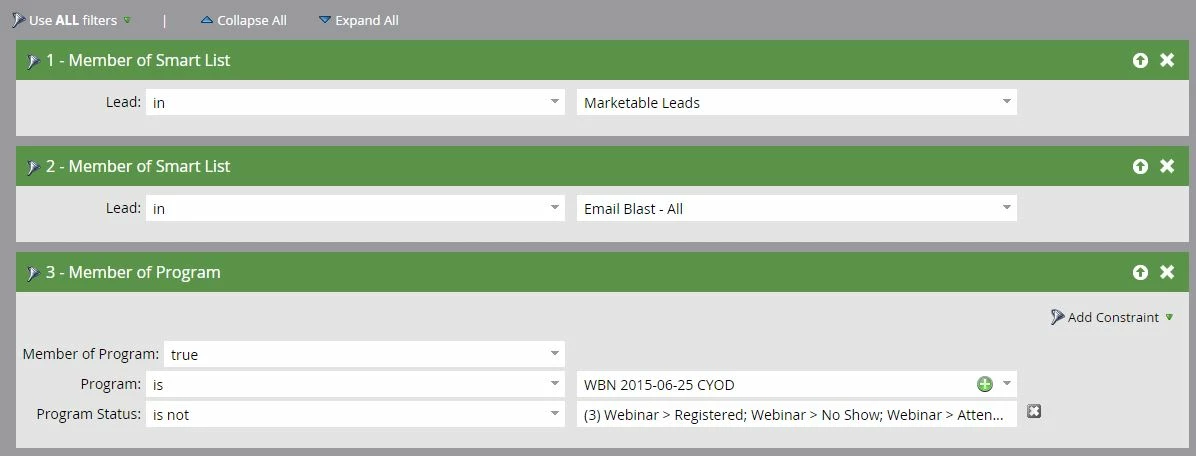
I am hoping someone can check my work.......I want to send an email to the marketable leads in my Email Blast-All list, but I want the email to exclude people who registered or attended my webinar.  Is this set up correctly? THANK YOU!

This post is no longer active and is closed to new replies. Need help? Start a new post to ask your question.
Best answer by

Lisa Heay​ looks good! I would actually keep the filter logic to ALL, if you want to reach out to other members of the program that are not registered/attended to the webinar.

Be sure you confirm that the webinar partner (if you're using one), is synced up before sending! For our GTM sometimes it takes a few hours until we see that leads have changed to an Attended status!

Also, to be extra safe, I *always* set up a smart list within the program of leads I want to omit. Then in the Smart Campain, I say "Member of Smart List Not In List". It just gives me piece of mind, and I don't have to think about the double negative grammar, and logic..

let me know if this helps!
3 replies

June 30, 2015

FYI. I moved this post to the Products and Support​ section where you will get this product related question answered faster.

June 30, 2015

Hi Lisa

it seems 3 conditions in your Smart List

1. The marketable leads

2. In my Email Blast-All list

3. but I want the email to exclude people who registered or attended my webinar.

Now your Smart List is (1 and 2 and 3).

If you want to send (1 and 2) or 3, change "Use ALL filters" to "Use Advanced filters" and set "(1 and 2) or 3".

Accepted solution
June 30, 2015

Lisa Heay​ looks good! I would actually keep the filter logic to ALL, if you want to reach out to other members of the program that are not registered/attended to the webinar.

Be sure you confirm that the webinar partner (if you're using one), is synced up before sending! For our GTM sometimes it takes a few hours until we see that leads have changed to an Attended status!

Also, to be extra safe, I *always* set up a smart list within the program of leads I want to omit. Then in the Smart Campain, I say "Member of Smart List Not In List". It just gives me piece of mind, and I don't have to think about the double negative grammar, and logic..

let me know if this helps!

June 30, 2015

Thank you!