"Smart Campaign already exists" error | Community
Skip to main content
March 3, 2015
Question

"Smart Campaign already exists" error

  • March 3, 2015
  • 13 replies
  • 2434 views
Hello Community!

Is anyone seeing this same error, screenshot below? Our team is seeing this error when creating new Smart Campaigns, despite there not being a Smart Campaign with the same name. One member of our team suggested it may have to do with new updates, because we started seeing it after this.

Anybody have any tips?

Thanks!
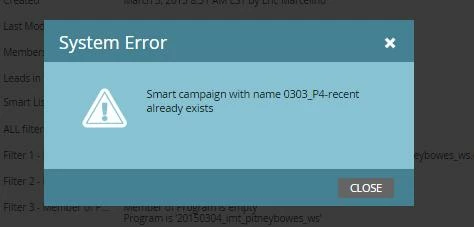

This post is no longer active and is closed to new replies. Need help? Start a new post to ask your question.

13 replies

March 3, 2015
Are you sure you aren't using the campaing name in an archived campaign from a previous year? Just spitballing, but we had an issue when creating a new campaign for the same product this year having used the same title in a campaign in 2014. We've started throwing years at the end our our campaigns to avoid this moving forward.
March 3, 2015
Thanks for the tip Nicholas. Unfortunatley, I don't think that's it, because the program name is entirely unique.
March 3, 2015
I am actually seeing a similar issue. I created a Smart Campaign in a program under a certain folder. When I tried to move it to a different folder in the same program (with the new "Move" function), I received the same error telling me it already existed. Which is technically true, but kinda defeats the purpose of the move function a bit. 
March 3, 2015
Thansk Kenway. We're seeing that error, too, in addition to the one I already described above.
Dan_Stevens_
Level 10
March 3, 2015
Do you have multiple workspaces?  Is the smart campaign within a program or in the Lead Database section?  If it's within a program, smart campaign names do not need to be unique since the smart campaign inherits the parent program name as part of the full referenced name.  If this is in the Lead Database - and not within a program - the name must be unique, even across workspaces.  I know you said this name was unique - just making sure you checked all possiblities (which may or may not exist in your environment).
March 3, 2015
We've seen this error too, when moving smart campaigns between folders within a program. Yes, the names are unique. We renamed the smart campaign to something else, moved it into the new folder, and re-named it back to the original name and it worked! I assume it is a bug with the new "moving" smart campaign functionality that was just released.
Dan_Stevens_
Level 10
March 3, 2015
I'm wondering if this is yet another case for having to refresh your browser after making some of these changes prior to taking action.  I'm finding that we're being asked to refresh our browsers more than ever due to some other related bugs we've encountered in Marketo lately.  For example, as soon as we create a static list, we need to refresh our browser to ensure Marketo has properly captured this list within our instance (if we plan on importing names to this immediately thereafter).  Otherwise, Marketo doesn't see this list properly and will fail during step 3 of the import process.
March 3, 2015
I'm seeing this error too. I'm going to email Support about it and I'll report back with my findings.
March 9, 2015
Seeing this error as well when trying to move a newly created smart campaign into a folder within a program.  Has anyone heard back from support?
March 9, 2015
I´m seeing this also