
Single click to close all folders | Community
Skip to main content
Zoe_Forman
Community Advisor and Adobe Champion
April 25, 2024
Solved

Single click to close all folders

  • April 25, 2024
  • 3 replies
  • 4229 views

Okay as the day goes on I open more and more folders and programs and get lost in my own world.

Apart from logging off Marketo is there a short cut or quick way to close down all open folder in bulk?

Yes this is like having 20 tabs open in 3 different browsers.


Thanks,
This post is no longer active and is closed to new replies. Need help? Start a new post to ask your question.
Best answer by JeffHensiek

Correct me if I'm wrong on this (and maybe you're looking for something a little different).  I think this functionality already exists.  


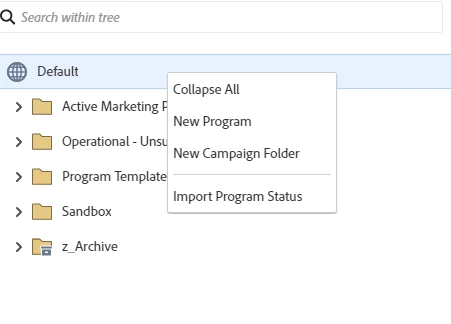
Highlight "Default" and "right-click" and you'll see the "collapse all" capability.


3 replies

Jo_Pitts1
Community Advisor
Community Advisor
April 25, 2024

@zoe_forman ,

this sounds more like browser support than Marketo support.  Maybe check into the support forums for whichever your preferred browser is.  Potentially Tab groups, or a plug in that closes tabs from a domain? (e.g. for Chrome, this might help: https://chromewebstore.google.com/detail/manage-tabs-by-domain/jgjhgpeaejjahlbcgijdibooomicdcfi)

Katja_Keesom
Community Advisor and Adobe Champion
April 26, 2024

Hey @jo_pitts1 , she says it's like the browser tab situation, but then translated to Marketo and having umpty folders in the tree open. And indeed, there is no real solution to that one. Even when you navigate away from your Marketing Activities and go back in you are still seeing the same mess you left behind. Would be nice to have a "collapse all" button at the top of the tree.

Dave_Roberts
Level 10
April 26, 2024

Yeah, tab groups in Chrome for the win here for sure, but nothing Marketo-specific from what I've seen so far. And while we're on it, it really drives me nuts that you don't get an option to open a new link in the same tab or in a new tab, it just kinda depends on what you click and then end up with a bunch of tabs open. This would for sure be a great suggestion for the Ideas portion of the community. If you submit it, post a link here and I'd be happy to give it the ol' thumbs up.


Here's some docs on closing tabs in case you aren't already using something like that:
https://support.google.com/chrome/answer/2391819?hl=en&co=GENIE.Platform%3DAndroid#zippy=%2Cclose-all-tabs
And more from the same page on setting up tab groups in Chrome:
https://support.google.com/chrome/answer/2391819?hl=en&co=GENIE.Platform%3DDesktop#zippy=%2Cgroup-your-tabs


Zoe_Forman
Community Advisor and Adobe Champion
April 27, 2024

Thanks for your thoughts @dave_roberts and @jo_pitts1  and @katja_keesom 

My default browser in FIREFOX but the question is around closing or allowing folders in Marketo, or to be opened in a new tab/windor.

Maybe one to add to IDEAS.

Cheers, Zoe 

Zoe_Forman
Community Advisor and Adobe Champion
April 27, 2024

Thanks all - I have now added to IDEAS - here is the link: 


Streamlined Folder Management with Single Click to Close All Folders

https://nation.marketo.com/t5/ideas/streamlined-folder-management-with-single-click-to-close-all/idi-p/347501#M20913

JeffHensiek
JeffHensiekAccepted solution
Level 4
May 8, 2024

Correct me if I'm wrong on this (and maybe you're looking for something a little different).  I think this functionality already exists.  


Highlight "Default" and "right-click" and you'll see the "collapse all" capability.


Jeff HensiekMarketing Automation Program Manager
SanfordWhiteman
Level 10
May 9, 2024

(Also, doesn’t refreshing the tab close everything?)