Sending Followup Email for Webinar | Community
Skip to main content
February 14, 2013
Solved

Sending Followup Email for Webinar

  • February 14, 2013
  • 1 reply
  • 1044 views
I am creating my first webinar campaign with Marketo. We want to send a followup email to members of our list who do not complete our signup form after the initial contact (i.e. after sending the initial email to them). I need help figuring out the steps for this. Right now I have the following (which isn't working correctly):

Smart List: Filter (Member of List = Lead in [ListName]) (Not Filled Out Form = Form Name is [FormName])
                              
Flow: (Send Email = Email: [EmailName]), (Wait = Duration: [Periodof Time]), (Change Status in Progression = Program: [ProgramName]; New Status: [Webinar> Registered])

Can anyone tell me what I'm doing wrong here?

Thanks in advance, 

Andrea
This post is no longer active and is closed to new replies. Need help? Start a new post to ask your question.
Best answer by
Andrea,

I suggest you leverage Progression Statuses which are part of programs. You can read up on some background info in this article -- go about halfway down to the section called Progressions.

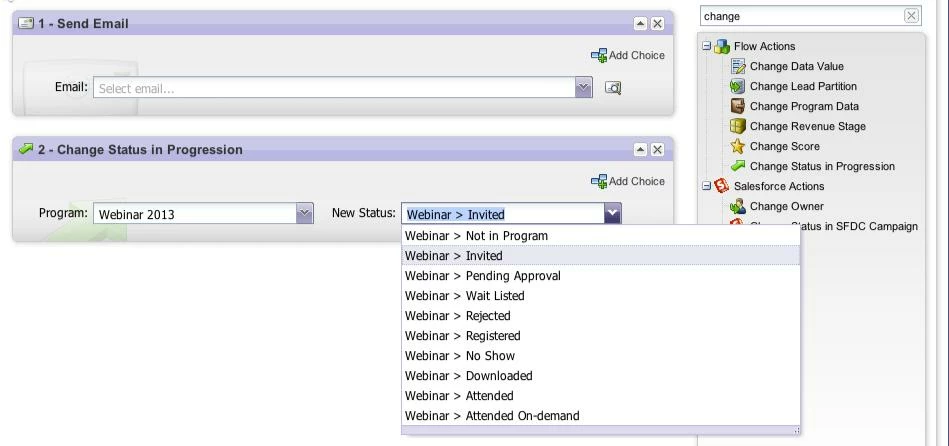
So, in the campaign used to email out the initial invite to the webinar, make sure you include the flow action to change the Progression Status of all the leads to Webinar > Invited.


For those who register for the webinar, make sure you change their Progression Status to Webinar > Registered.

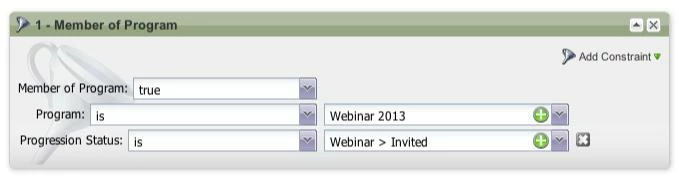
Then, in your campaign to send out a follow-up email to leads who haven't registered for the webinar, you can use the "Member of Program" filter with the added constraint of "Progression Status" for your smart list:


1 reply

Accepted solution
February 14, 2013
Andrea,

I suggest you leverage Progression Statuses which are part of programs. You can read up on some background info in this article -- go about halfway down to the section called Progressions.

So, in the campaign used to email out the initial invite to the webinar, make sure you include the flow action to change the Progression Status of all the leads to Webinar > Invited.


For those who register for the webinar, make sure you change their Progression Status to Webinar > Registered.

Then, in your campaign to send out a follow-up email to leads who haven't registered for the webinar, you can use the "Member of Program" filter with the added constraint of "Progression Status" for your smart list: