Seed Lists and Communication Limits | Community
Skip to main content
January 30, 2019
Solved

Seed Lists and Communication Limits

  • January 30, 2019
  • 3 replies
  • 8158 views

Hi all,

The Marketing Operations Team at my company recently decided to seed ourselves on each batch campaign. However, our instance has some strict communication limits (i.e. 1 email per day and 2 per week). Tomorrow we will be sending two batch emails and I am wondering if there is anyway our seed list can bypass these strict comm limits? Does anyone have any ideas for a workaround?

Thanks in advance!

-Megan
This post is no longer active and is closed to new replies. Need help? Start a new post to ask your question.
Best answer by Dan_Stevens_

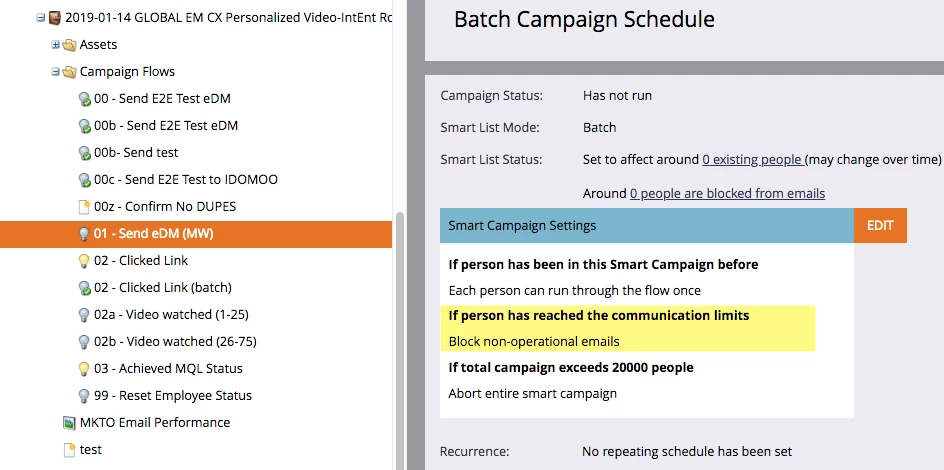
That's not true. Communication limits apply to default programs as well, if a smart campaign is included that sends an email:

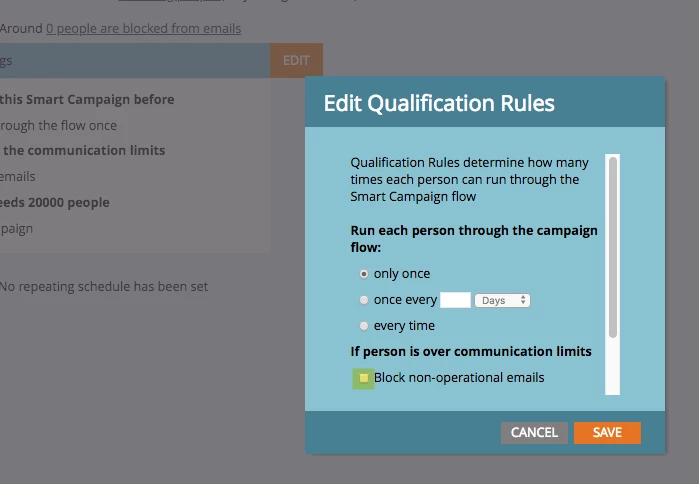
What I would do Megan is setup a separate smart campaign to send the same email to your seed list - but for this campaign, disable the blocking of the email, regardless of comms limits (deselect the checkbox) - like Amber mentioned below:

3 replies

Jay_Jiang
Level 10
January 31, 2019

DIY email counter?

2 custom score fields for emails per day and emails per week

3 smart campaigns - 1 trigger to increment both fields each time email is sent (except for seed emails), 1 batch to reset daily count and 1 batch to reset weekly count

your email program filters will always include emails per day < 2 and emails per week < 3

Rachit_Puri2
Level 5
January 31, 2019

Hi Megan

Communication limits apply only to the email and engagement program types. Read here.

You can use a default program to send your emails, include your seed list in the smart list, and they should get the emails from both the batches. Hope this helps.

January 31, 2019

Hi Rachit! We currently use default programs for our batch sends, so this is very helpful. Thank you!

Rachit_Puri2
Level 5
January 31, 2019

Megan Rublee​ If this resolves your query, can you please mark this as resolved and also mark the correct answer?

Amber_Hobson
Level 8
January 31, 2019

The way that we do it is I have a separate campaign specifically for our seed list. This way our normal campaign send can follow the limits that we have set up. Then on our seed list campaign, we set that one to ignore our communication limits. (We don't use the email programs, so if you're using that, it can change.)

January 31, 2019

Hi Amber! I really like this approach. Could you please share your Smart List and Flow logic for the internal campaign? I'm assuming it would just be "Member of List" in the Smart List and then "Send Email" in the Flow, but would like to confirm. Thank you!