Routing open text from a Marketo form | Community
Skip to main content
February 14, 2013
Solved

Routing open text from a Marketo form

  • February 14, 2013
  • 8 replies
  • 1784 views
Hi - I'm very new to Marketo. I have a form that contains an open text feedback block in it. I'd like to forward whatever content is input in this section of the form to a couple of email addresses (and not autopopulate CRM until the lead becomes an opportunity). How do I do this?

I've already embedded the form in a non-marketo landing page. I've created a landing page for the form submitter thanking them for submitting the form and I've created the campaign that sends an alert to to the email addresses once the form is submitted. I'm just missing the part on handling the feedback???

Thank you,
Deirdre
This post is no longer active and is closed to new replies. Need help? Start a new post to ask your question.
Best answer by
Hi Deidre,

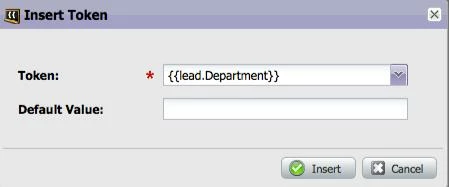
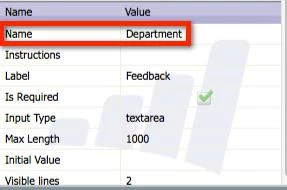
I took a look at your subscription. It looks like the field that you're using to capture the field is actually called "Department".


The field name (not the Display name) is what is used for the token so please look for this token in the email editor:


Since you haven't launched this, you may want to consider creating a different custom field called Feedback to help prevent confusion in the future. Create it in Salesforce and sync it down to Marketo if you (eventually) want that field to be visible in Salesforce. If you just want it to stay in Marketo, then you can create it in Marketo (Admin > Field Management).

Thanks,
Ei-Mang

8 replies

February 15, 2013
Create an email that contains the field tokens for the form information. That will be your alert to send in your Send Alert flow step.

For instance:

First Name:  {{lead.First Name}} 
Last Name: {{lead.Last Name}}
Comments:  {{lead.Comments}}

(Use the tokens icon in the email editor to find the correct fields.)

Use a Sync to CRM campaign to define when a lead should be synced.

February 15, 2013
Hi Deidre,

Just to add to Kelly's answer, here's a helpful article on using the Send Alert flow action.

Also, when you set up the smart list for this campaign, you can have the triggers be:
(1) filled out form, AND
(2) comments field is not empty

This way, if a lead doesn't put in any comments, no email is sent out.

Thanks, Ei-Mang
February 20, 2013
Thank you both for your help. I've added tokens to my email, but have run into another snag. I don't seem to have a token for "Feedback" or "Comments". Do I need to create my own token for this? If yes, not really sure what value I need to associate it to. I see from reading in the community that my token will only be visible within the program or campaign - however, even though I've tentatively already created a new "my feedback" token - it's not visible at all - so maybe I've done something wrong?
February 20, 2013
What's the field that you're currently using to as the Feedback field on your form? Let's say you called it "Feedback Box".

From the Email Editor, click the "Insert Token" icon (upper right corner). Then you should be able to find a token named {{lead.Feedback Box}} in the picklist and insert that into your email.

Does that help?
February 20, 2013
Hello Ei-Mang,

So yes, I did call it "Feedback", but there is no {{lead.Feeback}} listed in the token drop downs???

The form has been approved. Is there anything else I should check?

Thank you,
Deirdre
Accepted solution
February 21, 2013
Hi Deidre,

I took a look at your subscription. It looks like the field that you're using to capture the field is actually called "Department".


The field name (not the Display name) is what is used for the token so please look for this token in the email editor:


Since you haven't launched this, you may want to consider creating a different custom field called Feedback to help prevent confusion in the future. Create it in Salesforce and sync it down to Marketo if you (eventually) want that field to be visible in Salesforce. If you just want it to stay in Marketo, then you can create it in Marketo (Admin > Field Management).

Thanks,
Ei-Mang

February 21, 2013

Oh wow - thank you Ei-Mang!

Sorry - that's a total beginner error! I took the online training, but we ran into technical difficulties with some network issues and then weren't able to continue using Marketo. My training as a result has been disjointed and it's been hard to remember all the little pieces. Anyways - thank you very much for your help. I just went in and created a Feedback field in the admin section and am now able to proceed.

Thank you again,
Deirdre

February 21, 2013
Happy to help, Deirdre -- so glad to hear you're ready to go now!