reCAPTCHA Integration - Move Google disclaimer to bottom of form
Hello Marketo hivemind!
I'm looking for some help with the reCAPTCHA integration and how the Google disclaimer is showing up on the form.
Our forms are using progressive profiling and we needed to put a script onto the landing page so that the checkbox/privacy text field is showing up at the bottom of the form. (See screenshot below). If we don't have this script added to the page the progressive profiling fields show up under the checkbox field which looks very strange.
Now that we are adding reCAPTCHA I need to move that to the very bottom under the checkbox. 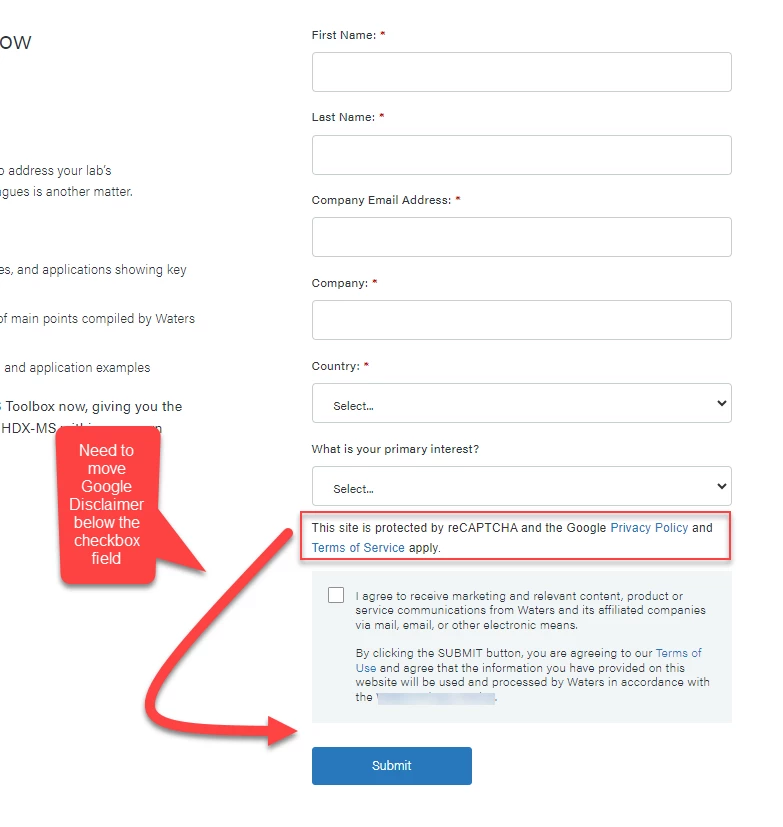
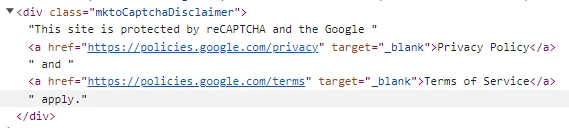
One of the challenges I'm running into is that I can't figure out what the google disclaimer text field ID is. Marketo support says they don't know if there is an ID that I can use as part of the integration.
(Note: I am not a JS expert so I'm learning as I go 😃)
I'm wondering if anyone else who has implemented the reCAPTCHA integration AND is using progressive profiling AND had to re-order fields to support it have run into this issue and might have a suggestion? Or is there a better approach that I should consider?
For reference
Below is the script we currently are using to move the checkbox field to the bottom of the form.
<script>
if (typeof MktoForms2 !== "undefined" && MktoForms2 !== null) {
MktoForms2.whenReady(function(form){
var formEl = form.getFormElem()[0],
inputRows = formEl.querySelectorAll('.mktoFormRow'),
buttonRow = formEl.querySelector('.mktoButtonRow'),
optInRow = [].filter.call(inputRows,function(itm){ return itm.querySelector('INPUT[name="optin"]');}).shift();
formEl.insertBefore(optInRow,buttonRow);
});
}
</script>
Thank you