Prevent oversized images in email templates | Community
Skip to main content
Mark_Kalamaridi
Level 2
November 14, 2022
Solved

Prevent oversized images in email templates

  • November 14, 2022
  • 2 replies
  • 4779 views

Hi

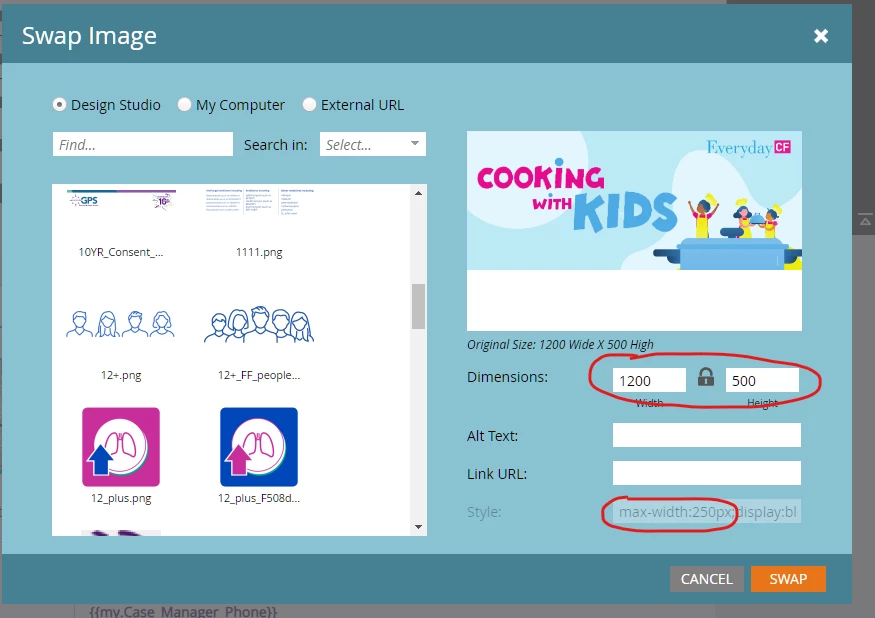
Does anyone know of a good way to handle situations where someone inadvertently 

inserts an oversized image into an email through the mktoImg ImagePicker?
Even though I have a max-width hard-coded and locked, Outlook will still render the

original width and blow out the template.

I know I could hard-code the image width for Outlook clients but I also need to handle
smaller widths as well.

Any help would be appreciated. Thanks.
 

This post is no longer active and is closed to new replies. Need help? Start a new post to ask your question.
Best answer by SanfordWhiteman

Don’t see how such a measure (even if it superficially existed) could be enforced, since you could just swap the image in Design Studio and break it all the same.

2 replies

SanfordWhiteman
SanfordWhitemanAccepted solution
Level 10
November 14, 2022

Don’t see how such a measure (even if it superficially existed) could be enforced, since you could just swap the image in Design Studio and break it all the same.

Mark_Kalamaridi
Level 2
November 18, 2022

Thank you. True about swapping images. I'm actually looking for a code work-around that'll

prevent the email from breaking when the large images sneak in. This problem does come up a lot here.

Setting a max-width works but not on Outlook. I could target Outlook with a fixed width but the images uploaded

aren't always the same width. 

So I'm really looking for a max-width work-around for Outlook.


Disha_Goyal6
Community Advisor
Community Advisor
November 15, 2022

Hi @mark_kalamaridi,


Max-width CSS will not work in outlook email clients. For that, you have to give fixed width to the images.


Hope this helps!


Thanks,

Disha

Mark_Kalamaridi
Level 2
November 18, 2022

Thank you. Unfortunately the uploaded images are of varying widths so setting a fixed width for Outlook won't always work.

Disha_Goyal6
Community Advisor
Community Advisor
November 21, 2022

Hi @mark_kalamaridi, you have to give fixed width in code like width="600". In this case, images will automatically adjust to this width and outlook email client will not create any issue. 


Make sure, your width size should be locked at template level. 


Thanks,

Disha