Power BI Connectivity with Smart Lists | Community
Skip to main content
Level 2
May 6, 2022
Solved

Power BI Connectivity with Smart Lists

  • May 6, 2022
  • 3 replies
  • 3257 views

Hi All,

I am trying to connect Power BI with Marketo using REST API. I have SMART Lists inside Marketo which needs to be pulled into Power BI. I was able to pull the Smart Lists using BULK Import API but that requires you to create a job, enqueue it and then wait for its completion to pull the data. This process is not working properly with Power BI. I am looking for Direct Querying with Power BI and want to refresh Power BI report with a schedule refresher.

I am now trying to import Marketo Activities and Leads data into Power BI using Power Query by calling REST API endpoints (not bulk import) and then trying to create Smart List filters using DAX measures. I was able to successfully import Activities data but not having any luck with Leads data. 
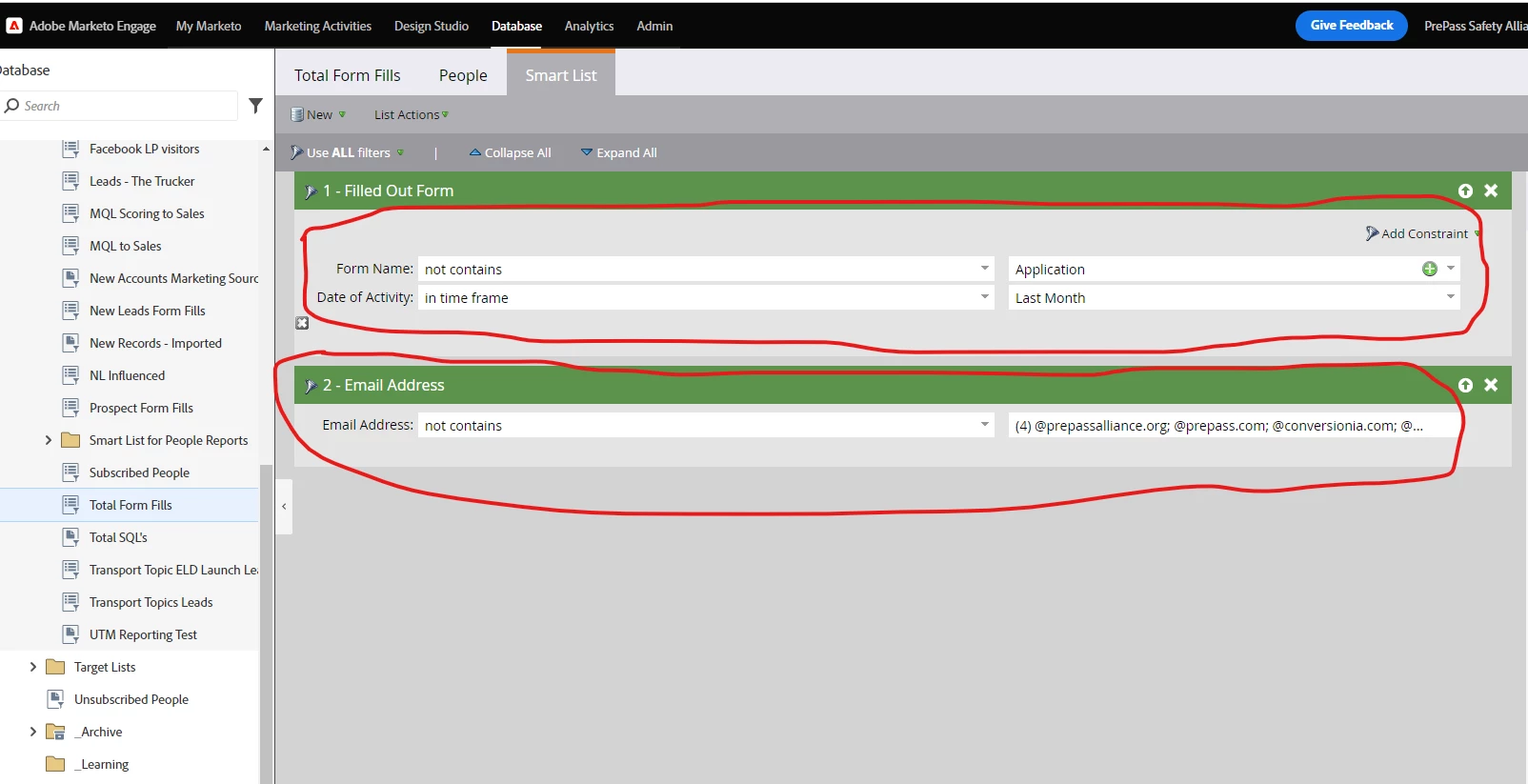
Please see the below screenshot of one of my smart list filters. I need to create the exact same filters inside Power BI but not sure how to get the 'email address' and 'date of activity'. 
I really appreciate any help in this regard.
This post is no longer active and is closed to new replies. Need help? Start a new post to ask your question.
Best answer by Katja_Keesom

@katja_keesom I could not get the formid from Bulk Leads and Bulk Activity extracts API. Is there any other endpoint to extract formid and join it with leads or activities?


From the bulk activity API you can pull activities with type 2 which is Fill out Form. The primary attribute listed in that activity is Webform ID, which is a numerical value, corresponding with the form ID you will see in the url when you go to the form in the UI. It is recommended to always include the form id in the form name to improve visibility.

And indeed, as Jo says, things like this are pretty well documented on the Developer pages.

3 replies

Jo_Pitts1
Community Advisor
Community Advisor
May 6, 2022

@muhammadfaisal1 ,

your query is a bit confusing, so some commentary from me followed by some answers:

Commentary

  • Power BI is a reporting tool... not a data integration or warehousing tool.
  • I'd use something designed to do such integrations (it could be hand rolled, or one of the integration tools out there), get the data into a database, and use Power BI from there.
  • Remember, Smart Lists are point in time, so you need to be careful about how you are using them from a reporting standpoint.  

Some Answers

  • Email is held against the lead
  • Date of activity is (not surprisingly) held against the activities.  

you'll need to extract both leads and activities into your reporting database, and then build reports from there.


Cheers

Jo


SanfordWhiteman
Level 10
May 6, 2022

I was able to pull the Smart Lists using BULK Import API but that requires you to create a job, enqueue it and then wait for its completion to pull the data. This process is not working properly with Power BI. I am looking for Direct Querying with Power BI and want to refresh Power BI report with a schedule refresher.

You don’t want that. You only think you do. 🙂


Direct querying (using the paginated REST API endpoints) is not sustainable. Between hard API limits, real-world performance, and user expectations such setups always fail.


The Bulk Extract API endpoints are the only realistic way to get data out of Marketo into a data warehouse. Like Jo says, invest time in building the queue mechanism to handle the 4-part process (create, enqueue, poll status, download) and import into a db. Then query that db.

Level 2
September 11, 2022

@jo_pitts1 & @sanfordwhiteman


Thank you for your responses. I have now started implementing the bulk extract API and so far able to bring Leads and Activities to my SQL database. I am not trying to create the same smartlist (screenshot I posted on my Question) by using SQL and I am now stuck at 'Form Name' filter. Any idea how can I get 'Form Name' filter/field using Bulk Extract API and join it with Leads or Activities to complete my SmartList?


Thank you

Katja_Keesom
Community Advisor and Adobe Champion
September 12, 2022

Information on a form fill would always be in the activity data. Fills out form is activity type 2 and as far as I recall you will get the form id in the extracts, but I am unsure about the form name.

Level 2
September 16, 2022

@katja_keesom I could not get the formid from Bulk Leads and Bulk Activity extracts API. Is there any other endpoint to extract formid and join it with leads or activities?