Please share the best practice for setting up Trade Show and program status | Community
Skip to main content
Teresa_Hsu1
Level 3
August 16, 2015
Solved

Please share the best practice for setting up Trade Show and program status

  • August 16, 2015
  • 1 reply
  • 2427 views

Hi,

I'm looking for the best practice for setting up Trade Show.  So, there will be several activities at a trade show: booth visit, session, party, and sometimes private meeting.  Should I have all of these activities under one trade show program?  How do I set up the program status, step#, and success so that I'll be able to run the report for each activity?

I also need to sync the campaign to SFDC.  Should I create the same status as campaign status in SFDC?

Thank you!

This post is no longer active and is closed to new replies. Need help? Start a new post to ask your question.
Best answer by Dan_Stevens_

For your first question, yes - you should definitely create separate event programs for every type of activity at your event.  We do this all of the time.  It's necessary not only for accurate reporting purposes, but it's also easier to focus on the specific activities, assets, and smart campaigns for each event activity.  For example, if you build everything in one program and one of your activities achieves "success" (e.g., attends a client party), then all of your activities will have achieved success.  Regardless if it's an event or specific content on your website - it's a best practice to create a separate program for each of these.

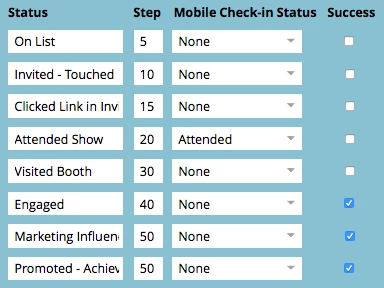
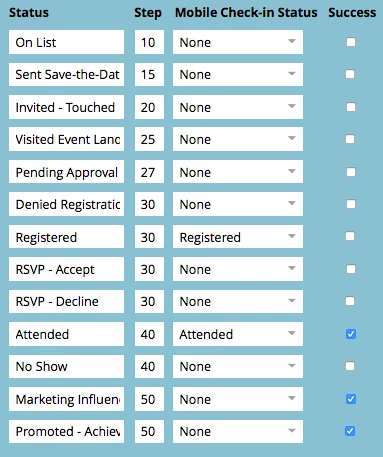
With regards to the appropriate channels to support each of these event programs - we have two types of channels: one for tradeshow booth visits and another for actual events that require form registration (executive breakfast, client cocktail reception, panel discussion, client dinner, etc.) - this is our roadshow channel.  Also, our roadshow channel is built to support multiple ways a user can register for an event: traditional registration, RSVP registration (where a single click confirms your registration without filling out a form), and a workflow to support "approval" registration (where a member of our marketing team must first approve the registration before they become registered):

Tradeshow (booth visits):
Roadshow:
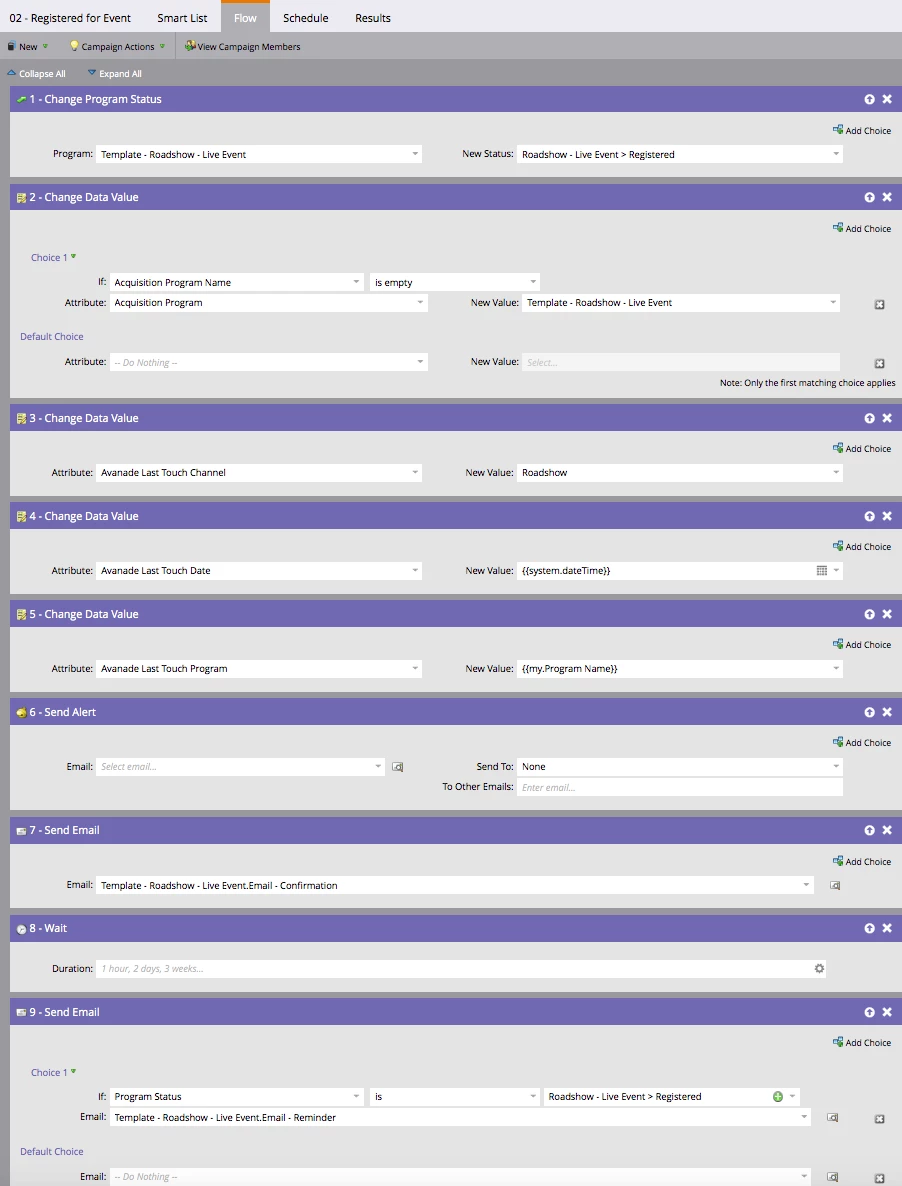
Just remember, in order to run proper reporting you must move leads into the appropriate program statuses based on specific behavior (using smart campaigns).  Here's what a typical smart campaign (flow steps) looks for our traditional event registration:
Hope this helps!

1 reply

Dan_Stevens_
Dan_Stevens_Accepted solution
Level 10
August 16, 2015

For your first question, yes - you should definitely create separate event programs for every type of activity at your event.  We do this all of the time.  It's necessary not only for accurate reporting purposes, but it's also easier to focus on the specific activities, assets, and smart campaigns for each event activity.  For example, if you build everything in one program and one of your activities achieves "success" (e.g., attends a client party), then all of your activities will have achieved success.  Regardless if it's an event or specific content on your website - it's a best practice to create a separate program for each of these.

With regards to the appropriate channels to support each of these event programs - we have two types of channels: one for tradeshow booth visits and another for actual events that require form registration (executive breakfast, client cocktail reception, panel discussion, client dinner, etc.) - this is our roadshow channel.  Also, our roadshow channel is built to support multiple ways a user can register for an event: traditional registration, RSVP registration (where a single click confirms your registration without filling out a form), and a workflow to support "approval" registration (where a member of our marketing team must first approve the registration before they become registered):

Tradeshow (booth visits):

Roadshow:

Just remember, in order to run proper reporting you must move leads into the appropriate program statuses based on specific behavior (using smart campaigns).  Here's what a typical smart campaign (flow steps) looks for our traditional event registration:

Hope this helps!

Teresa_Hsu1
Level 3
August 17, 2015

Thank you so much Dan!

So, when you said "...create separate event programs for every type of activity at your event...", I'm not 100% sure what that means?

Tradeshow is one of our channels.  Did you mean you have another category after the channel so that you could have different programs associate with the tradeshow?

Dan_Stevens_
Level 10
August 17, 2015

Here's an example of our participation at a Gartner Digital Workplace event.  Notice we have three separate programs for 1) visits to our tradeshow booth (using the "tradeshow" channel), 2) a client dinner and 3) an executive speaking session (as well as a separate program to send out a follow-up email to all attendees of that session):