
Person Score not Populating Consistently Across Platform | Community
Skip to main content
Kelci_Martinsen
Level 2
July 27, 2021
Solved

Person Score not Populating Consistently Across Platform

  • July 27, 2021
  • 2 replies
  • 3621 views

UPDATE - smart list still not populating correctly when "is not 0" used, but I have used Ruchi's workaround logic "is greater than 0, is less than 0" and this is populating correctly and consistently.

--------------------------------

Hi All!


I'm running into an issue where about 20 contacts in our database are populating on a Smart List where they shouldn't be. 


I recently implemented a new lead scoring system and reset all our Person Scores back to 0 (4 days ago). I then ran a quick smart list to ensure there wasn't anyone missed and that none of the old programs where still adding/subtracting to the score.

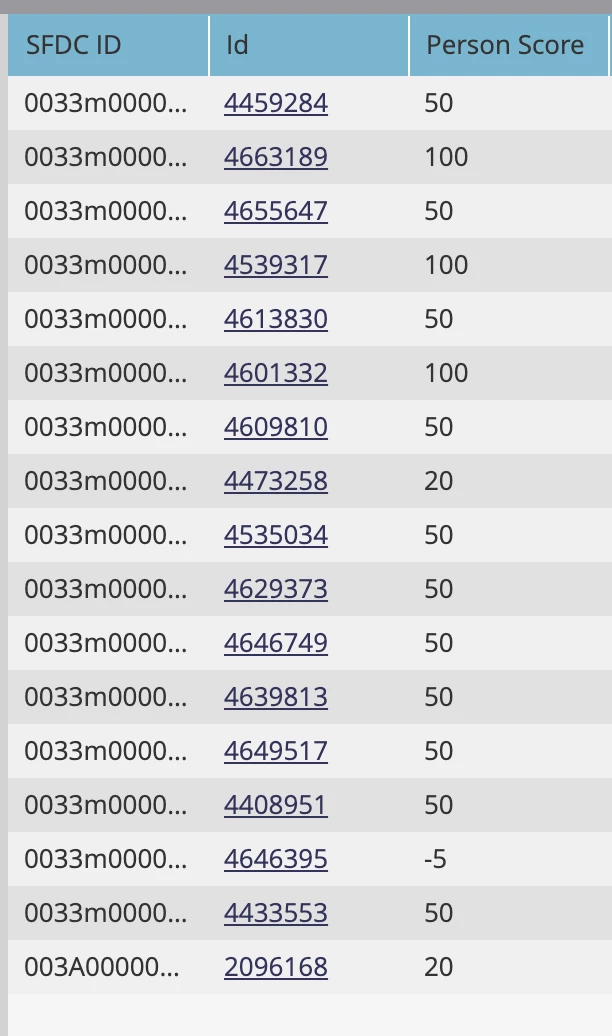
Smart List Parameter - Person Score is not 0


My Smart List populated with about 20 contacts each showing a value for the Person Score column BUUUUT when I clicked into each of the contacts to see either why the score wasn't updated or what program had changed it, I noticed the actual contact record shows Person Score = 0. Also, double checked we do not have multiple fields called Person Score.


Screenshot of Smart List populated and scores showing in Person Score column.
Screenshot of Contact Record showing Person Score = 0 


I was wondering if anyone else has run into this? Am I losing it? Is there a simple solution here I'm not seeing? Also, Would this issue affect additional smart lists that we use to trigger set scoring caps etc?

This post is no longer active and is closed to new replies. Need help? Start a new post to ask your question.
Best answer by Ruchi_Lapran1

Hi Kelci,


Is your smartlist still showing incorrect results? It's uncommon that smartlist is showing up Person Score value different than what it is under lead details. This discrepancy may certainly impact triggered campaigns you are running on the basis of this smartlist.

Can you share a screenshot of campaign run for resetting the Person Score=0? Also, can you perform a manual fix for one of such leads and check if that reflects in the smartlist?

Instead of using Person Score is not 0, try using greater than or less than logic.

2 replies

Katja_Keesom
Community Advisor and Adobe Champion
July 28, 2021

I have noticed that smart lists do not always process the latest changes all that quickly. Can you actually see an activity registered under these "strange" people to reset the score to 0?

Level 2
July 28, 2021

Hi Kelci,


It normally takes some time for the Smartlists to show the updated value.


Thanks,

Monali


Kelci_Martinsen
Level 2
July 28, 2021

Its been four days. How long of a delay do you usually run into?

Ruchi_Lapran1
Adobe Champion
Ruchi_Lapran1Adobe ChampionAccepted solution
Adobe Champion
July 28, 2021

Hi Kelci,


Is your smartlist still showing incorrect results? It's uncommon that smartlist is showing up Person Score value different than what it is under lead details. This discrepancy may certainly impact triggered campaigns you are running on the basis of this smartlist.

Can you share a screenshot of campaign run for resetting the Person Score=0? Also, can you perform a manual fix for one of such leads and check if that reflects in the smartlist?

Instead of using Person Score is not 0, try using greater than or less than logic.

Kelci_Martinsen
Level 2
July 28, 2021

Hi Ruchi,


I tried your greater than 0, less than 0 workaround and it worked! The smartlist for is not 0, still isn't populating correctly, maybe a cache or something (although I've attempted to clear) But I will use the greater than 0, less than 0 going forward!


Thank you so much!

Kelci

Ruchi_Lapran1
Adobe Champion
Adobe Champion
July 28, 2021

You're welcome Kelci!