
New Email Editor :( | Community
Skip to main content
Colin_Ryder
Level 4
July 20, 2015
Solved

New Email Editor :(

  • July 20, 2015
  • 30 replies
  • 9738 views

Playing with the new email editor and there are a few good things but also some stuff that needs to be improved.

  1. It was better to be able to see html vs text side-by-side (so you can see if something has been copied or not). This is useful for me because I have a lot of people who forget to do this and also sometimes the alignment doesn't come across very well.
  2. Find and Replace - can this not also be added into the code view?
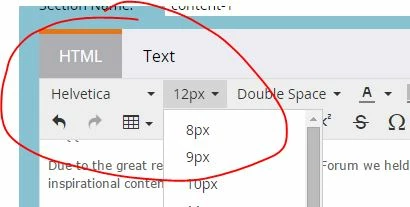
  3. Font / Font Size selection - There used to be a "None" feature which was very helpful if for example you wanted to change back to your templates default size. You could just choose "Font size" and it would pick up the default template specified size.
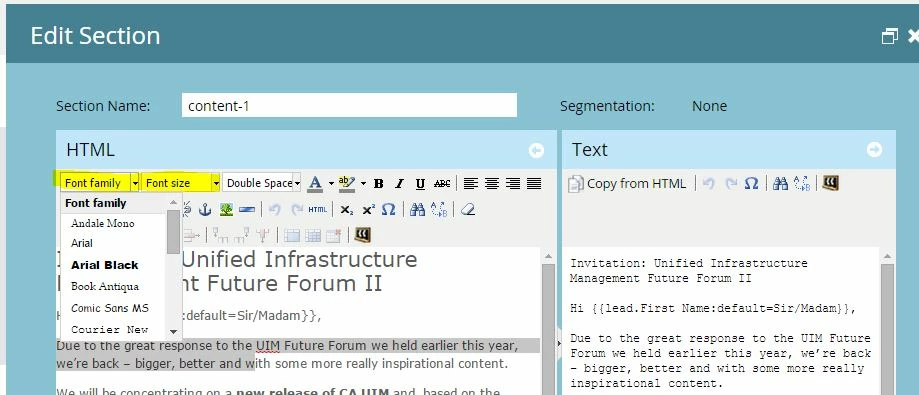
    Also, for example we use a 13px font (which is not an option in the drop down list ) so now if out users change the font size, we cannot fix this without going into the code and changing it manually.

  4. Half the icons are missing until you click more. I use the code view a lot because our users who are not html savvy screw up the code. Yes, we have told them on numerous occasions to paste content as plain text but not everyone follows the rules.
  5. Links - the advanced tab where you can see style etc has gone away. This was useful if you wanted to add in a color for the link quickly. Now you have to select the text and highlight it AFTER you make the link. Plus you get un-necessary code - i.e Span Tags.

    Example:- Creating a link
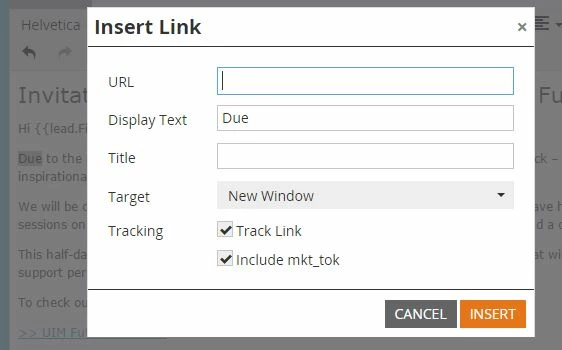
    Gives you this below (we don't use default microsoft blue)
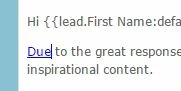

    Now we have to highlight the text and change the font colour, resulting in this un-necessary text. It isn't killing the email but it's not needed and now takes me twice as long.

Anyone else have some comments to add - good or bad?

Cheers

ps - I have reverted to the old version in the Admin section under email but hope these points (and hopefully others from the community) can help improve the editor. It's good to have a more modern view but some of the functionality needs to be tweaked.

This post is no longer active and is closed to new replies. Need help? Start a new post to ask your question.
Best answer by

Hey Boris, Frank and Colin! I can't address the stuff that's broken, I'm personally going to make product and engineering aware of the fact that you aren't happy.

But I CAN address Frank's comment of "Why are we trying to fix something that isn't broken"

The short answer is that while the old editor wasn't broken, it was terribly out of date on the back end. The version we were running was well behind current and incompatible with some of the newer HTML 5 technology. It definitely did need to be updated. Unfortunately updating the version also updated the UI and that's causing some pain points.

30 replies

July 22, 2015

Just wanted to add my feedback here. With the new editor the font of any given email changes without any user input. For example, I opened up an email I was working on days before the editor change, which was set at Arial size 12. Opening the email up after the change automatically shifted the font to Helvetica size 14. Why?! After 3 years of using the legacy editor I was used to its quirks, and now it seems we have to get used to a whole new set of issues.

July 22, 2015

I agree with #1 - it was much easier to see the HTML and text side by side. Sometimes when I go back into an email to make a small change, I do so on the HTML version but often forget about it in the Text since it isn't staring me in the face. I'm getting a little bit used to it now, and it is nicer to have the wider screen for editing.

Level 2
July 23, 2015

Has anyone found that when editing existing emails in the new editor any centred boxes left align even if the code has't changed ..only way is to edit the email via the html code and not the editor ..???

James_Glavin
Level 4
July 24, 2015

It was my first go at properly using the new email editor today. It's *bad*! I've reverted back to the legacy version. There are so many features that have disappeared (biggest gripe: no longer being able to easily access advanced properties for links to define the color without having to dive into the html) and it introduced some bugginess to templates that had previously worked well. Ah well, it's nearly the weekend...

July 27, 2015

I have an even worse issue since the update: every time I use the Rich Text Editor in the Landing Page editor and I click "Save", the page becomes grey and I cannot modify anything else. I have to close it and click "Edit" again from the Design Studio. This is EXTREMELY annoying and it NEVER happened before this last update. I tried on both Chrome and Safari, same exact thing. Anyone else experiencing this issue??

July 28, 2015

I have to agree that this update is terrible. It's not a step forward at all.  You would think there would be new features with greater ease of use.  I'm reverting to the old editor.

Level 2
July 30, 2015

Thank you to those who posted the instructions to reverting back to the old editor.

The Insert/Edit image box needs to come back. The new editor lacks nearly all of the image editing functionality of the old editor.

The "copy from html" button in the old version was far more effective than how it is buried now. It's original location served as a reminder to take this step.

Thank you

August 4, 2015

My users depend on the ability to accurately interpret MS Word formatting. The new editor is actually a little better in this regard, with one major exception: bullets.

It incorrectly applies a text-indent: -.25in; to each bullet, which ruins them.

With this fixed, I could be on board with this editor.

David_Gallaghe2
Level 4
August 12, 2015

I totally agree with everyone on this posting!

While the new interface is pretty... It would be great if someone could tackle these "Unschönheits*," namely...

  • Cmd+K -- this used to open the insert URL
  • Scalable HTML Window -- why is this a fixed item and why so small?
    • Feature Request -- can someone add color coding to the HTML Editor to make it easier to read, not a requirement just nice to have.
  • Default RTE Tool Set -- Include all tools
  • Default RTE Tool Set HTML -- move the <HTML> icon to the far right -- i keep clicking the add token button when i really want to view the html.
  • Open the right editor -- If you are viewing an email in text mode, and double click to edit, the text version of that email should open rather than the full RTE.
  • Did i mention cmd+K, yeah, i really miss that.
  • Feature Suggestion enable a RTE/HTML/CSS split screen option a la chrome developer tools...
  • I would also like to see the widely used cmd+k option brought back -- not sure if you saw that in this post, just sayin' .

I like my keyboard cmds

--------

*Unschönheit: Term coined while at may last employer referring to a product, feature or function that may be clunky but is usable and functional but with a bit of effort could be  implemented in a more streamlined and or clean manner)

Amy_Lepre
Level 6
September 23, 2015

Chiming in to say I agree with just about everything that's been posted. It's now been 2 months since the new editor was released and no fixes for any of these issues?

Dan_Stevens_
Level 10
September 23, 2015

@Justin Cooperman​ and his team have openly admitted that there were a quite a bit of issues with the deployment of the new editor, but more importantly has done a great job in capturing the feedback received to develop a re-deployment plan to address many of these issues.  See the discussion thread here: New Text Editor is ****