
New Email Editor :( | Community
Skip to main content
Colin_Ryder
Level 4
July 20, 2015
Solved

New Email Editor :(

  • July 20, 2015
  • 30 replies
  • 9738 views

Playing with the new email editor and there are a few good things but also some stuff that needs to be improved.

  1. It was better to be able to see html vs text side-by-side (so you can see if something has been copied or not). This is useful for me because I have a lot of people who forget to do this and also sometimes the alignment doesn't come across very well.
  2. Find and Replace - can this not also be added into the code view?
  3. Font / Font Size selection - There used to be a "None" feature which was very helpful if for example you wanted to change back to your templates default size. You could just choose "Font size" and it would pick up the default template specified size.
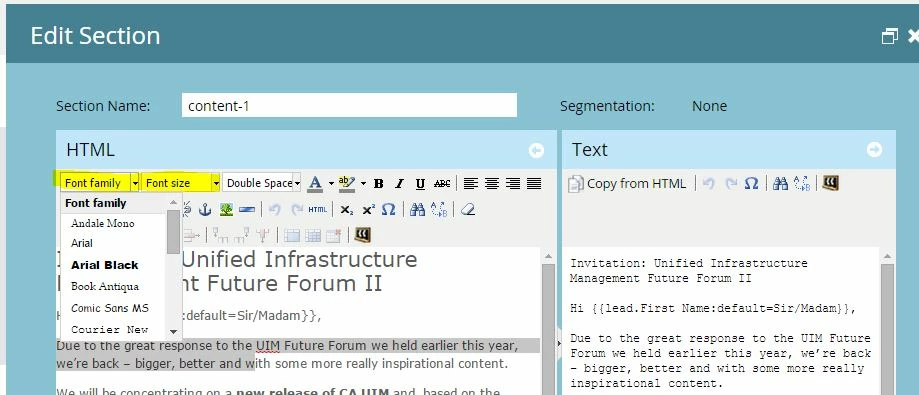
    Also, for example we use a 13px font (which is not an option in the drop down list ) so now if out users change the font size, we cannot fix this without going into the code and changing it manually.
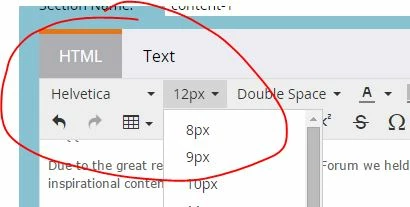

  4. Half the icons are missing until you click more. I use the code view a lot because our users who are not html savvy screw up the code. Yes, we have told them on numerous occasions to paste content as plain text but not everyone follows the rules.
  5. Links - the advanced tab where you can see style etc has gone away. This was useful if you wanted to add in a color for the link quickly. Now you have to select the text and highlight it AFTER you make the link. Plus you get un-necessary code - i.e Span Tags.

    Example:- Creating a link
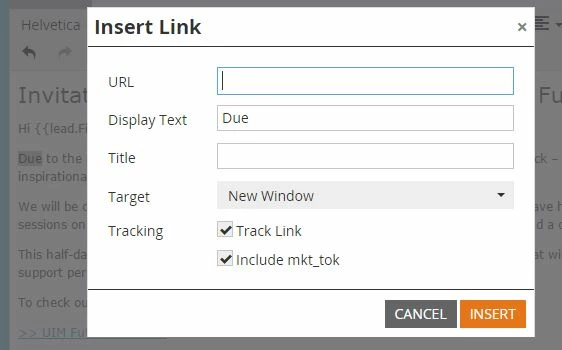
    Gives you this below (we don't use default microsoft blue)
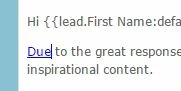

    Now we have to highlight the text and change the font colour, resulting in this un-necessary text. It isn't killing the email but it's not needed and now takes me twice as long.

Anyone else have some comments to add - good or bad?

Cheers

ps - I have reverted to the old version in the Admin section under email but hope these points (and hopefully others from the community) can help improve the editor. It's good to have a more modern view but some of the functionality needs to be tweaked.

This post is no longer active and is closed to new replies. Need help? Start a new post to ask your question.
Best answer by

Hey Boris, Frank and Colin! I can't address the stuff that's broken, I'm personally going to make product and engineering aware of the fact that you aren't happy.

But I CAN address Frank's comment of "Why are we trying to fix something that isn't broken"

The short answer is that while the old editor wasn't broken, it was terribly out of date on the back end. The version we were running was well behind current and incompatible with some of the newer HTML 5 technology. It definitely did need to be updated. Unfortunately updating the version also updated the UI and that's causing some pain points.

30 replies

July 21, 2015

Hi guys,

I am also struggling on adding HTML code on the SNIPPET editor.

Before, I could add a simple HTML + Javascript code into the HTML editor.

But now, when I add my HTML + Javascript code, the javascript disappears, so my snippet does not work.

Is anyone facing the same coding issue ?

Jamie_Rodger
Level 3
July 21, 2015

I noticed that the editor now adds additional <span> tags to every paragraph in my template, especially whenever a user copy and pastes text. Has anyone else found this to be the case?

July 21, 2015

I'm so glad others are posting about this change!I've reverted back to legacy for my group -- we needed the advanced settings in links and images!

Why fix something that was working fine? Marketo, there are soooo many other things that need to be worked on instead!!

Lucho_Soto
Level 5
July 21, 2015

I share these concerns. The advanced image editor is also gone, which allowed me to add inline CSS and links in images. I now have to go in to the code to do those things now that it's gone, which takes longer.

The advanced table editor is now also under "more", which adds an extra click for a function that I use all the time.

If you would like to vote to bring back this functionality, I opened an idea here:


Randy_Davis
Level 2
July 21, 2015

Also, we have found that the insert image icon does not display at all until you fully expand the edit window -- even if you click on More.... Ugh. We are taking a vote to keep the new editor or revert back to the original. So far it looks like we will revert...

Robert_Mullown2
Level 2
July 21, 2015

Going to give this new format a few days to see what I do and do not like.  At this moment in time I feel that I will revert back to the former version as I do need some of the advanced functionality that does not seem to be available here.

hena_wells
Level 4
July 21, 2015

Wanted to let you guys know that we are closely monitoring this thread (and others) related to the new text editor. Lots of good stuff here and we will look into each one of them. -Aj

Level 2
July 21, 2015

Arjun how can we get the issues fixed sooner. We are losing production time with the changes... How come you guys do not beta test these? It feels like this has been skipped.

hena_wells
Level 4
July 21, 2015

Hi Anton Belo​,

If you (or one of the admins in your team) go to Admin --> Email, you can toggle back to the old editor. -Aj

Nichole_Trobar1
Level 2
July 21, 2015

Our team uses the even/odd row fill on a regular basis in table options - does anyone know where this is in the new editor if at all?

Level 2
July 21, 2015

MARKETO PLEASE FIX THIS ASAP...

Level 3
July 22, 2015

This was a terrible update --- very hard to use. I edit HTML often and have to do extra clicks to get there. No drag/drop for images - I rarely have the URL since the files were uploaded previously and reused. To edit link style -- HUGE PAIN. We have to edit EVERY SINGLE LINK by copy/paste in the HTML, it's a nightmare. Text view is not visible so I think I will forget to copy from HTML if I've made updates (could potentially be VERY bad depending on how the content changes - legal issues, etc.). It's not clear what the Token in the URL is? Why we should use it/not use it and it appears that past links have been updated to include the token?

July 22, 2015

As a designer who uses Dreamweaver and essentially cuts and pastes the code into Marketo, I don't like how it strips stuff out from my DIV tags. I had to go thru an email I designed last week, figure out what was "broken", and fix the code so the whole email would center properly via tables instead of DIVs. I'm not thrilled and the simplification of code due to one worthless email program <cough>OUTLOOK</cough>. Yes, I know emails should be built via tables and no DIVs, but screw outlook.