
New Email Editor :( | Community
Skip to main content
Colin_Ryder
Level 4
July 20, 2015
Solved

New Email Editor :(

  • July 20, 2015
  • 30 replies
  • 9738 views

Playing with the new email editor and there are a few good things but also some stuff that needs to be improved.

  1. It was better to be able to see html vs text side-by-side (so you can see if something has been copied or not). This is useful for me because I have a lot of people who forget to do this and also sometimes the alignment doesn't come across very well.
  2. Find and Replace - can this not also be added into the code view?
  3. Font / Font Size selection - There used to be a "None" feature which was very helpful if for example you wanted to change back to your templates default size. You could just choose "Font size" and it would pick up the default template specified size.
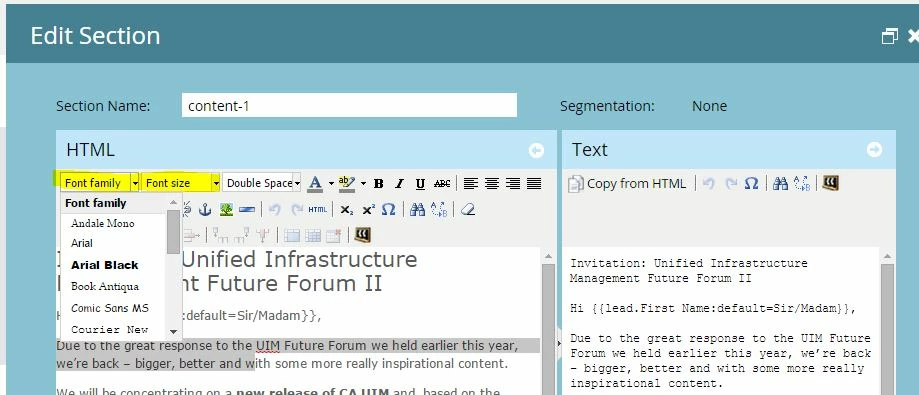
    Also, for example we use a 13px font (which is not an option in the drop down list ) so now if out users change the font size, we cannot fix this without going into the code and changing it manually.
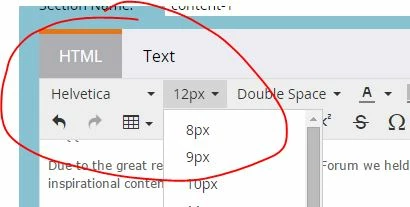

  4. Half the icons are missing until you click more. I use the code view a lot because our users who are not html savvy screw up the code. Yes, we have told them on numerous occasions to paste content as plain text but not everyone follows the rules.
  5. Links - the advanced tab where you can see style etc has gone away. This was useful if you wanted to add in a color for the link quickly. Now you have to select the text and highlight it AFTER you make the link. Plus you get un-necessary code - i.e Span Tags.

    Example:- Creating a link
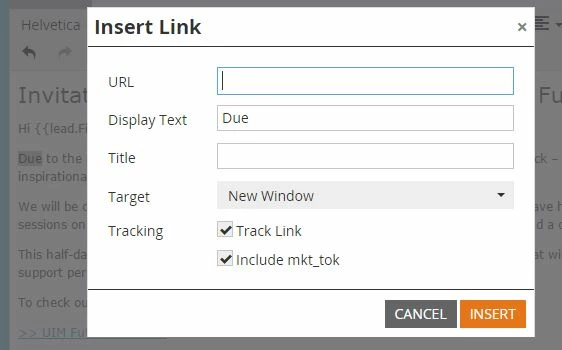
    Gives you this below (we don't use default microsoft blue)
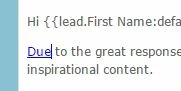

    Now we have to highlight the text and change the font colour, resulting in this un-necessary text. It isn't killing the email but it's not needed and now takes me twice as long.

Anyone else have some comments to add - good or bad?

Cheers

ps - I have reverted to the old version in the Admin section under email but hope these points (and hopefully others from the community) can help improve the editor. It's good to have a more modern view but some of the functionality needs to be tweaked.

This post is no longer active and is closed to new replies. Need help? Start a new post to ask your question.
Best answer by

Hey Boris, Frank and Colin! I can't address the stuff that's broken, I'm personally going to make product and engineering aware of the fact that you aren't happy.

But I CAN address Frank's comment of "Why are we trying to fix something that isn't broken"

The short answer is that while the old editor wasn't broken, it was terribly out of date on the back end. The version we were running was well behind current and incompatible with some of the newer HTML 5 technology. It definitely did need to be updated. Unfortunately updating the version also updated the UI and that's causing some pain points.

30 replies

Boris_Kiperas1
Level 2
July 20, 2015

I completely agree with all the points raised above and i would like to add one more - for some really strange reason you removed the expand button in the HTML editor screen and it is so much harder to check and edit HTML now when we are constrained with such small window. The editing window cannot even be resized. In short, your new Rich Text Editor design in my view is an epic fail.

I would strongly recommend to Marketo product team to invest more time and effort on fixing real system issues rather than fixing what needs no fixing.

Boris Kiperas
July 20, 2015

Why are we trying to fix something that isn't broken" This was not a well thought out plan.

Level 2
July 20, 2015

Where is the ADVANCED EDITOR???

Edward_Masson
Level 10
July 20, 2015

Click on the email section in Admin, There is a new tab, Edit Editor Settings. Here you can revert to Legacy settings (the old, more popular editor).

July 22, 2015

Thank you so much for that tip!  I think it would take me forever to work around the new version, that would be it for email marketing!

July 20, 2015

I agree with Colin's points.  My job time just doubled.

July 20, 2015

Completely agree! "Easier" has created more work.

Accepted solution
July 20, 2015

Hey Boris, Frank and Colin! I can't address the stuff that's broken, I'm personally going to make product and engineering aware of the fact that you aren't happy.

But I CAN address Frank's comment of "Why are we trying to fix something that isn't broken"

The short answer is that while the old editor wasn't broken, it was terribly out of date on the back end. The version we were running was well behind current and incompatible with some of the newer HTML 5 technology. It definitely did need to be updated. Unfortunately updating the version also updated the UI and that's causing some pain points.

Level 3
July 20, 2015

And what is wrong with the SAVE function? I reuse a lot of templates, so I will just change text. Hit SAVE, doesn't save. Try again and hopefully remember what I've just typed. Half of it saved, the other half didn't. Try again. Now it's all reverted back to the original. Try again. Half saved. Try again. Reverted to original. See the pattern here?

And I don't grasp why I think I've clicked on the HTML tab, but I don't see any HTML.

July 20, 2015

The HTML option is still present, the icon just changed. Previously it said "HTML", now you have to click "More" and then the icon that looks like this:

July 22, 2015

Thank you! I was having trouble finding where I could access the HTML view!

Debbie_Miles
Level 2
July 20, 2015

Agree completely.

Also is anyone else having issues with bullets? They are listed correctly as tags <li> etc but are coming out as question marks on the sample send.

When tested to various mobile devices, gmail on an iphone has all overlapped text - you can't read the email at all. grrr

Dan_Stevens_
Level 10
July 20, 2015

While I'm not experiencing this issue with bullets, I am noticing now whenever you hit the "enter" key, it no longer creates a new paragraph.  Instead, a single <br> tag is entered.  Is there a way to configure the editor so that it enters new paragraphs upon hitting enter?

July 20, 2015

Is anyone having problems with advanced image editing?  We use a "mobile-img" class to identify images that need to be scaled on a smaller screen, and that advanced option isn't showing up anymore.  I'm going to see if I can use the legacy settings, but if anyone has any tips for using features that are no longer part of the images or links editors? 

July 20, 2015

What's the testing process like for introducing new features? Do certain orgs and Champions give feedback before the release? I am very interested in this process so we can avoid making more work for trained users and admins and enable the new features. 

My very first thought when I opened the new editor is that the HTML option is missing so I will always have to click on the advanced icon.

July 20, 2015

The HTML option is still present, the icon just changed. Previously it said "HTML", now you have to click "More" and then the icon that looks like this:

July 20, 2015

Yes, thanks. That's what I meant by the advanced icon Hopefully it keeps my preferred option so I don't always have to click the icon to show the additional buttons.