
Nesting an email program in default Marketo program (multiple email sends) | Community
Skip to main content
janerusnak
Level 2
January 28, 2022
Solved

Nesting an email program in default Marketo program (multiple email sends)

  • January 28, 2022
  • 1 reply
  • 3882 views

Hi there, 

Would anyone please be able to help me wrap my head around the set up of Nested email programs within default program?

The goal: product promotion with drip emails on specific days, not reoccurring. Each email has an A/B test subject line. The Main Program syncs and updates statuses in a Salesforce campaign, like Open, Clicked, Visited landing page, Filled in the form.

I'm using Email programs to have analytics for every email, however in Salesforce I want to know the overall success of the Main program, not individual emails. 
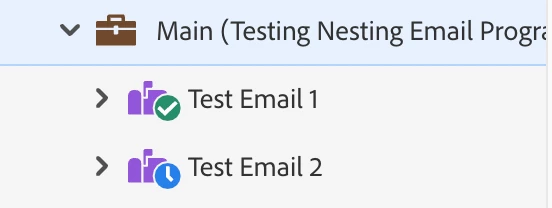
Questions:

1. At what point and how I make the audience of Test Email 1, Members of the Main Program?

2. Should each nested email program have smart campaigns to sync appropriate status to SF and update the member status of the Main campaign?

3. Can I have smart campaigns that update statuses for the Main campaign based on the performance of individual emails, outside of nested programs? (like shown on the image)
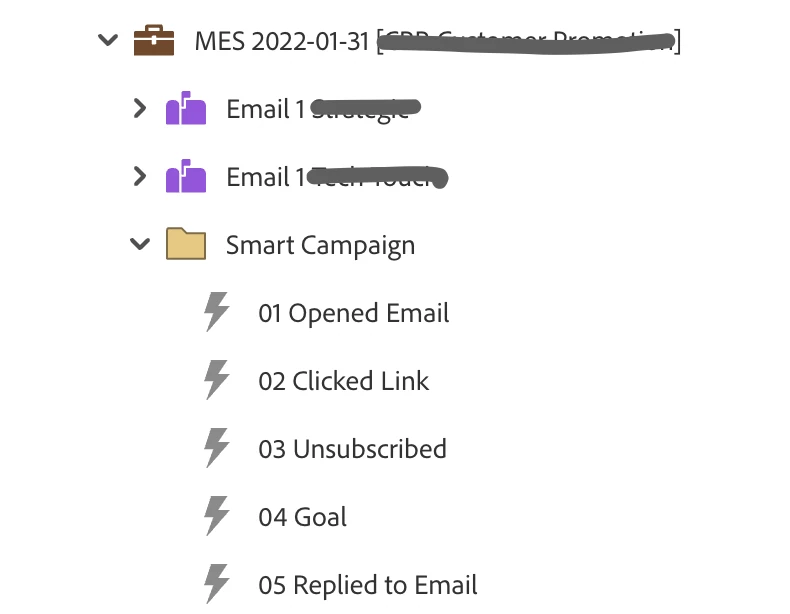
 

4. Is there anything else I need to consider when nesting email programs within default program?

Thanks in advance for you input!

This post is no longer active and is closed to new replies. Need help? Start a new post to ask your question.
Best answer by Katja_Keesom

Hi Jane,

Not sure I would have chosen this set up, but I guess it works.

Regarding your questions:

  1. You can make people member of the main program using a flow step. At which point you do so is up to you and there are several ways to look at that. Either the moment the email is sent or delivered would be the most logical trigger I'd say.
  2. Yes, that would be the most logical set up.
  3. Absolutely, that is no problem.
  4. With multiple emails being able to update similar statuses on the main campaign, I would make sure that the smart campaigns in the main program only update the status if that was not already done before. So add a filter to your smart list to say the program status should not already be the status you are updating to or higher. That avoids people going through the flow unnecessarily.

1 reply

Katja_Keesom
Community Advisor and Adobe Champion
Katja_KeesomCommunity Advisor and Adobe ChampionAccepted solution
Community Advisor and Adobe Champion
January 28, 2022

Hi Jane,

Not sure I would have chosen this set up, but I guess it works.

Regarding your questions:

  1. You can make people member of the main program using a flow step. At which point you do so is up to you and there are several ways to look at that. Either the moment the email is sent or delivered would be the most logical trigger I'd say.
  2. Yes, that would be the most logical set up.
  3. Absolutely, that is no problem.
  4. With multiple emails being able to update similar statuses on the main campaign, I would make sure that the smart campaigns in the main program only update the status if that was not already done before. So add a filter to your smart list to say the program status should not already be the status you are updating to or higher. That avoids people going through the flow unnecessarily.
janerusnak
Level 2
January 31, 2022

Thank you, @katja_keesom!


What set up would you choose in my case? I always used flow steps to send drip emails at specific times, but recently the team was changing the delivery days and times the last minute and i had no idea it's not as simple as changing the time and day of the delivery in the flow step (you have to remove people from the smart campaign, than create a new SC with correct flow steps). So I'd rather use individual email sends to be on the safe side. Plus there is no option to A/B test anything in the multiple email send programs set up through flow steps. 

Looking to spend wisely at your company? Check out procurify.com
Katja_Keesom
Community Advisor and Adobe Champion
January 31, 2022

I would use two emails instead of the nested programs. Your email performance will be shown per email in that case as well and you can run your subject line tests with a champion / challenger set up.