
Nested Program in Engagement Stream | Community
Skip to main content
michellechopin
Community Advisor
Community Advisor
October 14, 2021
Solved

Nested Program in Engagement Stream

  • October 14, 2021
  • 1 reply
  • 3983 views

Hello Community!


I've recently re-formatted our engagement programs to streamline them and I've given myself an opportunity to use a nested program for the first time (yay!). I used this awesome guide, alongside this post to better understand the set up and how the Smart Campaigns work, and imported the Marketo Program template as well for basic outlines (there doesn't seem to be a single step-by-step guide anywhere, which would be super helpful).


With that, I've been able to add my nested program to the stream as follows (I also learned that you cannot nest a program if you're using "Recipient Time Zone" in the Stream Cadence):
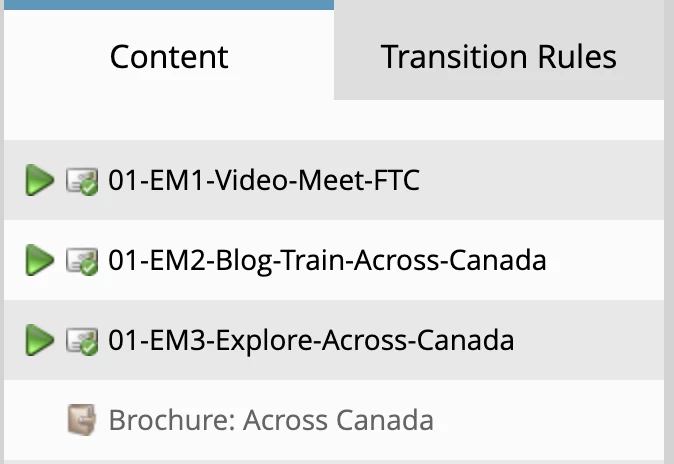
The Nested Program Smart Campaigns do the following:

  • Skip: If a lead has filled out the form on our website to get this brochure, then change their Program Status to "Skip"
  • Send: If a lead is a member of the main engagement program, then send them this email, and change their Program Status to "Sent"

Before I activate that program in the stream, I have two questions:

  1. There is a blue arrow on the Sent Email Campaign now that I've added the Nested Program to the Stream (as above) - will this automatically work as I activate the program in the stream or should it have it's own schedule (i.e. every 2 weeks, one hour before the Stream Cast time)?
  2. Is it safe to assume that once someone reaches that Brochure Program and either receives or skips it, that Marketo will move the lead onto the next piece of content at the appropriate time (either on the next cast date or in place of the skipped program)?


Apologies if those are obvious questions/answers - without clear step-by-step instructions, I usually need expert reassurance before committing to it 😆 Once I'm good with this program, I'll be implementing it across other engagement streams too.


Thanks in advance!

Michelle
This post is no longer active and is closed to new replies. Need help? Start a new post to ask your question.
Best answer by falvares

Before I activate that program in the stream, I have two questions:

  1. There is a blue arrow on the Sent Email Campaign now that I've added the Nested Program to the Stream (as above) - will this automatically work as I activate the program in the stream or should it have it's own schedule (i.e. every 2 weeks, one hour before the Stream Cast time)?

The blue arrow means that the Smart campaign will be requested. No additional scheduling is required on the smart campaign. The engagement program should call that campaign when required.

  1. Is it safe to assume that once someone reaches that Brochure Program and either receives or skips it, that Marketo will move the lead onto the next piece of content at the appropriate time (either on the next cast date or in place of the skipped program)?

Yes, the leads would move on to the new piece of content in the stream if they have already gone through the campaign or are an existing member of the program.


1 reply

falvaresAdobe EmployeeAccepted solution
Adobe Employee
October 14, 2021

Before I activate that program in the stream, I have two questions:

  1. There is a blue arrow on the Sent Email Campaign now that I've added the Nested Program to the Stream (as above) - will this automatically work as I activate the program in the stream or should it have it's own schedule (i.e. every 2 weeks, one hour before the Stream Cast time)?

The blue arrow means that the Smart campaign will be requested. No additional scheduling is required on the smart campaign. The engagement program should call that campaign when required.

  1. Is it safe to assume that once someone reaches that Brochure Program and either receives or skips it, that Marketo will move the lead onto the next piece of content at the appropriate time (either on the next cast date or in place of the skipped program)?

Yes, the leads would move on to the new piece of content in the stream if they have already gone through the campaign or are an existing member of the program.


michellechopin
Community Advisor
Community Advisor
October 15, 2021

Hi @falvares,


Thank you so much for the quick reply and confirmation! 


That sets my mind much more at ease and I'll activate these now - super stoked to get to use a program like this for further personalization and streamlining in our engagement programs.


Much appreciated  😀

Michelle