Multiple nurtures setup | Community
Skip to main content
Level 2
November 29, 2024
Solved

Multiple nurtures setup

  • November 29, 2024
  • 2 replies
  • 2598 views

Hi,


I have a doubt regarding nurture setup. Currently, I have more than three nurtures running with the leads receiving communication from each nurture once a week. How to ensure that a lead is in only one nurture at a given time and enters the next nurture once the content in the 1st is exhausted? Also, is there a way to set a priority/order in which lead runs through the multiple nurtures i.e can we decide which nurture it should go through 1st, 2nd, and so on?

Best answer by uditmathur

Hi @shreyaresilinc ,

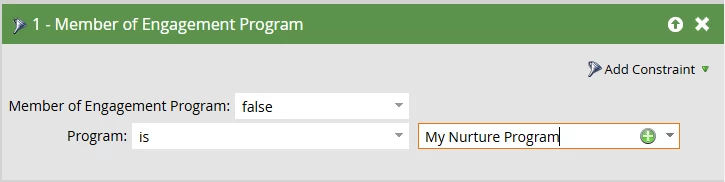
To answer this you can use "Member of Engagement Program" filter in your smart list of the campaign you are using to add leads & select the other two programs.


To answer this,

Yes you can define the order by adding leads to the program 1st in your order & not to the following programs. Once they have exhausted the content from the 1st program you can than change their program to the next in line through a separate campaign. 


Word of caution here, exhausted content should not be used as the trigger for transition as this clearly indicates that your leads are not engaging to content & have not shown interest in your product/ service.

Leads should always be transitioned based on their definite action taking with your content & have shown intent of engaging.


Hope this helps. 😊 

2 replies

uditmathur
Community Advisor
Community Advisor
November 29, 2024

Hi @shreyaresilinc ,

Can you clarify if you have 3 separate engagement program or have 3 streams in an engagement program?

Level 2
November 29, 2024

I have set up 3 separate engagement programs.

uditmathur
Community Advisor
uditmathurCommunity AdvisorAccepted solution
Community Advisor
November 29, 2024

Hi @shreyaresilinc ,

To answer this you can use "Member of Engagement Program" filter in your smart list of the campaign you are using to add leads & select the other two programs.


To answer this,

Yes you can define the order by adding leads to the program 1st in your order & not to the following programs. Once they have exhausted the content from the 1st program you can than change their program to the next in line through a separate campaign. 


Word of caution here, exhausted content should not be used as the trigger for transition as this clearly indicates that your leads are not engaging to content & have not shown interest in your product/ service.

Leads should always be transitioned based on their definite action taking with your content & have shown intent of engaging.


Hope this helps. 😊 

Kristof-2
Level 4
November 30, 2024

Hey @shreyaresilinc,


to automatically move people to a next priority nurture, you can for example create and additional last stream in each nurture that will gather people who exhausted this nurture + engaged somehow there. Then, you can create a simple a "traffic controller" that will move them to the next priority nurture based on the trigger "Engagement program stream changes" to stream "exhausted + engaged" and in the flow step add them to a new nurture. 

To make sure that you are adding any incoming people to just one nurture, you can set a hierarchy of your nurtures and add them to the 1st one, and based on the above traffic controller they will move further. Also, alternatively, you can use a smart list filter "Not was added to engagement program" to make sure a person wasn't added to any other nurtures.

Level 2
December 4, 2024

Thank for the suggestions!

Zoe_Forman
Community Advisor and Adobe Champion
January 10, 2025

Hi @shreyaresilinc 

How are your nurture programs performing now?

I echo both @uditmathur and @kristof-2 suggestions.

Member of a program and a nurture controller are the best solutions to ensure a person is only in one nurture at a time but also that there is a clear nurture journey for each person - move to the next nurture based on a transition rule or exhausted content.
