Manually Pass Query String vs Hidden Fields | Community
Skip to main content
Level 2
May 1, 2020
Solved

Manually Pass Query String vs Hidden Fields

  • May 1, 2020
  • 1 reply
  • 6643 views

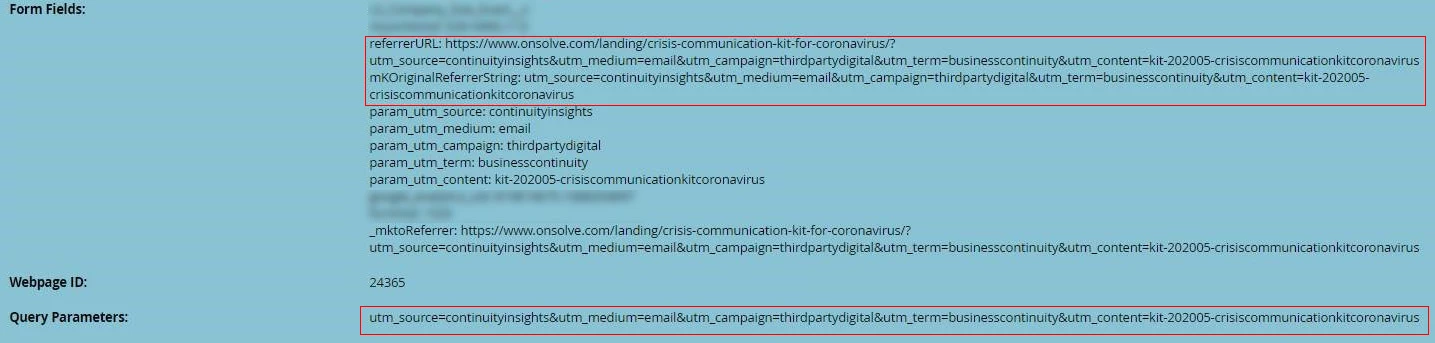
We use a universal form setup.  For example we use a single content form for all content downloads for easier management. When a visitor completes a form fill we use the Referrer URL and Query string to understand what content piece was downloaded, and the UTMs in the query string for attribution.


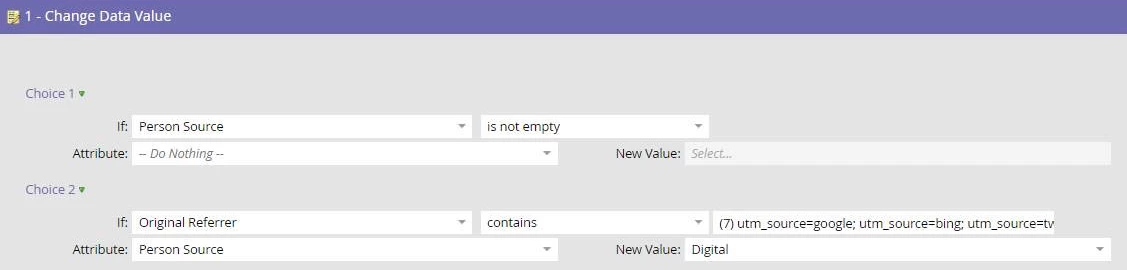
Currently we're using session cookies to preserve UTM parameters, and when a user views a page with a marketo form we rewrite the URL history to include the UTMs in the query string. We do this so we're able to use the form-fill triggers to analyze the query string and funnel the contact for appropriate attribution routing.


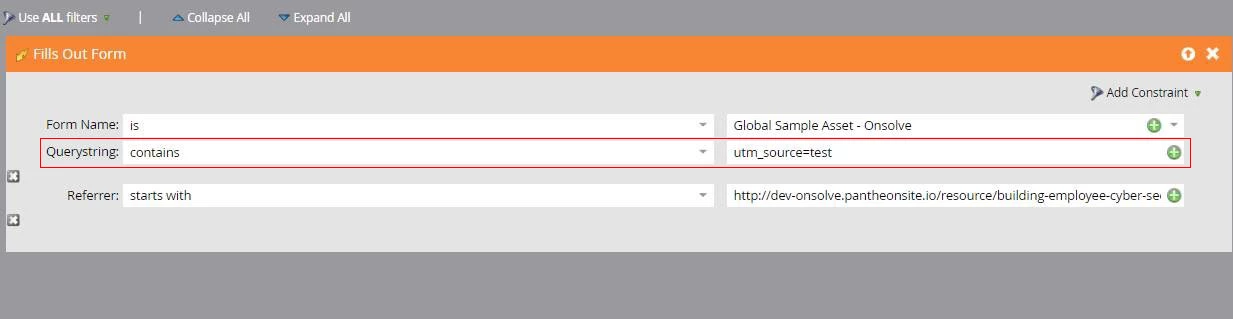
We are passing custom hidden fields for UTMs and a custom referrer full URL, but we've had more success relying on Querystring in the trigger for initial routing.


However, having the history rewrite to include the full query string is problematic.  For example, we're considering having a newsletter signup form in the footer of all pages and thus the saving querystring data would populate on all pages which is unsightly.  It can cause analytics inconsistencies in some cases. etc.


Is there manual way to populate a form's  querystring value with data we provide? Same question for referrerURL.


Example form-fill:
Example trigger:
Example Flow:
 

Best answer by SanfordWhiteman

No, the URL is cached when the Forms 2.0 library is loaded, and it's taken from the actual location.href, so you can't override it without (as you're doing) replaceState().


Likewise, the referrer is the actual document.referrer, no way to fake that.


However, what you're doing isn't strictly necessary. If your routing needs to work on contributing values other than the actual URL & Referrer, then put those values in hidden fields with a timestamp appended. Then you can use Data Value Changes on those fields, as they will always change when a form submits.


1 reply

SanfordWhiteman
SanfordWhitemanAccepted solution
Level 10
May 1, 2020

No, the URL is cached when the Forms 2.0 library is loaded, and it's taken from the actual location.href, so you can't override it without (as you're doing) replaceState().


Likewise, the referrer is the actual document.referrer, no way to fake that.


However, what you're doing isn't strictly necessary. If your routing needs to work on contributing values other than the actual URL & Referrer, then put those values in hidden fields with a timestamp appended. Then you can use Data Value Changes on those fields, as they will always change when a form submits.


krpurkAuthor
Level 2
May 1, 2020

Thanks very much for your response Sanford.


Three questions on that process:

  • So I'm understanding correctly, the timestamp would ensure that every submission (including those with the same values) would trigger a data value change. Does appending the timestamp trigger any other effects?
  • In the case where we use Data Value Change, does that also trigger on a new form submission? From our experience we've noticed that net new records might inconsistently trigger a value change on form submission unless a flow is used.
  • We would like to continue using the Trigger system to keep our program enrollment clean, but in this case we would need to check both the query string (in your example it would be a custom field with the query string and a timestamp),  in some cases we would also check the referrer and in others we would need to check what page the embedded form was submitted from.  We've ran into timing issues using filters and fields not being populated in time to route correctly.  Otherwise using two triggers together are viewed as an OR statement.  Any tips?

Example, triggers and filter where we've noticed inconsistencies in timing where data is available yet to filter:


Example, triggers together are viewed as or statements:


SanfordWhiteman
Level 10
May 2, 2020

  • So I'm understanding correctly, the timestamp would ensure that every submission (including those with the same values) would trigger a data value change. Does appending the timestamp trigger any other effects?

No, only the intended effect, which is to make it possible to trigger on the value from the current form post, as opposed to an existing value.


In the case where we use Data Value Change, does that also trigger on a new form submission? From our experience we've noticed that net new records might inconsistently trigger a value change on form submission unless a flow is used.

It will not trigger the first time a value is set (it's not inconsistent, that's the way it works).


When a person is created as a result of a form submission, that's a Person is Created trigger with constraint Form Name [is not empty]. A filter added to that trigger will capture the initial field values with no race condition.


  • We would like to continue using the Trigger system to keep our program enrollment clean, but in this case we would need to check both the query string (in your example it would be a custom field with the query string and a timestamp),  in some cases we would also check the referrer and in others we would need to check what page the embedded form was submitted from.  We've ran into timing issues using filters and fields not being populated in time to route correctly.  Otherwise using two triggers together are viewed as an OR statement.

Field value filters combined with a Filled Out Form trigger have potential race issues, but I'm not expecting you to use that trigger.


Another aggressive way to do all this without showing the end user what you're doing is to have an IFRAMEd page that submits the form (it should be noted that submission always uses a child IFRAME in turn).  


The outer page shows the form, but does not directly submit it; instead, it passes the data to the IFRAME on submit. The IFRAMEd page can have the interesting values mirrored in its URL, but the end user won't see that (I mean, unless they're very curious). So the final result is a Filled Out Form with all the trimmings available for constraints, without showing your cards to the user. Maybe I'll write up the technical details on the products blog soon.