Issues with Unicode uploads | Community
Skip to main content
March 8, 2017
Question

Issues with Unicode uploads

  • March 8, 2017
  • 5 replies
  • 10331 views

Has anyone else noticed a change when uploading unicode files? I tried several different methods of uploading a file (including this Import a Non-Latin Characters List - Marketo Docs - Product Docs​), but I always seem to have to retype the headers in the upload process:
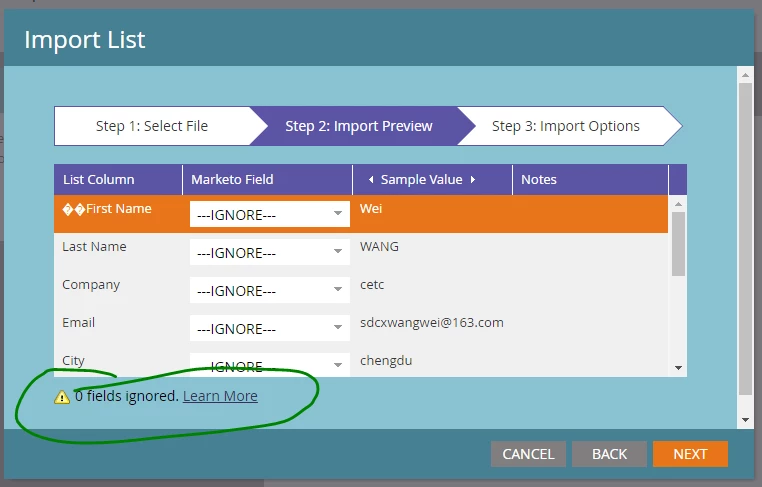
I also noticed that the bottom of the form says that zero fields are ignored, but that's definitely not the case.

Any one have insight or want to vent about the same issue?

This post is no longer active and is closed to new replies. Need help? Start a new post to ask your question.

5 replies

March 8, 2017

I noticed it once when I used an incorrect header format in the csv file after I chnaged the header name it worked fine.

March 8, 2017

Hey Addy - Thanks for the note. I haven't noticed any issues with Tab Delimited or CSV files myself. Do you import lists containing Asian characters using CSV?

Dan_Stevens_
Level 10
March 8, 2017

CSV should never be used for advanced/alternative character sets - always use Unicode Text.  It's also worth mentioning that you should always define the file format and never leave this field as "auto-detect" (I wish Marketo would just remove that option) as this often causes issues.  When importing Unicode Text, be sure to select "Tab Delimited".

It also looks like you have some invalid characters in your header row:

Dan_Stevens_
Level 10
March 9, 2017

This issue exists for us as well.  After selecting the list and setting the options, we see this:

After manually selecting the proper fields to map, the import results in new leads with no data!

This is a huge issue for us as we are a global company.  We import program members weekly (and sometimes daily) containing leads with special characters.

Dan_Stevens_
Level 10
March 9, 2017

Marketo Support came back with the following (even though I told them that Unicode text file imports have worked for years in Marketo):

We are only supporting UTF-8, UTF-16, Shift-JIS and EUC-JP as per documentation. Could you provide a list of an import that used to work so I can compare? As a workaround, could you in excel do a save as and save it as a tab delimited format? That should save it as a UTF-8 format and you should be good to import it.

So I decided to try this alternate approach.  When I saved the file as "tab-delimited" (vs. Unicode Text), the data in that file contained the special characters.  So that was encouraging.  But unfortunately, Marketo replaces all of those characters with question marks after it has been imported:

I'm not quite sure why Marketo Support isn't recognizing this as a bug - that just surfaced this week with multiple customers - rather than say "we don't support the file type you're trying to import"

Gary_Verster2
Level 2
March 9, 2017

We've been doing some more testing today (in spite of Marketo telling us that they can't replicate the problem!)... and we've had some success with saving as a csv with UTF-8 enabled and then importing with 'auto-detect' enabled. Seems to keep the special characters and map the fields... we're going to run a few more tests in the morning, but it seems that at least this is a workable alternative.

Just need to be careful about having commas in our address fields now, I guess!

March 13, 2017

I tried this solution below and it works for me:

Special Characters when downloading data from Marketo or Uploading into Marketo

Gary_Verster2
Level 2
March 13, 2017

Hi Said,

Yeah, the comma-separated UTF-8 upload is always a fallback, but this could introduce extra columns into the data (which is why there is the 'Open in Wordpad/Notepad' step in the solution). The chances of getting a comma in an address field is not exactly low, so what should be a relatively clean, quick and painless upload of a tab-delimited file could easily become a much longer, painful one. And I fear for what would happen to those people who are less adept with data cleaning...

Needs to be fixed... that's all there is to it.

G.

Dan_Stevens_
Level 10
March 13, 2017

Totally agree.  Using the Unicode approach is the simplest and least error-prone way to get these lists into Marketo. Why they would remove this functionality is beyond me and alienates Marketo's international customers.

March 16, 2017

Anyone have any luck yet? Marketo Support is saying that it should work as UTF-8, but I am not getting any different results.

Dan_Stevens_
Level 10
March 16, 2017

Nothing yet.  Support is still telling me they're looking into it. We have a bunch of lists we need to upload, but can't.

SanfordWhiteman
Level 10
March 17, 2017

Hey Dan,

Convert Excel's UTF16LE file to UTF8 and it'll work.

To do this I used the classic ​iconv​ which you can get from LibIconv for Windows

Command line:

iconv -f UTF-16 -t UTF-8 "E:\My Documents\unicode_export_utf16lebom.txt">"E:\Unicode_tests\unicode_export_utf8nobom.txt"

Screenshot showing success:

Dan_Stevens_
Level 10
March 29, 2017

On Monday (3/27), engineering pushed a patch into production to address this.  I did hear back from my team and they confirmed that the Unicode import is now working as expected.