Is it possible to add a save the date token to a button? | Community
Skip to main content
Ranae_Mogensen
Level 2
January 6, 2020
Solved

Is it possible to add a save the date token to a button?

  • January 6, 2020
  • 2 replies
  • 4496 views

Is it possible to add a token to a button in an email? I'd like to add a "save the date" button at the end of my email using my Add to Calendar token. 

Thanks!

This post is no longer active and is closed to new replies. Need help? Start a new post to ask your question.
Best answer by SanfordWhiteman

This is for a landing page:

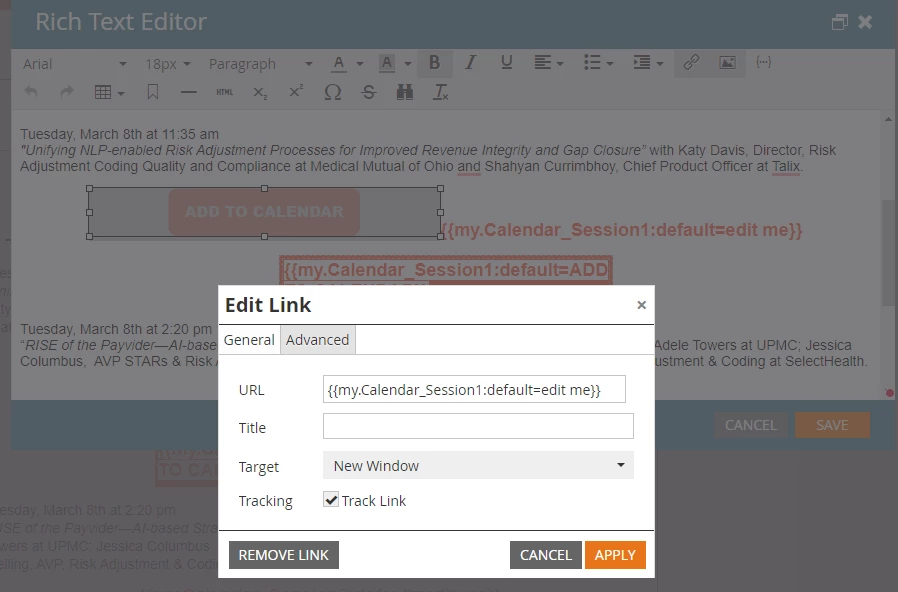
My orange "button" is a png. How do I get it to recognize the token in the URL field?


An ICS (Calendar) {{my.token}} contains an entire link (<a> tag). So you can‘t put it inside another link. That wouldn’t make sense as <a> tags cannot be nested.


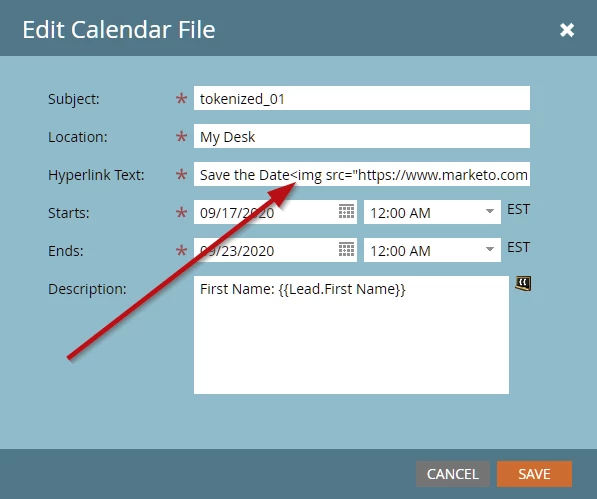
If you want to put an image inside the calendar link, you would add that to the token itself, like:
 

2 replies

SanfordWhiteman
Level 10
January 6, 2020

A "button" is just an <a> tag. And your token is just a URL. So it's the same as any other email link.

Tracy_Boesken
Level 3
February 11, 2022

Hi @sanfordwhiteman,

This is for a landing page:

My orange "button" is a png. How do I get it to recognize the token in the URL field? (The way it is now I receive a 404)

Also, the other two ways I tried is a regular token and a "box" with the token....which work but the hyperlink shows up green?? How would I change the color of the hyperlink?


Thanks,

--Tracy

SanfordWhiteman
SanfordWhitemanAccepted solution
Level 10
February 11, 2022

This is for a landing page:

My orange "button" is a png. How do I get it to recognize the token in the URL field?


An ICS (Calendar) {{my.token}} contains an entire link (<a> tag). So you can‘t put it inside another link. That wouldn’t make sense as <a> tags cannot be nested.


If you want to put an image inside the calendar link, you would add that to the token itself, like:


Jay_Jiang
Level 10
January 7, 2020

perhaps the easiest solution is to just put the calendar token inside a "button" i.e. a box with a border