


I’ve been spam blocklisted, what do I do?!
I’ve been spam blocklisted, what do I do?! 🫣
Nobody wants that dreaded email from Adobe telling you that you are in violation of your agreement with them because you have hit a spam blocklist. In case that this unfortunate thing does happen, or for anyone trying to prevent this from happening, below are some tips to help out. It is worth noting, most of the points about mitigation and spam blocker removal apply to a dedicated IP address, but you can still be a bad actor on a shared IP address which Adobe will contact you about. The best practices and troubleshooting tips apply to everyone!
There are different ‘rules’ depending on which spam blocklist you hit. Spamhaus is the most common one that requires an action plan to solve the issue, as well as to submit a request to be de-listed which you can do via their checklist tool. You will also want to check with your Adobe team if they will do this part once you complete the Adobe form with your action plan.
It’s best to search and learn more about the specific trap you hit to understand what needs to be done. Check out blogs such as this one from Validity that summarize the top spam lists.
5 Steps To Take When Getting Spam Blocklisted:
- ⏸️ PAUSE: This pause is two-fold: First, pause and take a breath so you can get your ducks in a row to solve this issue. Second, pause all your outgoing emails. You risk doing more damage to your IP reputation if you keep sending emails right now. But how do you know what emails are scheduled to go out? Please see “How to quickly ID emails that are scheduled to go out” below. It is a good idea to have an incident plan documented and in place for this ahead of time, so anyone on the team knows what to reference.
- ⚠️ ALERT: Tell everyone that needs to know. This will include teams whose emails are going to get paused, your IT team who you will likely want to get involved depending on your org structure, your team and manager, and any other stakeholders that need to know what is happening. Let them know you will follow up with next steps and information as you go along. Additional details to eventually share with the team should include impacts the pause will have on their KPIs, and when you will resume sending emails.
- ⭕ ISOLATE: Now it’s time to look into what happened that caused you to hit the spam list. If you can isolate the culprit (email send and audience) you will have an easier time fixing this issue and preventing it in the future! Are you wondering how in the world to do this? See “How to isolate the problem” below.
- 🏥 TRIAGE: Once you have figured out - or at the very least have a great guess at the issue - it’s time to figure out the damage and what your next steps will be to fix the problem. If the problem was in your marketable segmentation, or a disengaged and unclean database, you know you need to figure out a way to mark disengaged email addresses as not marketable, and a plan to clean the database. How many people were marked marketable that shouldn’t have been? How many invalid email addresses were getting emails? How often were you sending to them? Having this information will help you understand how bad the issue is. If you have had poor email send practices for awhile it could take time to regain your reputation. This is all important information you will want to have for your stakeholders as well so they understand that it may take awhile to see improvement in email KPIs.
- 🛠️ FIX: Now is the time to make sure you have everything in place to get off that spam list with the goal to never end up here again! This will include things like; database cleaning, adding a bounce management program, marketable segmentation updates, and ensuring you are sending to active, valid, and engaged email addresses. You will want to document this not only for your team and the future, but for Adobe as well. It is a requirement to provide Adobe the information of how you mitigated the problem and plan to fix the issue so you can be in compliance with your contract.This should be a multi-step document for NOW and LATER.
How to quickly ID emails that are scheduled to go out:
You can achieve this with the Calendar, or Marketing Activities Campaign Inspector. I will focus on the Campaign Inspector route as not all companies purchase the Calendar feature in Marketo.
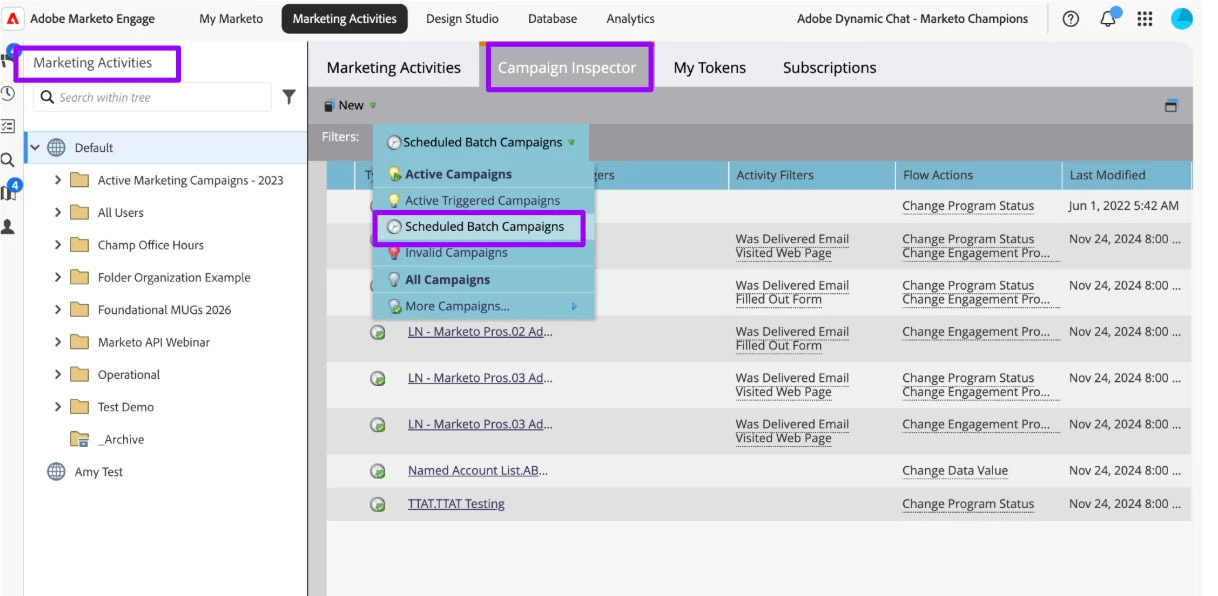
In Marketo go to Marketing Activities, click on your workspace, and then navigate over to the campaign inspector. It is worth noting that the campaign inspector shows all campaigns not just emails, but it’s the best way to filter down to what you need, quickly. Also you can export this to an .xls file, which is a great way to start documenting which campaigns were shut off.
You will want to start by focusing on batch campaigns that are scheduled. The goal is to unschedule each batch campaign, but ⭐ Pro Tip: use the .xls export or make a list someplace of all the program names, links to the program/email, their scheduled date, and the date you unscheduled the campaign so you can report back to your stakeholders on which emails are paused.
Triggered emails are next. Some of the emails that are trigger sends may be less risky to be sending at this time, but that doesn’t mean that there is zero risk. Navigate to the campaign inspector again, and search by active trigger campaigns
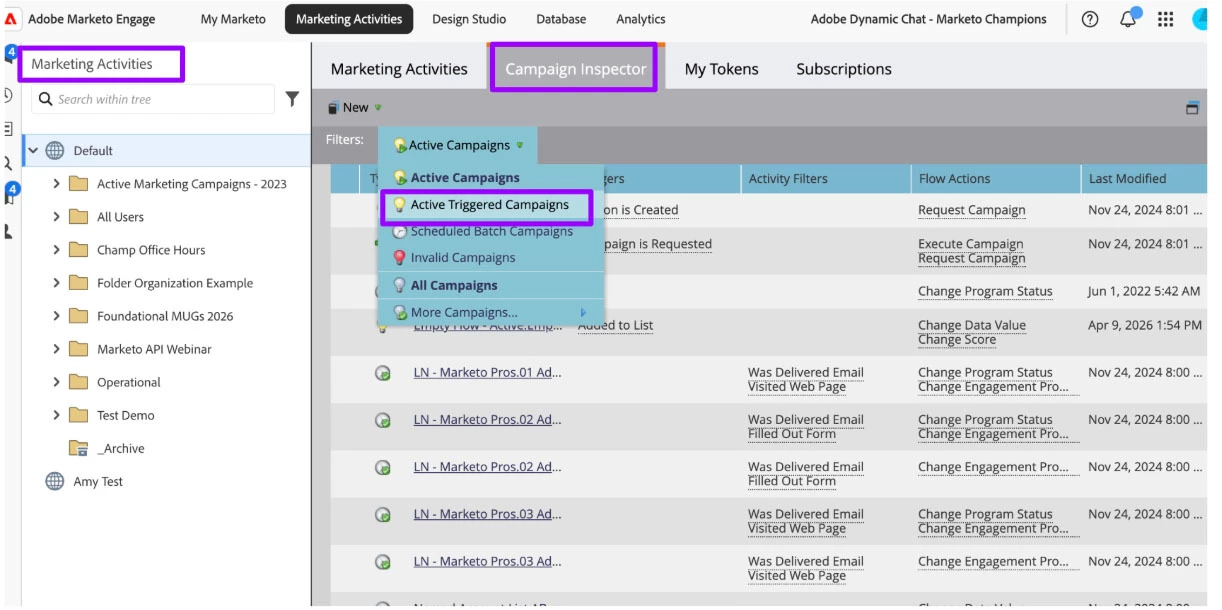
It may not be feasible to turn off all the triggered emails, but I would search for ones that are more high risk. This could be any email that goes out triggered by an activity but does not check that the email is valid and hasn’t recently bounced before sending. An example of a triggered email send that is typically less risky would be a webinar registration email. Unless it is a bot attack (which is a whole different story) the likelihood that someone fills out the webinar registration with a spam email is pretty low. This is the mindset that you should take if you do need to prioritize which ones to turn off.
A lot of triggered emails are for form fills, and you may want to weigh the risk of shutting these off. If a prospect fills out a form for an eBook and never receives the eBook you may be damaging your reputation in a different way. Weigh the pros and cons to shutting these off - it may depend on how many you have active. ⭐ Pro Tip: keep track of everything you do deactivate, along with links, so you can reactivate when you are settled.
How to isolate the problem:
Next, it is time to figure out what could have caused the issue. In some cases it is easy to pinpoint, in others it may not be. I like to start by looking at recent email activity to see if anything is unusual. Look for any email send with an abnormally high volume, and of course, an abnormally high bounce rate and low delivery rate. Go to Analytics > Email Performance:
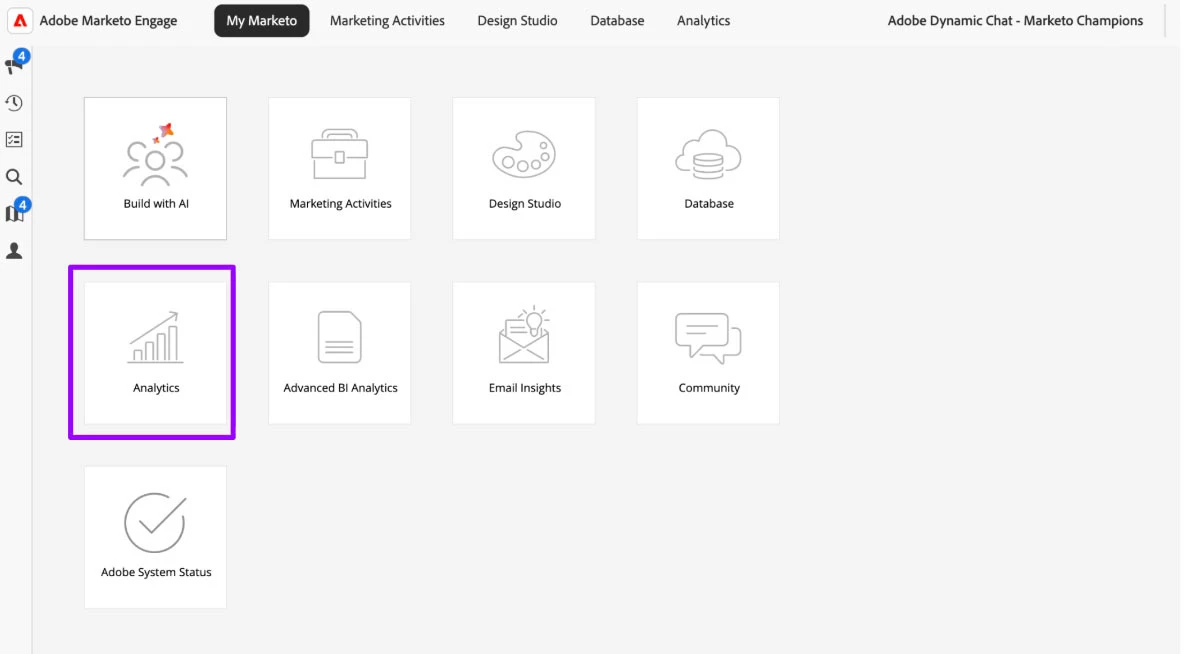
Marketo Engage Home Screen
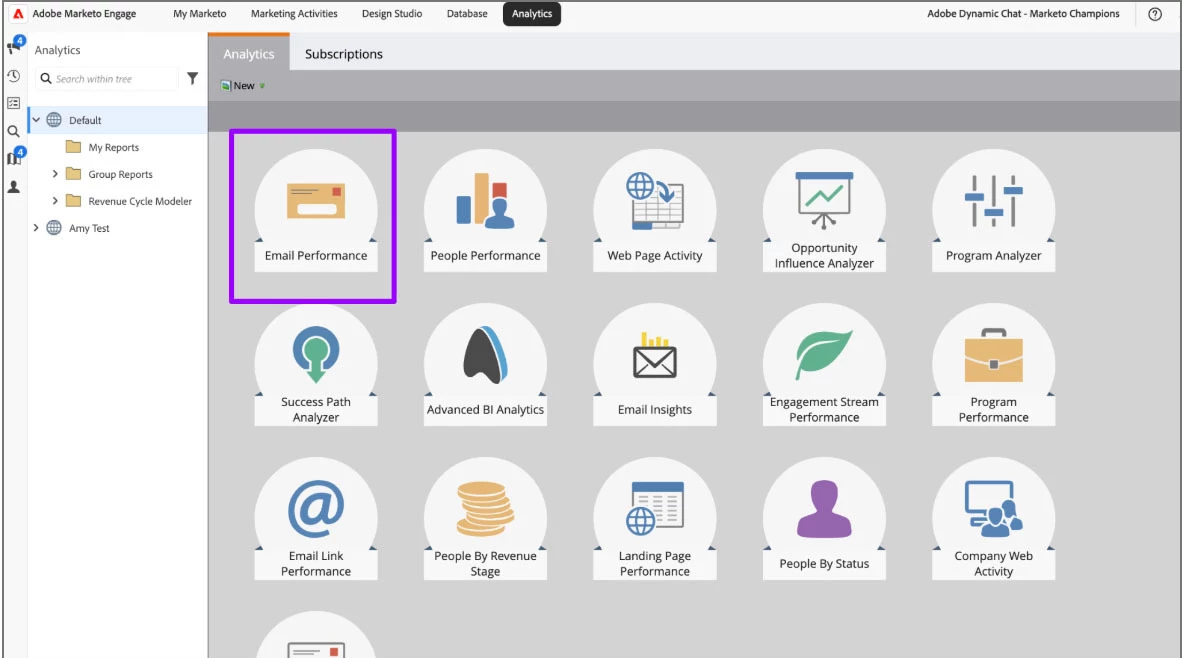
To set up the report I’d look at the timeframe that the incident occurred - Adobe should have provided this information when they notified you.
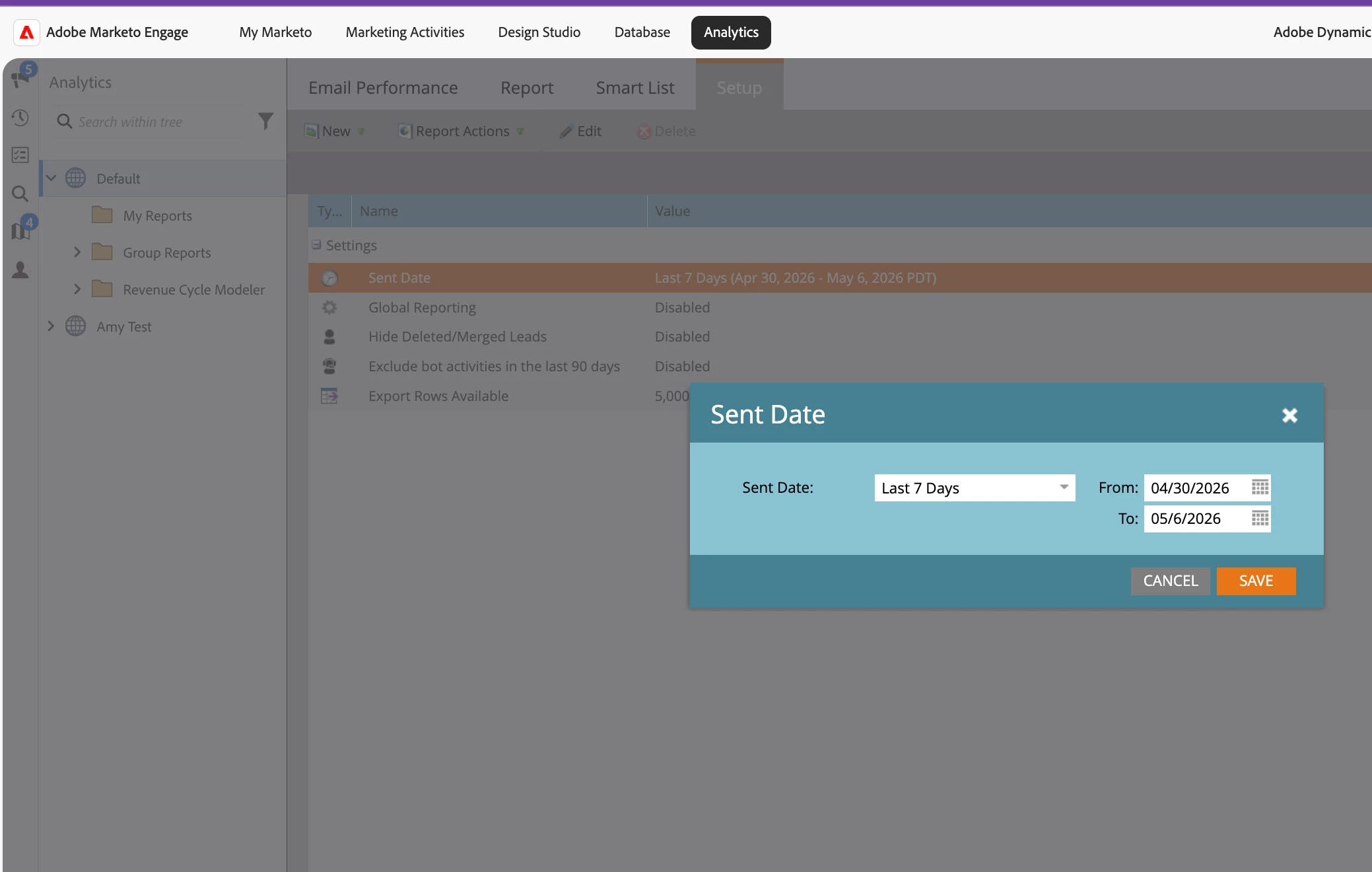
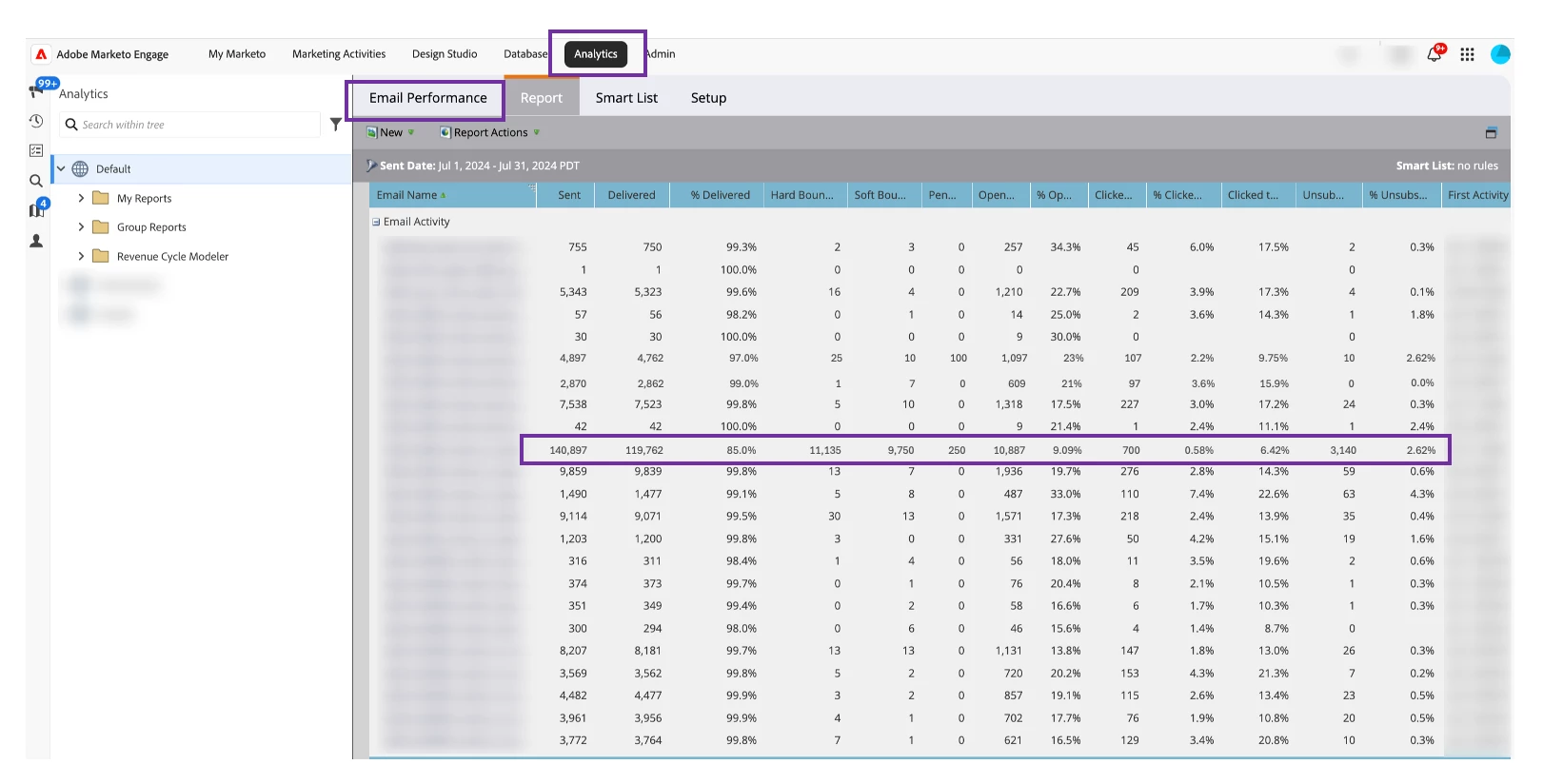
Note: this is sample data to show what to look out for, yours will likely look very different.
You can see in this report that there is at least one isolated email that went out to more people than normal, and had a high bounce rate. If you see something like this, that’s the best place to start. Navigate to this send and check the smart list. For the sake of this post, things that could cause an abnormally high send volume are things like mistakes in smart lists such as: OR statement where there should have been an AND, missing smart list filters, error in mailable segmentation or smart list, etc.
If you do not see any anomalies in the email send numbers, look for high bounces or high unsubscribes.
If that doesn’t turn up anything, try running a quick smart list report for things that could also be red flags such as invalid email addresses, a high number of new emails added to the database, and so on. These are all threads to pull at that could point to the reason there was bad data entering the database or to invalid email addresses sent to when they should not have been.
Use the data from all these different smart lists to understand where the issue lies. If you see a large increase in persons created from a source you don’t recognize, maybe someone imported a list they should not have. If you see email addresses change more often in the last few days, see what caused the change and see if another system incorrectly updated emails.
If none of these lead you to anything, keep looking at different things that could have changed that caused email sends to go to bad addresses. In my experience, it’s usually a send that went out to a larger audience and included ‘dead’ email addresses that had turned to spam and weren’t correctly marked as invalid or deleted from the database. Most of the time, you are really looking to isolate the send, but also isolate the reason behind the bad data hygiene to prevent this in the future.
Volume Increase Post-Fix
Once you are sure that the issue is fixed, you are ready to un-pause your email sends. My advice is to do a mini-IP warming exercise, starting with a low volume such as 10% of what you are used to sending, and send to people who regularly engage with your content. Monitor the results you are seeing for deliverability. If you see poor results, you will have to limit your sends a bit more, and dig deeper to see which domains are blocking your sends. Consider avoiding those domains until your reputation starts to improve. If you haven’t had bad sending practices for long, you may be lucky and not see many deliverability issues at all - but it is still a good idea to start back at a low volume and monitor. Once your deliverability rates improve, you can slowly start increasing your send volume.
Database Hygiene Steps
If you do not have a tool or process for: validating email addresses, marking email addresses with repeated bounces invalid, removing chronic non-responders, periodically reviewing your send lists and marketable segmentation, removing invalid emails from your database, you will want to get this set up right away. Taking all these steps makes sure that invalid or potentially dangerous email addresses do not end up on your send lists.
Recap
Now that you know the steps to take to find the issue, fix the issue, and prevent the issue - document, document, document! It is so much easier to have a process to follow to prevent spam listings as well as deal with them if you get listed. Share with your team, and do the appropriate trainings. It is up to everyone to ensure the database is clean and help prevent such listings.
Tools to use to help prevent and monitor for blocklist activity:
- MxToolbox: Blocklist Monitoring Tool
- Use this to set up a monitor on your IP address/Domain for any blocklists you may be hitting. MxToolbox will send you an email alert, but it is also a good idea to incorporate checking this in your morning/weekly routines.
- Email Validation Tool:
- Use a tool to validate email addresses in your database so that you verify you are not sending to spam addresses.
- Tools such as Kickbox, Neverbounce, email validation inside of Clay, among many others, are great tools to validate data in your daily workflows and can be used to validate lists before uploading.
- Email Deliverability Monitoring Tool:
- Using tools such as Google Postmaster tools, Litmus/Validity to continually and proactively monitor your deliverability and catch any potential pitfalls is a great way to prevent ending up on a spam list.
After all that, I wish you the best of luck on your email deliverability journey! Feel free to comment if there are questions or you want to see more information added to this post!