


How to Setup a Scoring Campaign for the CTA Being Clicked in an Email.
Here is a scalable way to setup a scoring campaign for when someone clicks the main Call-to-Action (aka a priority link) in your email.
Step 1 – Determine the keyword for your main Call-to-Action. In this example, the keyword I am using is “CTA”.
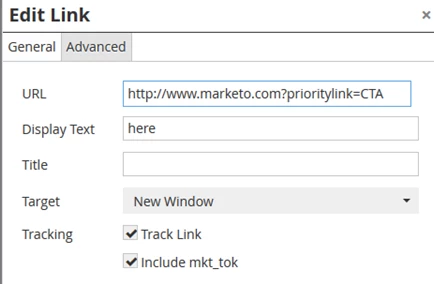
Step 2 – Add an UTM parameter to all your email Call-to-Action links. The UTM parameter doesn’t need to be an actual hidden field on any of your forms. In this example, the UTM is “prioritylink” and the value will be "CTA".
Here is how the link looks in my email.
Step 3 – Setup your scoring campaign.
Here is what the trigger will look like.

Whenever a record clicks on the link with the UTM parameter which contains a value of "CTA" the record will flow through the campaign. If your email doesn't have a main Call-to-Action or you don't want to score the email simply don't add the UTM parameter.
That's it. Happy scoring!