Form for Unknown Visitor vs Known Visitor | Community
Skip to main content
Karin_Edmondson
Level 3
May 16, 2013
Solved

Form for Unknown Visitor vs Known Visitor

  • May 16, 2013
  • 7 replies
  • 3157 views
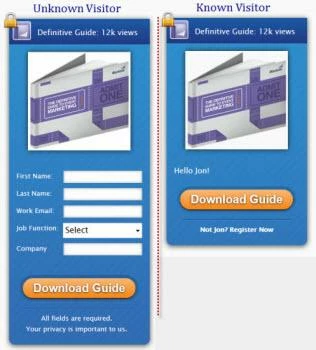
In the blog post "Anatomy of a blog Redesign - 10 Best Practices from Marketo" by Jon Miller, he shows a form that is different for a known visitor vs a longer form for an unknown visitor.  I am trying to find the instructions on how to do this, but I have not been able to find anything on the Community that show me how.

Has anyone done this and can give the instructions?
Thank you,
Karin
Best answer by Kenny_Elkington
Hey Wes,

You can use either Progressive Profiling(https://community.marketo.com/MarketoArticle?id=kA050000000LHAFCA4) or Show Custom HTML for Known Leads(https://community.marketo.com/MarketoArticle?id=kA050000000LHAZCA4) to implement this.

7 replies

May 16, 2013
I also read this post and am interested in the same thing, as well as how to implement the subscription "pop-up" box that he referenced is integrated with Marketo and uses progressive profiling functionality (only shows for people unknown/new to the blog).

Thanks!
May 16, 2013
I believe there is already a few discussions about this on the forum already, do some searching around and you should find it. As for the 2nd piece, I think that pop-up box is simply shown to visitors without a cookie set; there is a bit of javascript that looks for the cookie, and if it finds one, it hides that box instead of showing it. There are lots of tutorials (and plugins if you use a CMS like WordPress or Drupal) available for this functionality.

I'm still waiting for a Marketo/Feedburner (or FeedBlitz, etc.) integration myself...
Karin_Edmondson
Level 3
May 16, 2013
Jason:
I did search for a long time this morning and could not track it down.
That is why I posted this.  What should I be searching for??
I searched for "known vs unknown", "forms for specific visitor", etc.
Thanks,
Karin
May 21, 2013
Not sure if this was what was used, but segementation and dynamic content, as described in this article might be the approach:

https://community.marketo.com/MarketoTutorial?id=kA250000000Kz1pCAC


Karin_Edmondson
Level 3
May 22, 2013
I will test this out today.  I think it may be how it was done.
Thanks,
Karin
July 16, 2014
What was the final answer for this? Would like to get this functionality up.
Kenny_Elkington
Adobe Employee
Kenny_ElkingtonAdobe EmployeeAccepted solution
Adobe Employee
July 16, 2014
Hey Wes,

You can use either Progressive Profiling(https://community.marketo.com/MarketoArticle?id=kA050000000LHAFCA4) or Show Custom HTML for Known Leads(https://community.marketo.com/MarketoArticle?id=kA050000000LHAZCA4) to implement this.