Floodlight Tag - getting this Limited Access error message. | Community
Skip to main content
Level 5
September 7, 2017
Question

Floodlight Tag - getting this Limited Access error message.

  • September 7, 2017
  • 2 replies
  • 5745 views

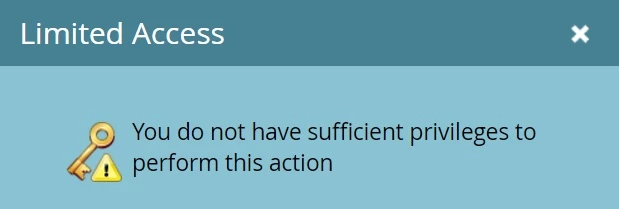
We are trying to embed a Floodlight Tag into our email and we are getting this error message.  I have provided the code below.

This error message seems like it pertains to our access - is there something that we need to do with our account?

Please advise.  Thank you
Here is the code:

<!--

Start of DoubleClick Floodlight Tag: Please do not remove

Activity name of this tag: IFP PPO Email Retargeting 1

URL of the webpage where the tag is expected to be placed: Email.com

This tag must be placed between the <body> and </body> tags, as close as possible to the opening tag.

Creation Date: 08/16/2017

-->

<script type="text/javascript">

var axel = Math.random() + "";

var a = axel * 10000000000000;

document.write('<iframe src="1844680.fls.doubleclick.net/activityi;src=1844680;type=bsca2000;cat=ifppp0;dc_lat=;dc_rdid=;tag_for_child_directed_treatment=;ord=' + a + '?" width="1" height="1" frameborder="0" style="display:none"></iframe>');

</script>

<noscript>

<iframe src="1844680.fls.doubleclick.net/activityi;src=1844680;type=bsca2000;cat=ifppp0;dc_lat=;dc_rdid=;tag_for_child_directed_treatment=;ord=1?" width="1" height="1" frameborder="0" style="display:none"></iframe>

</noscript>

<!-- End of DoubleClick Floodlight Tag: Please do not remove -->

This post is no longer active and is closed to new replies. Need help? Start a new post to ask your question.

2 replies

Level 8
September 7, 2017

At first glance it looks like this is related to your Role permissions in the Admin section. Are you the Marketo admin? If so, go to Admin>Users & Roles>Roles and make sure the Admin role has all permissions granted. If you are not the admin, ask your admin to do it for you or have a discussion with him/her about updating your permissions.

Level 5
September 7, 2017

I thought that too but as "admin" I get the same error message.  I would thik that a Web Designer/Graphic Designer would be able to insert the code - I then assigned.

This seems to be a bit issue - we can insert JAVA script (and the floodtag) in a Marketo Lanidng page but we get the error message in the email!

SanfordWhiteman
Level 10
September 7, 2017

Can't safely put <script type="*/javascript> or <iframe> tags in an email so maybe the error text is weird, but the intent is right.

Level 5
September 17, 2017

We found using a token and and replacing <iframes> with <img> seems to be working.

Image tags for Floodlight - DoubleClick Digital Marketing Partners Help

Kirstin_Mahoney
Level 2
December 8, 2017

Did you have any issues with reporting? Our doubleclick appears to be impacting reporting opens to Marketo.

SanfordWhiteman
Level 10
December 8, 2017

The 2 pixels function independently.