Excluding internal employees from flow steps | Community
Skip to main content
Level 2
May 5, 2026
Question

Excluding internal employees from flow steps

  • May 5, 2026
  • 5 replies
  • 71 views

I’m looking to send an automated email to anyone who fills out a form. I want the email to be sent 2 days later (but only during the week), and I don’t want internal employees to receive the automated email.

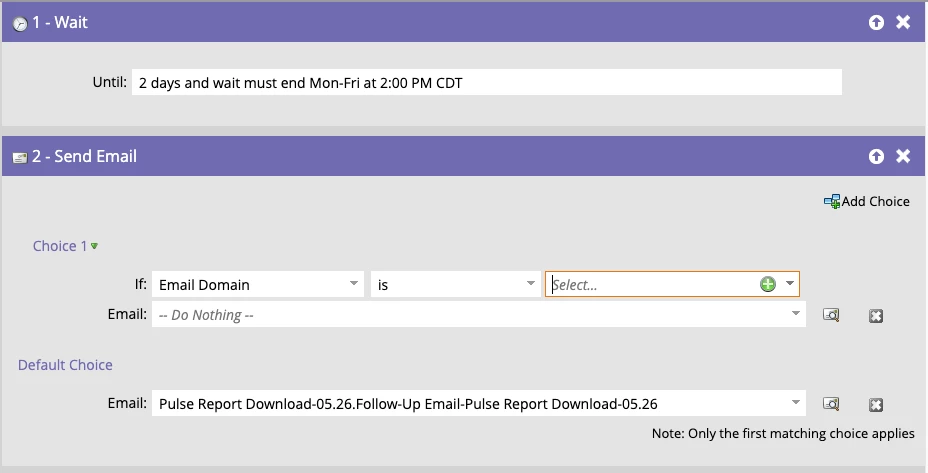
In the smart list is the trigger “Fills out form”, and below is what I have for the flow steps. Is this the right setup (of course with my company’s email domain filled in)? Should I leave “Do nothing” for the choice 1 section?


    5 replies

    AWmindtree
    Level 4
    May 5, 2026

    Hi ​@megweber221 
     

    Yes, your approach is correct, but you don’t need the “Do Nothing” choice in the flow.

    For excluding internal employees, the recommended approach is to handle this in the Smart List, not the Flow. You can do this in either of the following ways:

    • Option 1 (Simple):
      Add a filter:
      Email Address → does not contain → @yourcompany.com
    • Option 2 (More scalable):
      Create a Smart List in Database (e.g., Seed List) that contains all internal/test users, and then add a filter:
      Member of Smart List → is not → Seed List

    The second option is generally preferred for long-term scalability, as it centralizes the exclusion logic and avoids updating multiple campaigns when internal users change.

    Hope this Helps...

    Level 2
    May 5, 2026

    This makes complete sense! Thanks so much for your help.

    Katja_Keesom
    Community Advisor and Adobe Champion
    Community Advisor and Adobe Champion
    May 6, 2026

    Be aware! Correction on your option 2 here: the filter logic should be:
    NOT Member of Smart List → is → Seed List

    The way you describe it now, it will INclude members of all smart lists except the seed list, where you want to EXclude members of the Seed List.

    BlaneMcMichen-1
    Adobe Employee
    Adobe Employee
    May 5, 2026

    Yes. That would be the way to skip that step for employees, but it is more common to use Email Address as the field and the domain value with the @ (i.e. @adobe.com) and the contains operator. Marketo has a special recognition in the code for the @domain.com expression. 

    Since the Email Domain is a derived value formt he email address, it could take an extra second or two to evaluate, so you will want to avoid that race condition in the cases that you do not have a preceeding wait step.

    NOTE: In you example, employees will go through all of the other flow steps in your smart campaign, but the email send will be skipped.  If you don’t want them to go through your steps at all, then add the filter to smart list so they do not qualify at all for the campaign.
     

    Matches one or more email domains.


    Level 2
    May 5, 2026

    This makes sense - thank you!

    BlaneMcMichen-1
    Adobe Employee
    Adobe Employee
    May 5, 2026

    If you do want them to go through the flow, but not get the email, then you can use the conditional flow step that you started with, except use the field contains condition as ​@AWmindtree describes in option 1.

    Level 2
    May 5, 2026

    Thank you!

    BlaneMcMichen-1
    Adobe Employee
    Adobe Employee
    May 5, 2026

    dupe

    BlaneMcMichen-1
    Adobe Employee
    Adobe Employee
    May 5, 2026

    deleting dupe