Error when trying to merge duped email address contacts - One from SFDC one from Marketo | Community
Skip to main content
Level 2
February 9, 2024
Solved

Error when trying to merge duped email address contacts - One from SFDC one from Marketo

  • February 9, 2024
  • 2 replies
  • 4689 views

Im trying to merge contacts with the same email address. The contacts were originally added in Marketo, they have since been added in SFDC, creating duplicates in Marketo. 

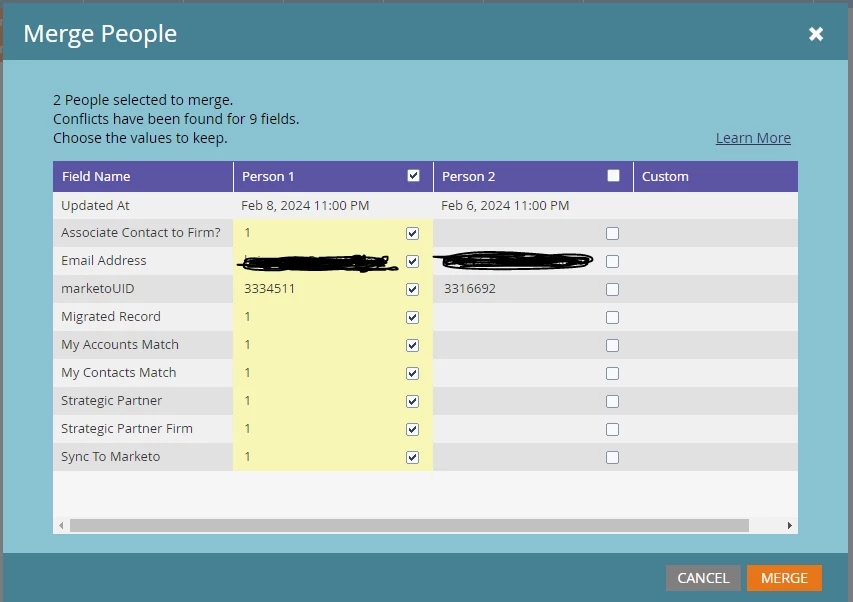
Selecting the SFDC contact as the lead as per below
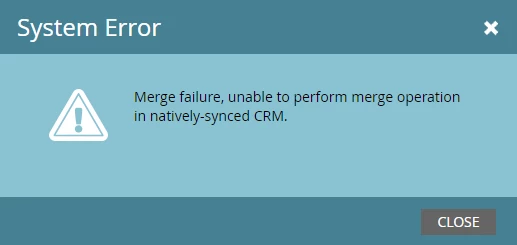
I get the following error - "Merge failure, unable to perform merge operation in natively-synced CRM."
Do we need to update settings on the SFDC end to allow the merge to take place? If so what?

Thanks!

This post is no longer active and is closed to new replies. Need help? Start a new post to ask your question.
Best answer by Katja_Keesom

Hey @benjinc ,


The root cause is actually simple, but little known. It is not the checkboxes in the pop up of your screenshot that dictate which record is the surviving record, but that is determined in an earlier step. When selecting the two records you want to merge, YOU NEED TO SELECT THE SFDC RECORD FIRST. The pop-up to select surviving fields has no influence on that.


In general, when you have many dupes like this it might be worthwile to use a more automated way to run your deduplication. You can do something yourself via the API, but I have also ones or twice taken a temporary license for a tool like Ringlead to perform the task in a controlled way.

2 replies

Jo_Pitts1
Community Advisor
Community Advisor
February 9, 2024

@benjinc ,

if both records are in SFDC, then you'll need to merge them in SFDC.


If one records is in SFDC and one in Marketo, you'll need to make the SFDC record is the one that is retained (although I thought Marketo did that automatically).


Regards

Jo

Zoe_Forman
Community Advisor and Adobe Champion
February 10, 2024

@benjinc as @jo_pitts1  it depends where your records are situated.

If both records are in Marketo then could look at the records Activity Logs and see which has the most relevant details in the Activity Log - and that may be the record you want to keep.


Often you need to do this lead by lead - not one 'winner' format for all.

Katja_Keesom
Community Advisor and Adobe Champion
Katja_KeesomCommunity Advisor and Adobe ChampionAccepted solution
Community Advisor and Adobe Champion
February 15, 2024

Hey @benjinc ,


The root cause is actually simple, but little known. It is not the checkboxes in the pop up of your screenshot that dictate which record is the surviving record, but that is determined in an earlier step. When selecting the two records you want to merge, YOU NEED TO SELECT THE SFDC RECORD FIRST. The pop-up to select surviving fields has no influence on that.


In general, when you have many dupes like this it might be worthwile to use a more automated way to run your deduplication. You can do something yourself via the API, but I have also ones or twice taken a temporary license for a tool like Ringlead to perform the task in a controlled way.