Email Throttling | Community
Skip to main content
Level 2
July 5, 2024
Solved

Email Throttling

  • July 5, 2024
  • 3 replies
  • 2850 views

Hello,


We recently took on Marketo and would like to introduce throttling when sending out emails, which on our previous platform was a default option. 

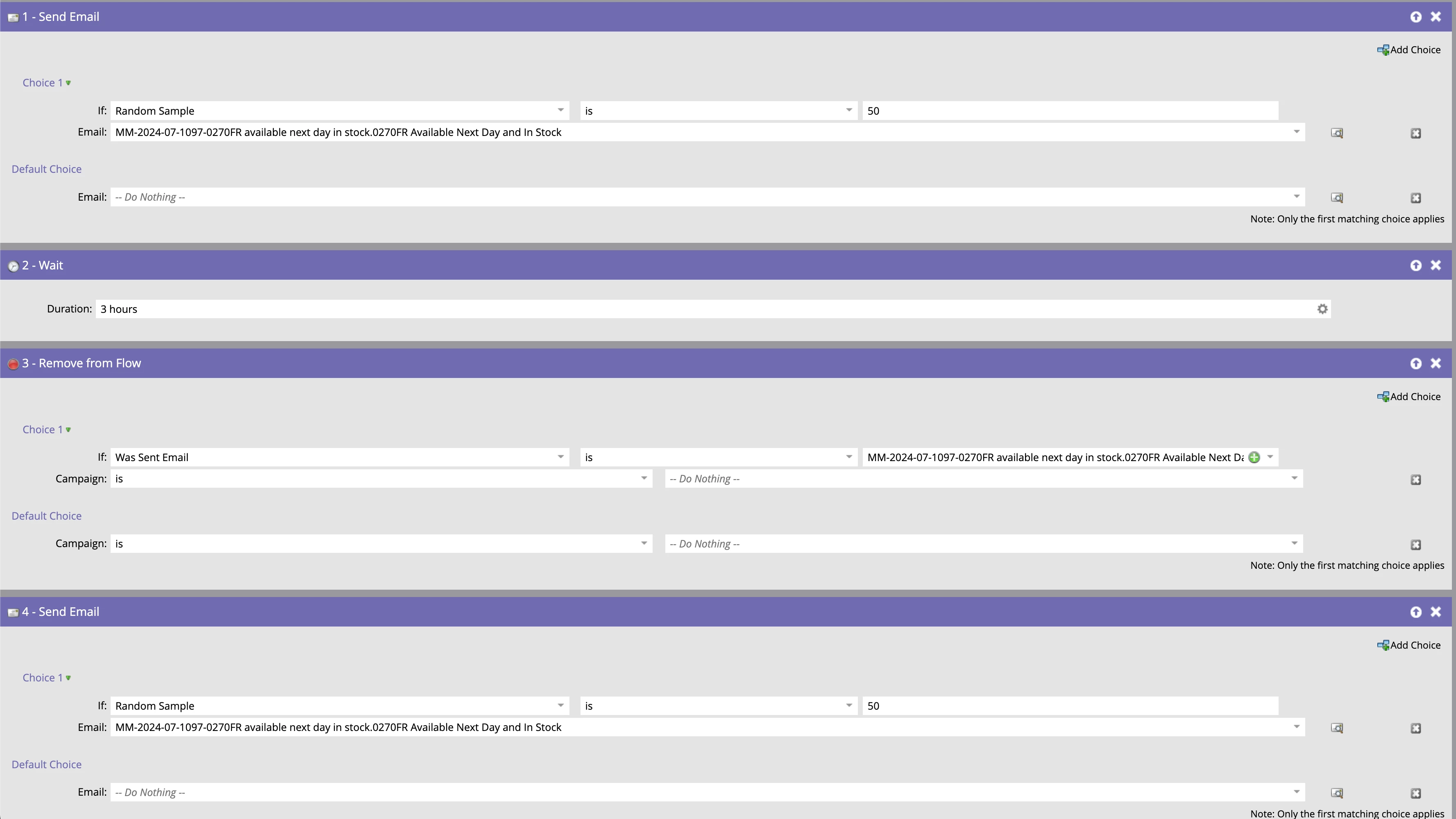
We've set up this simple flow to select 50% of our audience, send the email, wait a few hours, remove sent contacts from the flow, then send to the remaining 50%. 


Does this look like it will work?

We've set this up in the programs Send Email smart campaign, there's nothing in the smart list other than Mkto_Emailable. If this is correct I assume we just schedule the smart campaign as usual and then schedule & approve the program.

I think you can tell we're new to this so any help is very much appreciated.

This post is no longer active and is closed to new replies. Need help? Start a new post to ask your question.
Best answer by JackSi1

@jamieobexYou should use the Random Sample option in a flow step to add them to two separate static lists rather than send the e-mail - then use the lists to send. This allows extra visibility and control. 

3 replies

uditmathur
Community Advisor
Community Advisor
July 5, 2024

Hi @jamieobex ,


Can you explain your use case?

Are you sending the same email to both your groups? If so than why do you want to remove them?

If you are sending different emails then instead of removing them you can create 2 different programs & use smart list filter " Member of the program" (program 1) this will automatically filter your 1st 50% audience.


JamieObexAuthor
Level 2
July 5, 2024

Hi @uditmathur 


Thank you for your response. 

Essentially we're getting blocked by spam filters when sending emails out that are signed off by an account owner (pulled from Dynamics). Say the account owner has 50 contacts under an account, we'd like to break this up so not all those in the same company receive the emails at once.

We've spoken to a couple of customer's IT team's who have kindly unblocked us, and have stated that the cause is due to everyone receiving the same email at the same time, and their systems automatically blocking it as spam.

Hoping that this sort of solution will help with this, as some of the content we can't refine the contact lists any further than they already are at. 

uditmathur
Community Advisor
Community Advisor
July 6, 2024

Hi @jamieobex ,

Sending emails from the account owner name is not a reason for blocking as a matter of fact sending email with a real person name imparts trust on part of customer & have traditionally shown improved conversions when compared with generic email ids (sales@ or marketing@ etc.).


I will suggest you to look into possibilities of segmenting your contact based on contacts demography & behavior. Since you have multiple contacts from same target account it does not make sense to blast the same content to all the contacts. For example some contacts may be from HR, some may be from Operations & so on & if you are sending a technical specification of your product to all they will definitely not be interested & will block.


Once you segment your leads than you can create content relevant to the contacts interest & schedule your email send on different days of the month. This way contacts will not receive mail at the same time & since the content will be more relevant for them it will surely improve your conversions.


Hope this helps.

JackSi1Accepted solution
Level 4
July 5, 2024

@jamieobexYou should use the Random Sample option in a flow step to add them to two separate static lists rather than send the e-mail - then use the lists to send. This allows extra visibility and control. 

SanfordWhiteman
Level 10
July 7, 2024

This will not do what you expect. The 2nd time you use Send Email with a Random Sample choice, it will split the people remaining in the flow by 50%.


As @jacksi1 notes you should use Random Sample in a separate campaign. That campaign can have a single Add to List flow step with N choices adding up to 100, sorting into N Static Lists.


Then base your send campaigns on Member of List.


Broadly speaking Random Sample should only be used “offline” to sort people into lists/programs that you action in other campaigns. (There are exceptions but you can learn them later!)