Email notifications on Iphone | Community
Skip to main content
Level 2
October 6, 2023
Question

Email notifications on Iphone

  • October 6, 2023
  • 1 reply
  • 1332 views

Hi!

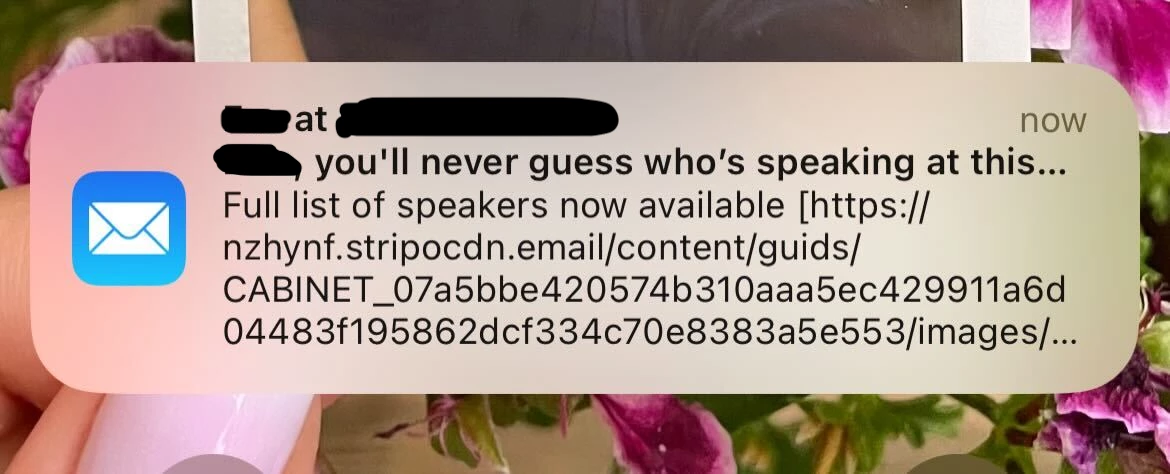
In the mobile notifications of my emails (this only happens with iPhones apparently), the code of the header image is visible. Do you know if there is any way to avoid this?

Thanks


This post is no longer active and is closed to new replies. Need help? Start a new post to ask your question.

1 reply

Katja_Keesom
Community Advisor and Adobe Champion
October 9, 2023

Without any more details, my first guess would be that the email client is populating the preheader based on the first bit of content from your email, which happens to be the header image code. You can try manually adding a preheader into your email under Email Settings to validate whether this indeed replaces your code. Different email clients handle preheaders differently which can be a bit of a pain.

Level 2
October 9, 2023

Hello!

Thanks for your reply Katja,

I used a preheader but unfortunately, it does not replace the code 😞  

In the pop up I can see the subject ("you´ll never guess...."), the preheader ("Full list of speakers now available"), and then the code ("https://...")

Level 2
October 9, 2023

If your preheader is shorter than the preview area, it will often continue reading down the email and populating more content. Try a longer preheader. We often will fill ours out with hyphens at the end.