
Efficient Google Adwords tracking | Community
Skip to main content
Itay_Billet4
Level 8
April 25, 2013
Solved

Efficient Google Adwords tracking

  • April 25, 2013
  • 6 replies
  • 2274 views
Hi All

I have some questions regarding efficient management and tracking of google adwords leads, as we start to create more ads. For starters, We're using a Marketo form & general LP in an Iframe for the landing page.
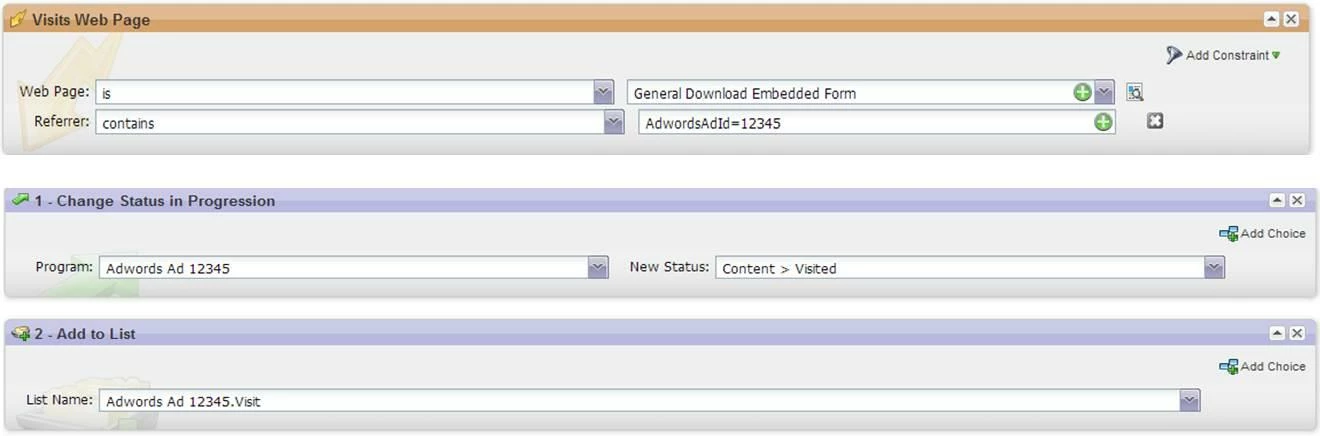
  1. Is it preferrable to track any Ad as a separate program, or bundle all ads to one program & SF campaign by groups?
  2. We have several ads leading to several landing pages (several ads can lead to one LP also). Tracking-wise, I thought about using the following smart campaign to capture visitors and add them to a list. Afterwards I'll be able to allocate them appropriately upon becoming known.

My only doubt it for the "Referrer", as it should view parent URL. Any thoughts?


Many thanks!

Itay


This post is no longer active and is closed to new replies. Need help? Start a new post to ask your question.
Best answer by
I generally steer clear of the iframe implementation of Marketo forms, as it tends to be messy when you want to do tracking like this later (for the parent URL issue you specify).  Ordinarily I’d say to either use Marketo landing pages for this, or use the more flexible form integrations into non Marketo pages (great info on these different types in the “Advanced Forms: The Ins and Outs” session at the summit, slides to be posted in the next few weeks)

I've organized my PPC and display advertising a few different ways based on trial and error. For a time, I had everything in one program, and then I branched out to having separate programs for separate PPC campaigns or display partners. A lot of it depends on the granularity of tracking you desire. If you go with separate programs for individual ads, you'll be able to associate conversions and revenue much more easily to an individual ad unit, but the tradeoff is increased complexity in your Marketo instance, and potentially for your sales team, who instead of having a couple of campaign codes to remember, now have a whole slew of codes to keep track of.

I found the approach that worked best for me (so far) is to have a separate program for each advertising type or partner. So I have one for AdWords, one for AdCenter, and one for each of my display and retargeting platforms. In each of those, I use manually tagged URLs using UTM parameters (a pain if you have a huge campaign with a lot of ads, I know), and using cookies to capture the URL variables and populate them into hidden fields once a form is submitted (guide to doing this here).

Then, on the reporting end, I have less than 10 campaign codes I’m looking at, and if I need to see detailed comparisons, I can simply sort by the various UTM variable fields (aka if I wanted to compare sales performance of a leaderboard vs skyscraper display ad, or keyword a vs keyword B). You could do this in salesforce reports, or even within the revenue cycle explorer reports.

Hope this helps!

6 replies

April 25, 2013
Itay, we don't use separate programs to track different ads beacuse we use Google Analytics and goal completion pages to give us the macro view of the performance of different ads.   We have separate programs for Google Paid Search, Google Remarketing Ads and Google Contextual Ads, for overall channel performance tracking. You could combine the 2 ad programs into 1 if you want to further simplify. 

The Referrer constraint should work for the visit to the LP, but not to the form page in the iframe.
Accepted solution
April 25, 2013
I generally steer clear of the iframe implementation of Marketo forms, as it tends to be messy when you want to do tracking like this later (for the parent URL issue you specify).  Ordinarily I’d say to either use Marketo landing pages for this, or use the more flexible form integrations into non Marketo pages (great info on these different types in the “Advanced Forms: The Ins and Outs” session at the summit, slides to be posted in the next few weeks)

I've organized my PPC and display advertising a few different ways based on trial and error. For a time, I had everything in one program, and then I branched out to having separate programs for separate PPC campaigns or display partners. A lot of it depends on the granularity of tracking you desire. If you go with separate programs for individual ads, you'll be able to associate conversions and revenue much more easily to an individual ad unit, but the tradeoff is increased complexity in your Marketo instance, and potentially for your sales team, who instead of having a couple of campaign codes to remember, now have a whole slew of codes to keep track of.

I found the approach that worked best for me (so far) is to have a separate program for each advertising type or partner. So I have one for AdWords, one for AdCenter, and one for each of my display and retargeting platforms. In each of those, I use manually tagged URLs using UTM parameters (a pain if you have a huge campaign with a lot of ads, I know), and using cookies to capture the URL variables and populate them into hidden fields once a form is submitted (guide to doing this here).

Then, on the reporting end, I have less than 10 campaign codes I’m looking at, and if I need to see detailed comparisons, I can simply sort by the various UTM variable fields (aka if I wanted to compare sales performance of a leaderboard vs skyscraper display ad, or keyword a vs keyword B). You could do this in salesforce reports, or even within the revenue cycle explorer reports.

Hope this helps!
Michelle_Tizian
Level 10
April 25, 2013
Thanks Elliott and Jeff, you gave me some ideas.  I created 2 different programs for our PPC campaigns and the main reason I did it that way is because our promotion is for 2 different types of products and the target area is Europe and the other is Asia.  It's just easier for me to look at the program reports when they are separate. 
April 26, 2013
Agree with Elliott's approach.
  • Use Google Analytics to track individual ad & keyword performance.
  • Use Marketo Programs & SFDC Campaigns to track channel performance to opportunities.
Itay_Billet4
Level 8
May 1, 2013
Great answers, thank you all!
September 17, 2014
Hey Jeff,

We are having some difficulties around this topic now and I really wanted to check out the guide you hyperlinked to, but the link comes up with an error. I wanted to see if you remember where that was so I can go track it down.

Any help would be appreciated! Thanks!