Difference between folder and campaign folder | Community
Skip to main content
Level 2
October 5, 2022
Solved

Difference between folder and campaign folder

  • October 5, 2022
  • 4 replies
  • 4005 views

Hi There,

Can anyone describe about a simple folder and campaign folder differences, please? 

Thanks and Regards,


This post is no longer active and is closed to new replies. Need help? Start a new post to ask your question.
Best answer by Vinay_Kumar

Hi @amod_kumar_shar


Campaign Folder

1. The campaign folder helps you to keep your instance organized like arranging the activities year-wise, program category wise etc. 
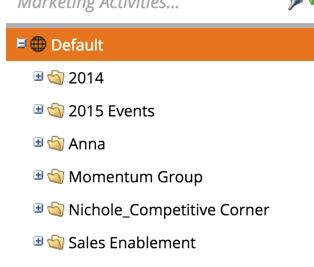
2. You can add tokens to the campaign folder.


Folder

1. The folders or simple folders helps you to keep you assets (like emails, campaigns, forms, smart lists etc.) organized. 
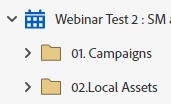
2. You cannot add tokens to the folders. 


Hope this helps. 

4 replies

Katja_Keesom
Community Advisor and Adobe Champion
October 5, 2022

There is no real difference. In your Marketing Activities tab it is called a Campaign folder, in all other tabs simply a folder. The only difference I am aware of is that you cannot have two campaign folders with exactly the same name.

Michael_Florin-2
Level 10
October 5, 2022

Also, a Campaign Folder - a folder above a program - can have tokens. A folder underneath a program cannot.

Katja_Keesom
Community Advisor and Adobe Champion
October 5, 2022

True enough, well caught. And at that level they are called simply folders again instead of Campaign folders. So indeed Campaign folders can have tokens.

No idea btw why we can't set up tokens at the workspace level...

Vinay_Kumar
Community Advisor
Vinay_KumarCommunity AdvisorAccepted solution
Community Advisor
October 6, 2022

Hi @amod_kumar_shar


Campaign Folder

1. The campaign folder helps you to keep your instance organized like arranging the activities year-wise, program category wise etc. 

2. You can add tokens to the campaign folder.


Folder

1. The folders or simple folders helps you to keep you assets (like emails, campaigns, forms, smart lists etc.) organized. 

2. You cannot add tokens to the folders. 


Hope this helps. 

Level 2
October 7, 2022

Hello Vinay,

Many thanks for describing this in detail.
Thanks a lot.

/Many Thanks
SanfordWhiteman
Level 10
October 13, 2022

More detail just for completeness


1. Both types of folder found in the Marketing Activities tree technically (i.e. as seen via API) have the Folder type Marketing Folder. They’re differentiated by their place in the tree, but Campaign Folder isn’t actually a distinct thing via API.

2. If you want to get super-confused, what you think of as Program types are considered to be Folder types in some parts of the API. So you just have to do a lot of memorizin’ to understand what’s what.

Michelle_Tizian
Level 10
October 6, 2022

A campaign folder you can see the emails that have ran and it's performance such as sent, delivered, opens and etc.  that's inside that folder, where as a regular folder inside a program does not show that info.