Data Management Strategies – Setting Marketing Suspended to False | Community
Skip to main content
Brian_Law_MKTO
Adobe Employee
Adobe Employee
June 26, 2017

Data Management Strategies – Setting Marketing Suspended to False

  • June 26, 2017
  • 2 replies
  • 2807 views

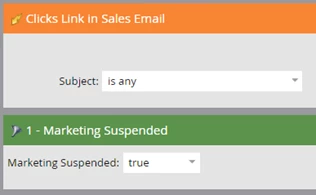
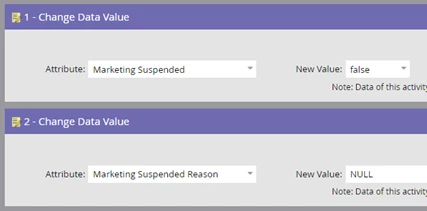
Instructions for setting the Marketing Suspended to FALSE if the email address field is updated or the record does an activity.

Smart Campaign

Set Marketing Suspended to False - New Activity

Smart List
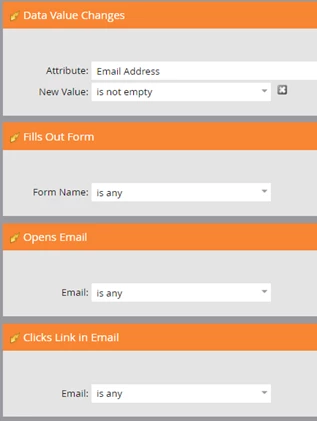
Remember to add any master smart or static lists you are using to prevent promotional emails being sent to specific records which have the Marketing Suspended field set to TRUE so this campaign doesn't accidentally change the Marketing Suspended field.

Flow
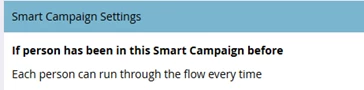
Schedule
Additional resources for managing bounces.

This post is no longer active and is closed to new replies. Need help? Start a new post to ask your question.

2 replies

Amanda_Thomas6
Level 8
June 27, 2017

This is great! I think it's super easy to mark people marketing suspended and forget to mark them back after a certain period of time or after an action is taken. Great reminder to search my instance!

Brian_Law_MKTO
Adobe Employee
Adobe Employee
July 1, 2017

Amanda, thanks for the feedback!