Custom JS for forms | Community
Skip to main content
Level 4
July 15, 2024
Solved

Custom JS for forms

  • July 15, 2024
  • 1 reply
  • 3445 views

I am not fluent in JS, but was trying to create an embed script to put a form on an outside page, while also allowing the CTA to be changed, as well as re-directing the thank you page based on the URL where the form was embedded. Here is my code:


<script src="//go.autoshopsolutions.com/js/forms2/js/forms2.min.js "></script> <form id="mktoForm_3948"></form> <script> MktoForms2.loadForm("//go.autoshopsolutions.com", "180-DGD-014", 3948, function(form){ form.addHiddenFields({ LastFormURL : document.location.href }) }); </script> <script> { const ctaText = "Download Now"; /* -- NO NEED TO TOUCH BELOW HERE -- */ MktoForms2.whenReady(function(readyForm){ const formEl = readyForm.getFormElem()[0], buttonEl = formEl.querySelector(".mktoButton[type='submit']"); buttonEl.textContent = ctaText; }); } </script>

I have also setup the Marketo form to redirect based on the new field I created in Marketo called LastFormUrl

It doesn't work though and instead just stays on the page, which is the default action.


Any ideas?
Best answer by SanfordWhiteman

I updated the code, but it is still defaulting to the same "stay on page" action.

<script src="//go.autoshopsolutions.com/js/forms2/js/forms2.min.js "></script>
<form id="mktoForm_3948"></form>
<script>
MktoForms2.loadForm("//go.autoshopsolutions.com", "180-DGD-014", 3948, function(form){
  form.addHiddenFields({ lastFormURL : document.location.href })    
});
</script>

<script>
{

  const ctaText = "Download Now";

  /* -- NO NEED TO TOUCH BELOW HERE -- */

  MktoForms2.whenReady(function(readyForm){
    const formEl = readyForm.getFormElem()[0],
          buttonEl = formEl.querySelector(".mktoButton[type='submit']");

    buttonEl.textContent = ctaText;
  });

}
</script>

shopboss-062824.mystagingwebsite.com/ebook-the-shop-owners-guide-to-the-millionaire-making-kpi/


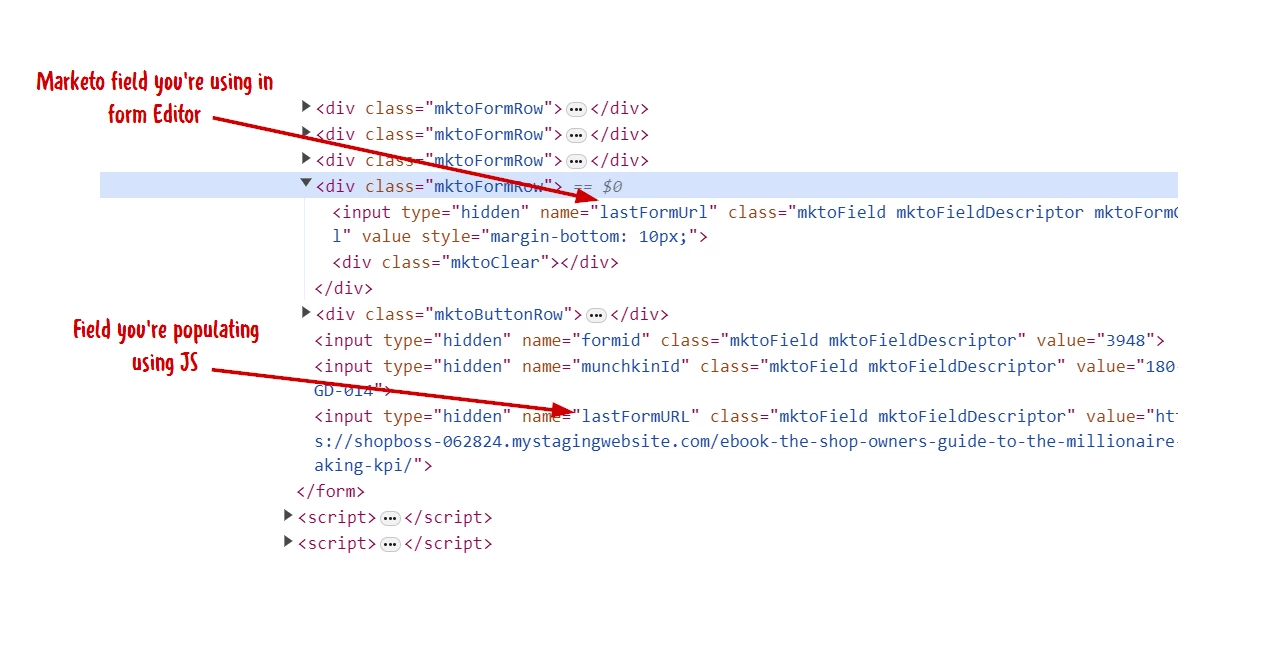
Sorry, the correct field is lastFormUrl. (Which you’d see in Field Management.)


1 reply

SanfordWhiteman
Level 10
July 15, 2024

There’s nothing specifically wrong with the code. However, there’s also nothing in the code that has anything to do with changing the Thank You URL.


You might be changing the Thank You URL in Form Editor based on the field LastFormURL. But that configuration isn’t shown here so we couldn’t say one way or the other!


Also note LastFormURL would have to be the SOAP API name of the existing field for the code to update it via JS; otherwise, the code would be adding an unknown field which wouldn’t be usable on the server.  You can export the field names from Field Management to double-check.

kenmckownAuthor
Level 4
July 15, 2024

I am setting that on the form, you can see my choices here:

And the value is coming in on the form submission:

But it is not redirecting. It just stays on the page.

SanfordWhiteman
Level 10
July 15, 2024

But it is not redirecting. It just stays on the page.


Then you have other JS that’s keeping it on the page (i.e. an onSuccess function). It’s not the JS above, which doesn’t directly affect Thank You behavior.