Create a Smart List based on field selection in Form | Community
Skip to main content
September 27, 2013
Solved

Create a Smart List based on field selection in Form

  • September 27, 2013
  • 6 replies
  • 3399 views
Hi there,

I'm new to Marketo and I'm trying to build a subscription center for my blog.

I have built the form and landing page in Marketo. Users are asked to choose one of three options: daily, weekly, or monthly:
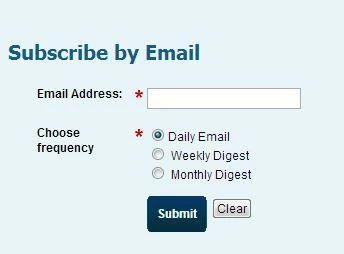


I'd like to have Marketo automatically add users to a smart list based on which option they've chosen, daily, weekly or monthly. Is there a way to do this? I used a Template Form Field called "Campaign Interest" to create that frequency menu, FYI.


This post is no longer active and is closed to new replies. Need help? Start a new post to ask your question.
Best answer by
1. Just create three smartlists, for each three values for "Frequency"
2. Filter on Filled Out Form, and select your form
3. Second filter on value for field "Frequency" (e.g. Frequency is Daily Email)

That's it.

6 replies

September 27, 2013
There are multiple methods to implement the goal in mind. 
 
I would like to comment a subtle detail before going any further: " to have Marketo automatically add users to a smart list based on which option they've chosen". It is more likely it is supposed to mean a static list or a smart campaign.
A smart list reads valuesdynamically from the database; they do not need any proces to add new leads.

Adding to a static list:
- a triggered campaign can consist of a single trigger "Fiils Out Form"
- add a constraint to specify the form name and, ideally, the web page (landing page histing that form)
- the flow is: Add to List
- Click Add Choice
. If Campaign Interest is daily
Add to static list "daily_list"
. If Campaign Interest is weekly
Add to static list "weekly_list"
. If Campaign Interest is monthy
Add to static list "monthly_list"

The sending campaign would have its smart list consisting of "Member of List" in list_name
 

Smart lists are perfectly valid options.
They will have one or more filters selecting the target leads for batch campaigns.
For weekly you would use a single filter: Campaign Interest is weekly and so on.

Please review the help article "Lists" for more details

I would like to suggest two valuable resources to help you become comfortable with Marketo quickly:


Accepted solution
September 30, 2013
1. Just create three smartlists, for each three values for "Frequency"
2. Filter on Filled Out Form, and select your form
3. Second filter on value for field "Frequency" (e.g. Frequency is Daily Email)

That's it.
September 30, 2013
This also means they can fill out the form again, but choose a different value (update their preference). And they automaticaly move to the other smartlist.
September 30, 2013
Thanks both for your help! Both options worked, but I went with Diederik's smart list for the ability to automatically move the subscriber to a new smartlist if they changed their preferences. Works perfectly now. Thanks again!
October 1, 2013
No problem Manny. So issue solved?
October 1, 2013
Yup, was able to create and test the unique lists and also created some flows to trigger email responses when subscribers choose a particular type of newsletter. Thanks again!