
Create a LP that clears you Cookie! | Community
Skip to main content
Diederik_Marte4
Level 4
March 22, 2017
Solved

Create a LP that clears you Cookie!

  • March 22, 2017
  • 3 replies
  • 7429 views

Even though we inform our colleagues, somehow some still fill out a form on someone's behalf or click a link in a forwarded email. I'm thinking about creating a blank landing page that clears the current Marketo cookie on visit (obviously with noindex, nofollow, etc). And then have that secret landing page set as homepage for sales reps and marketers. This way we prevent rogue behavior (page vists, etc) on a lead, whilst it actually was a sales rep accidentely tagged as the lead.

I'm thinking about a few ways of achieving this, but maybe someone already cracked this ;-) Maybe just a simple line of code that sets the date of the Marketo cookie in the past. But then I do need to know how to reference it. Any ideas?

This post is no longer active and is closed to new replies. Need help? Start a new post to ask your question.
Best answer by Grégoire_Miche2

Hi @Diederik Martens ,

Indeed

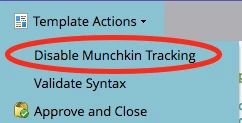
  1. Create a LP TEMPLATE that does not have the munchkin (this is done in editing the template and hitting the following menu:
  2. Add to you template a couple of JS that will clear cookies and prevent them from being posted to Marketo on form submit:

<!-- CREATE EMPTY MUNCHKIN COOKIE - TO ESENTIALLY MAKE THE PAGE UNTRACKABLE -->

  <script>document.cookie = "_mkto_trk=;path=/;domain="+".inficiences.com"+";expires=0"</script>

<!-- END -->


<!-- Clear the Marketo tracking cookie value on submission of the form, without having to delete the cookie itself from the user’s browser. -->

  <script>

  //add a callback to the first ready form on the page

    $(function() {

      MktoForms2.whenReady( function(form){

      //add the tracking field to be submitted

        form.addHiddenFields({"_mkt_trk":""});

        //clear the value during the onSubmit event to prevent tracking association

        form.onSubmit( function(form){

        form.vals({"_mkt_trk":""});

      })

    })

  })

  </script>

-Greg

3 replies

Grégoire_Miche2
Grégoire_Miche2Accepted solution
Level 10
March 22, 2017

Hi @Diederik Martens ,

Indeed

  1. Create a LP TEMPLATE that does not have the munchkin (this is done in editing the template and hitting the following menu:
  2. Add to you template a couple of JS that will clear cookies and prevent them from being posted to Marketo on form submit:

<!-- CREATE EMPTY MUNCHKIN COOKIE - TO ESENTIALLY MAKE THE PAGE UNTRACKABLE -->

  <script>document.cookie = "_mkto_trk=;path=/;domain="+".inficiences.com"+";expires=0"</script>

<!-- END -->


<!-- Clear the Marketo tracking cookie value on submission of the form, without having to delete the cookie itself from the user’s browser. -->

  <script>

  //add a callback to the first ready form on the page

    $(function() {

      MktoForms2.whenReady( function(form){

      //add the tracking field to be submitted

        form.addHiddenFields({"_mkt_trk":""});

        //clear the value during the onSubmit event to prevent tracking association

        form.onSubmit( function(form){

        form.vals({"_mkt_trk":""});

      })

    })

  })

  </script>

-Greg

SanfordWhiteman
Level 10
March 22, 2017

Hey Greg --

To delete a cookie, use

'expires=' + new Date(0).toGMTString()

not

'expires=0'

The latter sets a session cookie with no value, which isn't the same as deleting the cookie (for example '_mkto_trk' in <cookie object> would still be true). For Munchkin in particular it will still work but isn't the right general approach.

new Date(0) sets an expired cookie, which means actual deletion.

Also, you don't need the form stuff if you're deleting the cookie before the form loads.

Grégoire_Miche2
Level 10
March 22, 2017

Thx !

In fact I had this in some of our templates, which it self came from that post, if I remember well: Non-trackable landing page is still identifying me 

-Greg

Diederik_Marte4
Level 4
March 23, 2017

Thank you Grégoire and Sanford

I'm not about the form part, as there won't be any. Wouldn't the first line be enough, on a none-tracking-page, to clear the cookie for the specific domain (e.g. main website):

<script>document.cookie = "_mkto_trk=;path=/;domain="+".examplesite.com"+";expires=Thu, 01 Jan 1970 00:00:00 UTC"</script>

And add such a line for each (sub)domain that you're tracking. Then just visiting that page with the script would clear all Marketo cookies a sales rep might have?

6x Marketo Champion | Marketo Certified Solutions Architect (MCSA) | Marketo User Group Leader | International Speaker on Marketing Technology
SanfordWhiteman
Level 10
March 23, 2017
<script>document.cookie = "_mkto_trk=;path=/;domain="+".examplesite.com"+";expires=Thu, 01 Jan 1970 00:00:00 UTC"</script>

And add such a line for each (sub)domain that you're tracking.

Yes, though I wouldn't duplicate the code but iterate a collection:

['.example.com','.example.net','.example.org'].forEach(function(domain){

  document.cookie = '_mkto_trk=;path=/;domain=' + domain + ';expires=Thu, 01 Jan 1970 00:00:00 UTC';

});

Diederik_Marte4
Level 4
March 23, 2017

Hi Sanford,

Just checking that if I have a collection of domains and subdomains (e.g. sub.domain.com, www.domain.com, www.otherdomain.com, and newdomain.com), how the code would be. Because I think cookies can be shared with subdomain, but it has to be explicitely stated. And I don't think the Marketo cookies have that right. Could I mix domains and subdomains in the array infront of "forEach( ?

6x Marketo Champion | Marketo Certified Solutions Architect (MCSA) | Marketo User Group Leader | International Speaker on Marketing Technology
Casey_Grimes2
Level 10
March 23, 2017

This actually brings up an interesting thought: would it be possible to alter munchkin.js using something like l2 or ipify to check if the public IP is associated with the Marketo instance's employees' IP and then have it disregard any mkt_trk parameters sent over URL to update the tracking cookie? The documentation on createTrackingCookie isn't clear on whether it also does the overwrite when mkt_trk is passed via parameter, but my educated guess is that setting that to false would block the update.

Obviously this would cause some issues for internal testing, but putting that aside (and assuming there'd be a way around that, like having a proxy just for testing) would such a solution work? This is a common source of confusion within companies.

SanfordWhiteman
Level 10
March 23, 2017

Sure, but you don't need to change how Munchkin behaves, just wrap it in a condition, e.g.

<script>

function conditionalMunch(ipifyResult) {

        var allowedPatterns = [

            '1.2.3.*',

            '108.12.130.200',

        ];

        var ip = ipifyResult.ip,

            isAllowed = allowedPatterns

            .map(function(pattern) {

                return new RegExp('^' + pattern.replace(/(\.)/g, '\\$1').replace(/(\*)/g, '\\d{1,3}') + '$');

            })

            .some(function(rePattern) {

                    return rePattern.test(ip);              

            });

    if (isAllowed) Munchkin.init('410-XOR-673');

}

</script>

<script type="application/javascript" src="https://api.ipify.org?format=jsonp&callback=conditionalMunch"></script>

That wildcard pattern matching is quite naive but should do the trick.