Configuring send emails for no-show seminar (Physical event) | Community
Skip to main content
February 3, 2016
Question

Configuring send emails for no-show seminar (Physical event)

  • February 3, 2016
  • 1 reply
  • 1296 views

Hi All,

I may be missing something obvious, although I'm struggling with this one.

Here is the basic program flow

1. Prospect fills out form to attend seminar > program status changed to registered

2. Seminar is held > sales person compiles a list then supplies back to marketing

3. Marketing add this to program with people that attended > change program status attended

4. Send email

This works fine.

Meanwhile to account for people that registered although did not attend:

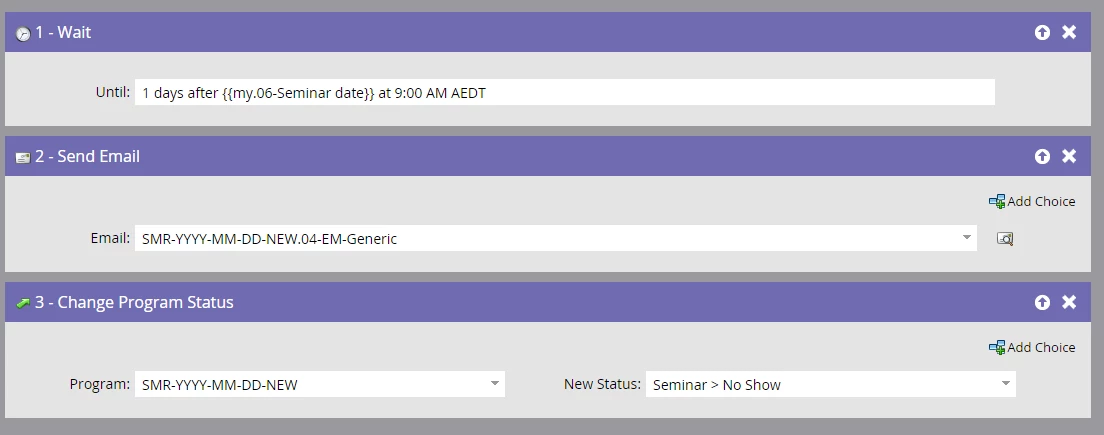
This is my attempt but it does not work.
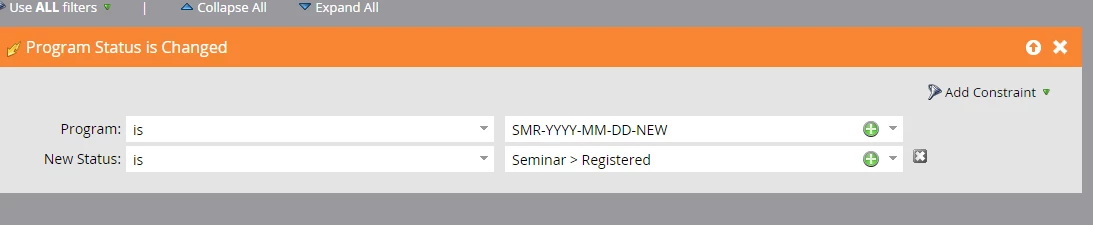
The problem is that people that attended are receiving this email. I know the problem is the listing trigger, but I would have thought that if someone program status changed during the wait period this would work.

Is there a good way to handle this situation?

As far as I can tell I cant automate it, I will need to manually select people in the members tab that didn't attend and mark as no show.

Thanks for your help

This post is no longer active and is closed to new replies. Need help? Start a new post to ask your question.

1 reply

Josh_Hill13
Level 10
February 3, 2016

No because once you put the Registered people into the flow, they stay there and do not exit until the end of the flow. The flow has no way of knowing the lead has a new Status. You have to tell it.

What you need to do is after the Wait Step, check to see if they are Attended, then Remove from Flow. Then flip everyone else to Program Status=No Show, then send Email if No Show.

A better method is to use a batch with Program Status = No Show. Anyone who is still Registered after you run the updated Attended list, you flip to No Show.

Then the batch campaign is scheduled (or you run it) and it only goes to No Show. You can also make this more efficient and say

Member of Program, Status=Attended, No Show

If No Show, Send Email 1

if Attended, Send Email 2

otherwise, nothing.

saves a campaign.

February 3, 2016

Hi Josh,

Thanks for your input.

Ill do some testing but is this what you meant

Thanks

Matt

Dory_Viscoglio
Level 10
February 3, 2016

Hey Matt, this is one of those things in Marketo where there are many ways to get to the same result. The last step above might be a little off, though, because you're saying that if they No Showed don't send anything, if they Attended don't send anything. In the step before you changed everyone who was still Registered to No Show.

I think what you want in the last step is "If Program Status is Attended, do nothing", Default Choice send generic email. OR, you could say "If Program Status is No Show, send generic email", Default Choice do nothing.

Also, you can try using Event Check In​! This will remove the manual upload of your list, and automatically change statuses to attended if someone is at your event.