Can form have thumbnail images next to a dropdown menu? - So, the images would be embedded within the form set-up? | Community
Skip to main content
Christine_LeBla
Level 4
July 18, 2022
Solved

Can form have thumbnail images next to a dropdown menu? - So, the images would be embedded within the form set-up?

  • July 18, 2022
  • 3 replies
  • 4705 views

Is it possible, in Marketo, to have thumbnail images next to a dropdown menu? So the images would wind up embedded within the form setup?

Example: a series of poster designs from which to choose from and dropdown next to the thumbnail img to select QTY desired.

How would I even go about something like this in Marketo? Or, is there a workaround I should do instead?


Thank you.
This post is no longer active and is closed to new replies. Need help? Start a new post to ask your question.
Best answer by Darshil_Shah1

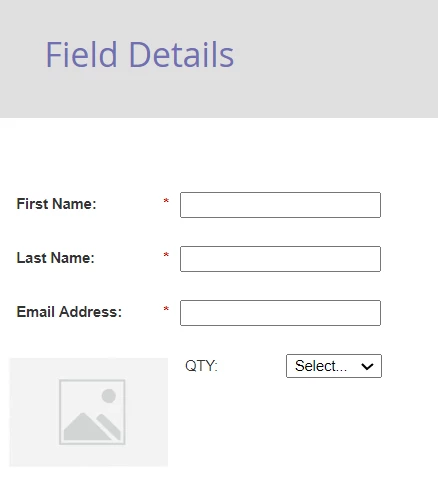
Yes, you can add images to the Marketo form by adding the rich text section next to the form fields. Something like below - 

You can also add multiple product images, and quantity fields per your requirement. If you'd like the user to select the product in the image as well, you can add the respective products' checkbox field next to the image as well, so a user submiting the form would submit product checkbox, and it's respective quantitiy select field along with other form fields as well (you'd end up with a ton of fields though). I'd also recommend adding the proper field validation rules as well.


You may also need some custom CSS to make the form pretty on the landing page. 🙂


3 replies

Darshil_Shah1
Community Advisor and Adobe Champion
Darshil_Shah1Community Advisor and Adobe ChampionAccepted solution
Community Advisor and Adobe Champion
July 18, 2022

Yes, you can add images to the Marketo form by adding the rich text section next to the form fields. Something like below - 

You can also add multiple product images, and quantity fields per your requirement. If you'd like the user to select the product in the image as well, you can add the respective products' checkbox field next to the image as well, so a user submiting the form would submit product checkbox, and it's respective quantitiy select field along with other form fields as well (you'd end up with a ton of fields though). I'd also recommend adding the proper field validation rules as well.


You may also need some custom CSS to make the form pretty on the landing page. 🙂


Christine_LeBla
Level 4
July 18, 2022

Thanks much! This is awesome!

Jasbirka
Level 5
July 18, 2022

Hi @christine_lebla,


Yes, we can add a thumbnail in the dropdown using a plugin or can directly use in the options as well, it totally depends upon the design, can you share design once?


Thanks!

Dave_Roberts
Level 10
July 18, 2022

You can also include images in the "label" for a field and set the labels to the "left" using the Marketo form editor (under the Settings options on pg 2). This might not work as well to sub images in-and-out based on a user selection but it's another way to add images beside or atop a form field if they were a one-input-to-one-image kinda deal.


Using a Rich Text element instead (or several) would also give you the option to show/hide the images to display the one that matches the selection using the native visibility rules in the form editor (ex. Show "Image A" if "choice A" is "true", Show "Image B" if "choice B" is "true" ...)