Attributing Channels when using the same URL for registration | Community
Skip to main content
January 8, 2015
Solved

Attributing Channels when using the same URL for registration

  • January 8, 2015
  • 2 replies
  • 3050 views
Hi Marketo community-

Looking for some help for an upcoming event we are hosting in Belgium. We want to send a print invitation with the URL to the Marketo registration page as well as an email invitation with the same URL. Does anyone know how we could attribute the different channels of print and email to the registrants for the event? Any help would be great.

Thanks,
This post is no longer active and is closed to new replies. Need help? Start a new post to ask your question.
Best answer by Dan_Stevens_

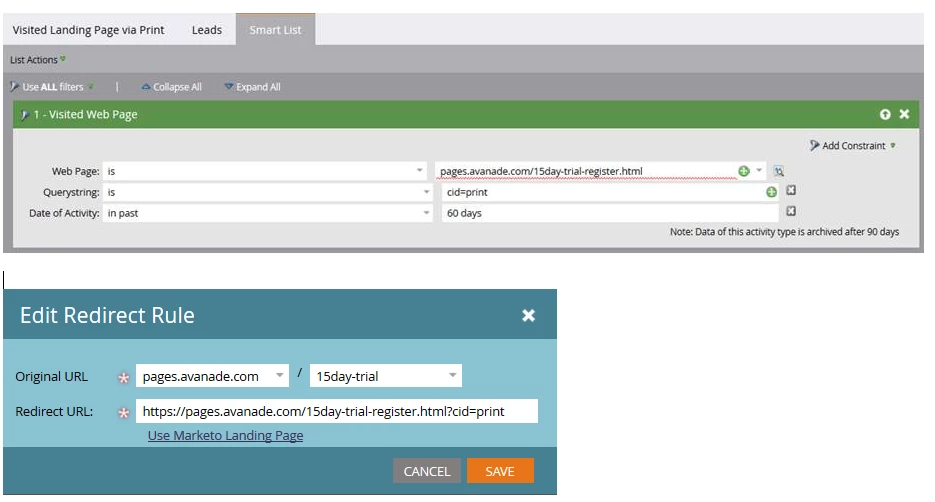
We actually deployed this exact method for a recent event program.  Now the marketer wants to know which of the registrants arrived to the registration page via the print advertisement.  But when creating the smart list, Marketo does not accept the web-based URL for the landing page - just the landing page name (which then prevents us from using the querystring constraint).

2 replies

January 8, 2015
We do something like this for our follow-up to events as well. It's imperfect, but basically we create the Marketo landing page for the event registration, and then create a redirect rule in Marketo that is specific to the print material–and includes the URL parameters for to attribute to the print material.

So the "vanity" url example.YOURDOMAIN.com/Belgium2015 in the print invitation will redirect to example.YOURDOMAIN.com/Standard_landing_page_url.html?source=print and we can attribute this to print. Then in the email, we use the same vanity url, but hyperlink directly to the landing page with different parameter information example.YOURDOMAIN.com/Standard_landing_page_url.html?source=email

It's probably not perfect, but ti's been working for us.
Dan_Stevens_
Dan_Stevens_Accepted solution
Level 10
May 19, 2015

We actually deployed this exact method for a recent event program.  Now the marketer wants to know which of the registrants arrived to the registration page via the print advertisement.  But when creating the smart list, Marketo does not accept the web-based URL for the landing page - just the landing page name (which then prevents us from using the querystring constraint).

May 19, 2015

Hi Dan,

You should be able to make 2 smartlists with the information you would like. 

When using the the 'Filled Out Form' trigger/filter the system does not seem to force a value from the picklist. 

If you add the contraints 'Web Page is..."  and 'Querystring Contains..."  it might do you what you want.

Here's an example from a triggered campaign:

In the above example, we feed leads through a pre-campaign that sets acquisition before requesting the ebook delivery campaign. 

Hope it helps!

Casey_Grimes2
Level 10
January 8, 2015
Hi Kara,

The best way to do something like this would be to use querystrings--for instance, if you're using Google Analytics, you would have your utm_medium values set for print/email. As such, you'd have URLs like

http://www.mydomain.com/belgium-event.html?utm_medium=email

As such, you can use querystrings to delineate traffic as well as form fillouts.

For your print piece, you can either use a redirect or a service like bit.ly to put something a little more human-friendly as the URL.