Accidently exported list instead of exporting .csv list | Community
Skip to main content
Level 1
January 17, 2022
Solved

Accidently exported list instead of exporting .csv list

  • January 17, 2022
  • 2 replies
  • 1636 views

I was trying to export a list of emails that were blocked from being sent an email. I went to list actions and hit export list. Now the leads are gone and I can't find where they were exported to so I can upload them. How do I undo exporting a list or find the export file?


This post is no longer active and is closed to new replies. Need help? Start a new post to ask your question.
Best answer by Katja_Keesom

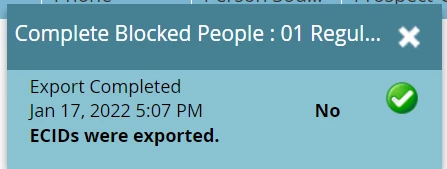
Normally, when you export the members of a list, the pop up will show a hyperlink to download the file. The screenshot already gives you a great hint though. It says "No ECIDs were exported.", so what you were trying to export contained no members and therefore there was nothing to download.

As @sanfordwhiteman said, an export will not remove a person from the database. So I would do some checks:

  • Does your blocked overview still contain people?
  • If not, can you replicate your original audience, adding the regular blocked criteria to see who should have been in your export?
  • Do you still have an example of a person who would have been in your blocked list so you can check in the Database section whether that person still exists in Marketo?
  • Do you have a standard process removing certain groups of people from the database that could have interfered here?
2 replies

SanfordWhiteman
Level 10
January 17, 2022
Exporting a list of people doesn't delete them from the database. Deleting the List asset itself doesn't delete them from the database, either. Only deliberately calling Delete Person removes them.

So something else must be going on. Did you ever download the CSV? What's in your (Marketo) history list?
Katja_Keesom
Community Advisor and Adobe Champion
Katja_KeesomCommunity Advisor and Adobe ChampionAccepted solution
Community Advisor and Adobe Champion
January 18, 2022

Normally, when you export the members of a list, the pop up will show a hyperlink to download the file. The screenshot already gives you a great hint though. It says "No ECIDs were exported.", so what you were trying to export contained no members and therefore there was nothing to download.

As @sanfordwhiteman said, an export will not remove a person from the database. So I would do some checks:

  • Does your blocked overview still contain people?
  • If not, can you replicate your original audience, adding the regular blocked criteria to see who should have been in your export?
  • Do you still have an example of a person who would have been in your blocked list so you can check in the Database section whether that person still exists in Marketo?
  • Do you have a standard process removing certain groups of people from the database that could have interfered here?