AB testing send dat in smart campaigns | Community
Skip to main content
PascaleC
Level 2
April 11, 2022
Solved

AB testing send dat in smart campaigns

  • April 11, 2022
  • 1 reply
  • 4056 views

Hi there, 


I'd like to AB test the send test of an email and I'll be using smart campaign. I thought about the below setup: 

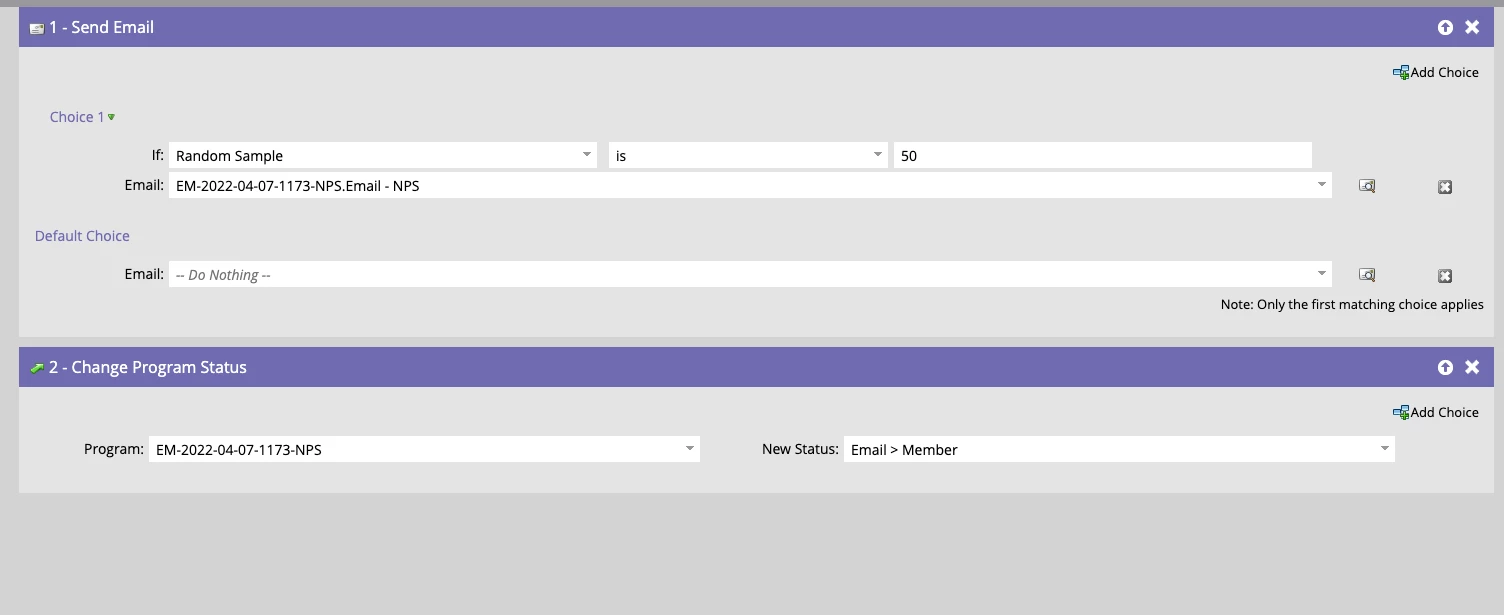
- Campaign 1: Send email to random sample 50 of my smart list 

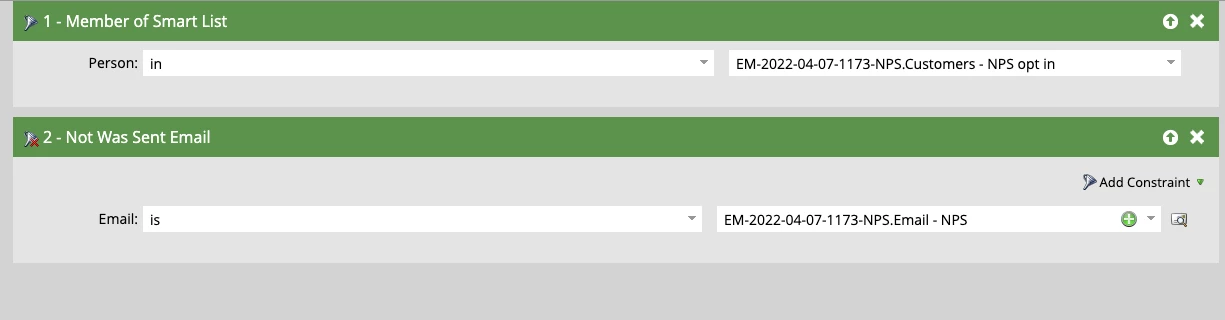
- Campaign 2: Send email to all contacts on my smart list that did not receive the email in campaign 1.

Do you think that would work? I'm afraid of the 'Do nothing' in campaign 1... I'm not sure if that means that it would just send the email to 50% of the list and not do anything on the rest? If I understood it correctly then I think this would work. 

Look forward to hearing your thoughts! 
This post is no longer active and is closed to new replies. Need help? Start a new post to ask your question.
Best answer by Darshil_Shah1

Ok I see, I thought there was another AB test option that I had missed 🙂 

In this case, I am using only one list and yes I could have used the panel. I will probably be creating another campaign to send a follow-up email, so I thought it would be better to do the AB test in the campaign rather than on the panel. But maybe I could use the panel for one campaign and then do it within the smart campaign next time. 


Absolutely! Built-in AB test is great in terms of quick set-up, cool dashboards, and is overall easier to manage.

Also, A/B test can take care of fragmenting your audience for sending the test variants and the winner email OOTB.

1 reply

Darshil_Shah1
Community Advisor and Adobe Champion
April 11, 2022

Do Nothing in the campaign 1's send email flow step would simply do nothing for the 50% of leads - i.e., no email will be sent, and for the rest (i.e., other 50% of the people) the email will be sent.


The smart list of the campaign 2 looks fine (given that you have the ALL selected in the filter configuration), leads w/o any send activity for the "Email - NPS" email AND people in the SL "Customers - NPS Opt in" at the time of campaign 2 run would qualify.


Lastly, FYR - the flow step 2 in campaign 1 w/o any choice step and condition would update everyone's status to Email > Member. (unless of-course, if that is what you want to do, you can keep it as is!)


In general I find the executing AB test for email via email send programs cleaner and easier to set up.

Katja_Keesom
Community Advisor and Adobe Champion
April 11, 2022

Totally agree with your comments, but in addition I would not make this two smart campaigns, but simply update the first to send email 1 to the 50% randam sample and make sending email 2 your default choice. That makes it go to the other 50%. Then it is no problem that flow step 2 updates the status for all.

Whenever an email needs to be sent out on a periodic schedule, that would be the option I would choose as using an email blast is not possible. For a one-and-done I would also choose the email blast.

Darshil_Shah1
Community Advisor and Adobe Champion
April 11, 2022

I would not make this two smart campaigns, but simply update the first to send email 1 to the 50% randam sample and make sending email 2 your default choice. That makes it go to the other 50%. Then it is no problem that flow step 2 updates the status for all.

Agreed @katja_keesom, TBH, I thought of this, but the title of the post "AB testing send dat in smart campaigns" made me think that @pascalec wants to do the date/time test 😅, i.e., run both the campaigns at different date/time, probably,