Solved
Opt-Out Link Warning in AJO Email: CJMMAS-2001-200
Hi Community,
I’m working on an email in Adobe Journey Optimizer (AJO) and I keep getting the following warning when validating the message:
{
  "type": "https://ns.adobe.com/aep/errors/CJMMAS-2001-200",
  "title": "The opt-out link is not present in the email body.",
  "status": 200,
  "report": {
    "additionalContext": {
      "errorLevel": "WARNING",
      "variantId": "7cc39f90-7b4b-4e40-957b-fdd9bdda767d",
      "variantName": "default",
      "source": "MESSAGE",
      "channel": "email"
    }
  }
}
I understand this is Warning only (status 200), not a hard error, but I would like to know:
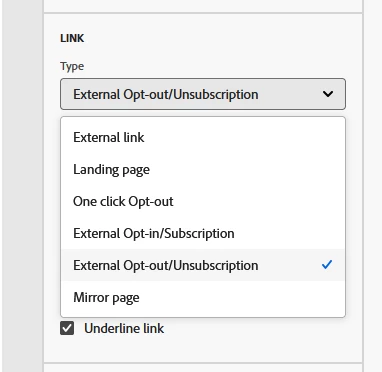
How can I ensure the opt-out link is fully recognized by AJO and remove this warning?
I am currently using this opt-out link in my footer:
<p style="text-align:center;">
  <a class="arc-link"
     data-nl-type="unsubscription"
     href="https://example.com/unsubscribe"
     style="color:rgb(150,156,170); text-decoration:underline;">
    Click here to unsubscribe from further email communications
  </a>
</p>
Is there something I’m missing in how AJO detects the opt-out link?
Any guidance on the correct syntax or other best practices to resolve this would be greatly appreciated.
Thank you!