Multiple Offer Collections or only one?? | Community
Skip to main content
Michael_Soprano
Level 10
July 23, 2025
Solved

Multiple Offer Collections or only one??

  • July 23, 2025
  • 2 replies
  • 274 views

Should I put different offers into one Offer Collection?

As an example:

1. 5% discount - Collection 1

2. Free delivery - Collection 2 


And then in evaluation Criteria put them in specific order

1. Collection 2

2. Collection 1 


On the other I can put everything into one Collection and then in Evaluation Criteria every offer would be evaluated based on the priority??

This post is no longer active and is closed to new replies. Need help? Start a new post to ask your question.
Best answer by Pulkit_Jain_

@michael_soprano 

You can choose between two options: Use multiple collections and order them according to evaluation criteria, or use a single collection and set offer-level priorities, depending on the requirement/need.


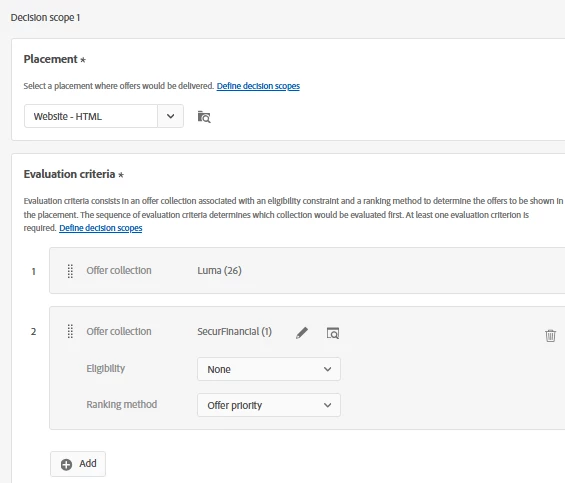
For Former: As you suggested, you put the “5% discount” in Collection 1 and “Free delivery” in Collection 2. In the evaluation criteria, you set the order for evaluation, e.g., Collection 2 (first priority), then Collection 1 (second priority).


In this case, the Decision Engine evaluates collections by your specified order. If two offers are requested and Collection 2 has an eligible offer, it will be returned first; if more are needed or none are found, it proceeds to the next collection. This lets you explicitly prioritize “types” of offers, e.g., always prioritize free delivery over a discount.


For Latter, both offers are part of the same Collection, and the evaluation criteria use this single collection. Here, every offer is prioritized using offer-level ranking/priority.


In this case, all eligible offers are stack ranked by your defined method (priority or formula), regardless of their nature. This is simpler, but you may lose some explicit control over category-level prioritization (e.g., if you always want to show a delivery offer before a discount offer, even if the discount has a higher offer-level score).

2 replies

Pulkit_Jain_
Adobe Employee
Pulkit_Jain_Adobe EmployeeAccepted solution
Adobe Employee
July 24, 2025

@michael_soprano 

You can choose between two options: Use multiple collections and order them according to evaluation criteria, or use a single collection and set offer-level priorities, depending on the requirement/need.


For Former: As you suggested, you put the “5% discount” in Collection 1 and “Free delivery” in Collection 2. In the evaluation criteria, you set the order for evaluation, e.g., Collection 2 (first priority), then Collection 1 (second priority).


In this case, the Decision Engine evaluates collections by your specified order. If two offers are requested and Collection 2 has an eligible offer, it will be returned first; if more are needed or none are found, it proceeds to the next collection. This lets you explicitly prioritize “types” of offers, e.g., always prioritize free delivery over a discount.


For Latter, both offers are part of the same Collection, and the evaluation criteria use this single collection. Here, every offer is prioritized using offer-level ranking/priority.


In this case, all eligible offers are stack ranked by your defined method (priority or formula), regardless of their nature. This is simpler, but you may lose some explicit control over category-level prioritization (e.g., if you always want to show a delivery offer before a discount offer, even if the discount has a higher offer-level score).

gengaipandi03
Level 4
July 29, 2025

Hi, 

In addition to the below offer setup, this is for your later suggestion as keep the offers in same collection. you can capping like the below to show the second offer after some number of decisioning happen. So use priority and capping on the same collection will be ok for your needs.