Incorrect Unique Journey Entries sum count | Adobe Higher Education
Skip to main content
Level 2
February 17, 2025
解決済み

Incorrect Unique Journey Entries sum count

  • February 17, 2025
  • 1 の返信
  • 658 ビュー

Hi, 


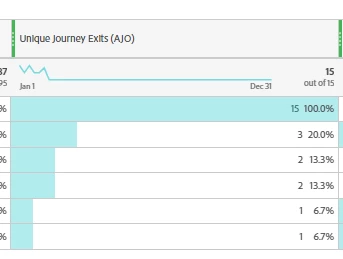
I am trying to create a Adobe CJA report for the journeys matching a condition. Under the Unique Journey Entries metrics, I see the total count as being incorrect {Total displayed :15/15 | actual sum : 24}. Need help 


このトピックへの返信は締め切られました。
ベストアンサー Harveer_SinghGi1

Hi @agooddoc ,

CJA shows deduplicated metric value as the column total, what this means is that if there were multiple values seen in the same journey of the dimension/field that you are using against a metric then on rows level you'll see that metric attributed against each of those values but in total it will be deduplicated and counted only once.

Let's take an example, if user visited a site and viewed home page and product page during the same session, the report run for pages with session metric will give 1 session credit to each home page and product page, which if you add will result as 2 but the total number of sessions is actually 1 only and that is what will show as column total, like below

I hope this helps.

Cheers!
1 の返信

Harveer_SinghGi1
Community Advisor
Community Advisor
February 17, 2025

Hi @agooddoc ,

CJA shows deduplicated metric value as the column total, what this means is that if there were multiple values seen in the same journey of the dimension/field that you are using against a metric then on rows level you'll see that metric attributed against each of those values but in total it will be deduplicated and counted only once.

Let's take an example, if user visited a site and viewed home page and product page during the same session, the report run for pages with session metric will give 1 session credit to each home page and product page, which if you add will result as 2 but the total number of sessions is actually 1 only and that is what will show as column total, like below

I hope this helps.

Cheers!

AGoodDoc作成者
Level 2
February 17, 2025

Hi @harveer_singhgi1 ,


Thanks! that makes sense. 


Is there a way by which I can reflect/calculate the actual sum while retaining the individual count for each row


Harveer_SinghGi1
Community Advisor
Community Advisor
February 18, 2025

Hi @agooddoc ,

If by actual sum you mean returning 24 instead of 15 in the example shared in question then you can use column sum function in a calculated metric to return this information,

Please note that this metric will show column sum for each row when trended on a ranked report.

Cheers!