Fragment customization | Community
Skip to main content
Level 2
September 19, 2024
Solved

Fragment customization

  • September 19, 2024
  • 1 reply
  • 1114 views

Hello!

I am trying to create a fragment which can be customized in the content section.

Use case is: User should be able to customize the color of CTA button, change the background color, highlight text with color.

I could not find any related document or example on this. Please help.

This post is no longer active and is closed to new replies. Need help? Start a new post to ask your question.
Best answer by SatheeskannaK

Hi @SatheeskannaK
That fragment works if I directly put the fragment in the email without customization; but my question was different.


I created a customizable fragment as below screenshot_1:

screenshot_1:
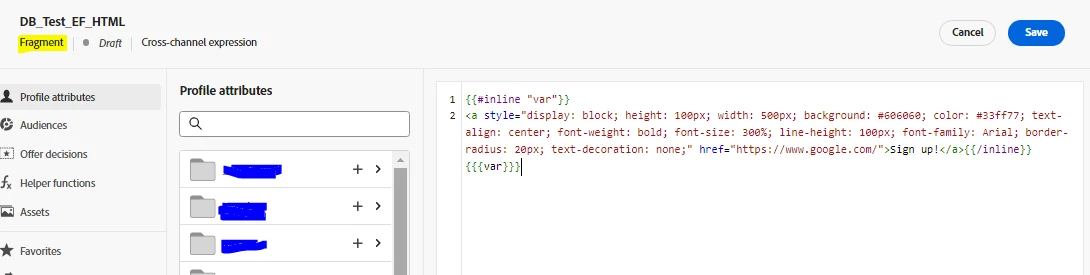
Then, if I use above fragment in the email(screenshot_2) and want to change the 'color:#de3a2f' from 'color: #33ff77'  this is not allowing me to save/simulate and hence can't send proof or publish the journey.

screenshot_2:

Below is the error:
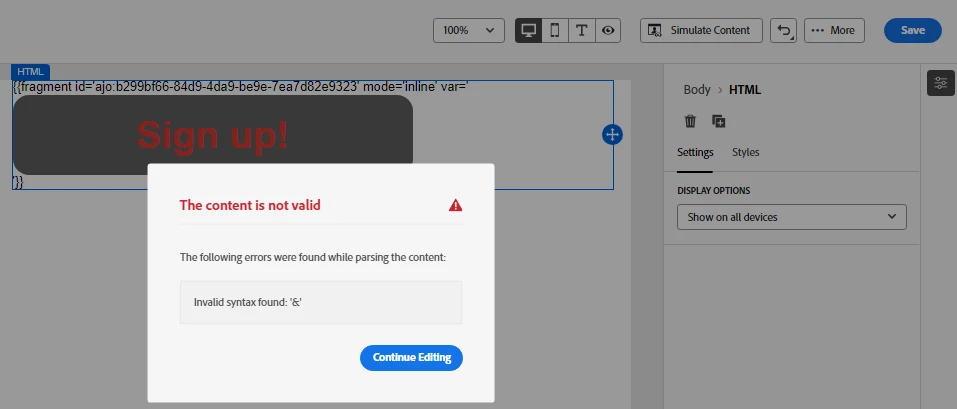
Error is not just on color property, it's on any property customization.

Hope this will give more clarity.


Thanks,

Duleswar Boro


You will have to use the break inheritance approach to make the changes on the existing fragment and use that as a standalone within that email. Follow this break inheritance approach. Essentially you will have to add the fragment into the email designer after adding click on the personalization that will open the fragment id. Then select the fragment associated with that and copy that code in the editor to make changes to styles and save them.  


1 reply

SatheeskannaK
Community Advisor
Community Advisor
September 19, 2024

@dboro Take a look at this documentation.

Thanks, Sathees
DBoroAuthor
Level 2
September 24, 2024

Hi Satheeskannak!
I tried to to write the following code to make the color customizable in the content; but this is giving me error while saving/simulating it.


{{fragment id='ajo:b299bf66-84d9-4da9-be9e-7ea5a82e9323' mode='inline' var='<a style="display: block; height: 100px; width: 500px; background: #606060; color: #33ff77; text-align: center; font-weight: bold; font-size: 300%; line-height: 100px; font-family: Arial; border-radius: 20px; text-decoration: none;" href="https://www.google.com/">Sign up!</a>'}}


Bellow is the error


SatheeskannaK
Community Advisor
Community Advisor
September 24, 2024

@dboro I created a fragment with this HTML code and used that on the email designer (screenshot2) then sent out a proof. 

Received proof with this content,


Thanks, Sathees