Email Rendering Issue in Web Outlook for API-Triggered Transactional Campaign | Community
Skip to main content
Level 2
February 18, 2026
Question

Email Rendering Issue in Web Outlook for API-Triggered Transactional Campaign

  • February 18, 2026
  • 1 reply
  • 11 views

Hi Team,

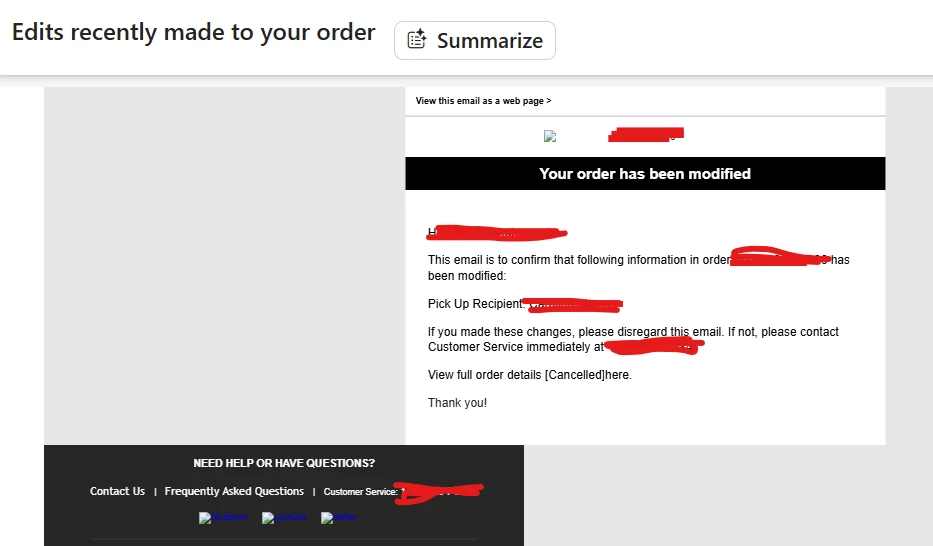
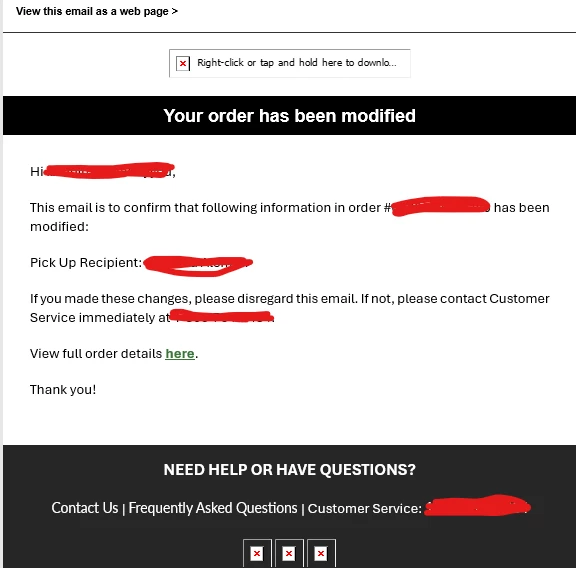
I was testing a test email from an API-triggered transactional campaign using Postman across two different email IDs, ensuring all context variable values were filled in. However, I encountered an issue with one email ID accessed via web Outlook: the email alignment is incorrect, and the "View Details Here" link is missing. Interestingly, when opening the same email as a web page, everything displays correctly.

For another email ID accessed via the Outlook app, everything appears as expected. Additionally, I triggered a test email to my Gmail ID, and it rendered correctly as well.

How can I resolve this issue with web Outlook?

Please find the attached images for reference:
 

1 reply

SatheeskannaK
Community Advisor
Community Advisor
February 18, 2026

@HardikJa 

Dealing with email rendering in Microsoft Outlook can be tricky because it's so particular about how it handles HTML and CSS. This often leads to significant inconsistencies in how an email appears to a recipient using Outlook compared to how it looks in other major email clients or web browsers.

The root cause of these rendering quirks is that modern desktop versions of Outlook (since Outlook 2007) utilize Microsoft Word's rendering engine for displaying HTML emails, rather than a standard, modern web rendering engine. This older, word-processing-centric engine lacks support for many contemporary CSS features and adheres to different standards.

To successfully address these rendering issues and ensure cross-client compatibility, developers must employ specific workarounds and code, commonly referred to as "MSO-specific styles" or "Outlook-specific conditional comments." These are special HTML comments that only Microsoft Outlook understands and executes.

There's no single, perfect solution for this. You need to experiment a bit to get it right.

https://www.litmus.com/blog/a-guide-to-rendering-differences-in-microsoft-outlook-clients

Thanks, Sathees